These are the Treasure AI features and improvements released in September, 2026.
Posted on: Sep 02, 2026
- AI Studio now connects to Treasure AI Voice through the same Connector/Connection model as Databricks, Snowflake, GitHub, and Treasure Data CDP, so an agent can read your meeting recordings, AI summaries, action items, and speaker-separated transcripts directly in a chat.
- Designed for sales teams and anyone who runs meetings, it turns conversations Treasure AI Voice has already captured into working material — drafting a follow-up from this morning's client call, or pulling every commitment made across a week of conversations — without exporting a file.
- The connection is read-only and inherits your Treasure AI Voice role: a Regular User's agent reads only that user's own recordings and an Enterprise Admin's reads the whole organization, and no agent can delete a recording, edit its tags, or start an export.
- Learn more by visiting the Connect Treasure AI Voice and Connections pages.
Posted on: Sep 03, 2026
- AI Studio agents can now search, read, and post Slack messages on your behalf, across the channels, direct messages, threads, and files your own Slack account can see.
- Designed for teams whose decisions and context live in Slack, it lets an agent recover an answer from months of conversation, summarize a thread alongside your CDP data, and post the result back to the channel that needs it.
- The agent acts as the member who connected, reading only what that person can read and posting, editing, and deleting under their name, so enabling the connector grants write access that cannot be narrowed per member or per channel.
- Learn more by visiting the Connect Slack and Connections pages.
Posted on: Sep 17, 2026
- An AI Studio work folder can now be shared with your account. A shared work folder keeps its files in one tree that every member reads and works in with their own AI, so what a colleague receives is the whole setup — folder structure, standing instructions, skills and actions — rather than a copy of the files.
- Work modes decide where each member, and the agent acting for them, may write: nowhere on the shared side, named top-level folders only, the whole folder, or the whole folder plus its settings. Every member also gets a private
my/area inside the folder that no one else can see. Sharing and importing are done on Web and Desktop. - Learn more by visiting the Shared Work Folders and Work Modes pages.
Posted on: Sep 30, 2026
- Treasure AI Studio is now available for Android on Google Play, joining the iOS app, so you can chat with Studio, check on work in progress, and send follow-up instructions from an Android device running Android 7.0 or later.
- The app signs in with your existing Treasure AI SSO and uses the same account, work folders, chat history, skills, and data access as Web and Desktop, because every command runs server-side rather than on the device.
- The Android and iOS apps share the version 1.2.0 mobile experience: the app opens straight to a new chat saved in your default work folder, a navigation drawer holds your work folders and Recent Chats, and you can long-press a chat to rename or delete it.
- Learn more by visiting the Getting Started page.
Posted on: Sep 30, 2026
- AI Studio agents can now read your Google Analytics (GA4) data during a chat, including acquisition, page, event, and key-event reports for any property you have access to, custom reports built from the dimensions and metrics you name, and a realtime view of who is on the site right now.
- Designed for teams who want traffic answers next to the rest of their data rather than in a GA4 tab and an export, it lets an agent compare the channels that drove a campaign's traffic against the segment that converted.
- The connection is read-only and deliberately narrow: the agent can read reports and the dimensions and metrics available to build them, but cannot change anything in Analytics or read a property's configuration or administration.
- An administrator enables the connector once in Connector Settings with no fields to fill in, and each member authorizes their own connection with their Google account, so the agent reaches only the properties that account can access.
- Learn more by visiting the Connect Google Analytics page.
Posted on: Sep 30, 2026
- AI Studio agents can now work with your schedule during a chat: they can read the calendars your Google account can see, search months of events, compare several people's busy time to find a slot that works, and create or update events.
- Designed for teams where scheduling is the last step of something the agent already did, it lets an agent book the review after it finishes the analysis instead of leaving the calendar entry to a separate window.
- The connection can write within a narrow surface: it creates and updates events, but cannot delete events, create or delete calendars, or change who a calendar is shared with, and Google invites any guests on an event the agent creates or updates.
- An administrator enables the connector once in Connector Settings with no fields to fill in, and each member authorizes their own connection with their Google account, so the agent reaches only the calendars that account can access.
- Learn more by visiting the Connect Google Calendar page.
Posted on: Sep 30, 2026
- AI Studio agents can now read how your site performs in Google Search during a chat, including clicks, impressions, click-through rate, and average position broken down by query, page, country, device, or search appearance, whether a specific URL is indexed, and what Google reports about your submitted sitemaps.
- Designed for teams who want organic search answers next to the rest of their data, it lets an agent find which queries are losing position, which pages Google has not indexed, or whether last week's sitemap was picked up.
- The connection is read-only: the agent cannot add or remove a property, submit or delete a sitemap, or change anything else in Search Console.
- An administrator enables the connector once in Connector Settings with no fields to fill in, and each member authorizes their own connection with their Google account, so the agent reaches only the properties that account can access.
- Learn more by visiting the Connect Google Search Console page.
Posted on: Sep 30, 2026
- In an AI Studio chat, the agent now normally asks for your approval on a question card before it runs a
tdxcommand, showing the exact command, what it does, and, for a write, what it will change, so you can approve it or choose not to run it. - Designed to give you a chance to catch a change before it reaches your Treasure Data CDP, it covers every
tdxcommand, read-only queries included, and lists several planned commands on one card rather than interrupting you before each one. - Runs started by an action schedule do not ask.
- Learn more by visiting the Security Overview page.
Posted on: Sep 08, 2026
- Engage Studio now supports link shortening and click tracking for SMS One-off and Always-On Campaigns, helping marketers reduce message length and measure engagement with links in their SMS messages.
- Enable Use TD shortened URL at the campaign level to replace eligible HTTPS URLs with shorter Treasure AI links. Shortened links use the
t6e.aidomain, are generated uniquely for each recipient when the campaign is sent, and remain active for 90 days. - Enable Link Click Tracking in workspace settings to record click events asynchronously in your Treasure Data account. Where detection is available, automated requests are identified with the
suspected_botfield. - Click tracking requires link shortening; UTM parameters alone do not create native Engage click events. Link shortening, click tracking, and UTM tracking can be used together, with UTM parameters continuing to support attribution in analytics platforms such as Google Analytics and Adobe Analytics.
- Learn more by visiting the Shorten links in SMS campaigns and Track clicks in SMS campaigns pages.
Posted on: Sep 14, 2026
- The
subscription_eventstable now records campaign attribution for unsubscribes from AlwaysOn email campaigns, so downstream analysis can connect each unsubscribe to the campaign that sent the message. - A new
campaign_modelfield identifies whether the campaign is a one-offCampaignor anAlwaysOnCampaign, allowing consumers to distinguish IDs from the two campaign types. - Existing records remain compatible: records written before this enhancement do not have the new field, and template or test sends have no campaign attribution.
- Learn more by visiting the Subscription Events Table page.
Posted on: Sep 15, 2026
- Engage Studio now automatically adds a
[TEST]prefix to the subject line of email messages sent with Send Test, making test messages immediately recognizable in recipients' inboxes. - Designed for marketers and reviewers who validate email content, the prefix makes it easier to distinguish test messages from live campaign emails and reduces confusion during review.
- The prefix is applied only to test email sends; live campaign subject lines remain unchanged.
- Learn more by visiting the Engage Content Creation page.
Posted on: Sep 30, 2026
- Open and Click event notifications now include an
isBotEventfield that indicates whether an event was likely triggered by an automated system or a human recipient. - The
LikelyorUnlikelyvalue is recorded in theis_bot_eventcolumn of the Engage Studio email deliveryeventstable, giving marketers and analysts added context for campaign engagement. is_bot_eventisnullwhen a notification does not includeisBotEventand for event types other than Open and Click.- The field does not filter or remove events.
- Learn more by visiting the Email Delivery Events Table page.
Posted on: Sep 17, 2026
- Personalization Studio now supports pausing campaigns with Active or Stale status directly from the campaign card, stopping personalized content delivery without deleting the campaign configuration.
- Paused campaigns remain in the campaign list and can be resumed later. Resuming changes the status back to Active and restarts content delivery.
- To delete an active campaign, pause it first. Active campaigns cannot be deleted.
- Learn more by visiting the Personalization Studio campaigns page.
Posted on: Sep 30, 2026
- Treasure AI Voice for iOS 1.9.1 now accepts
treasureaivoice://recordinglinks in other apps or files and saves query parameters, such asrecordRefandsessionRef, as external metadata on the resulting recording. - Teams can start a recording from a link in the app or file they already use and keep references to their own records or activities with the conversation instead of entering them manually.
- If the paired PLAUD device is not connected when the app opens, Treasure AI Voice retains the metadata in the current app session; after the device connects, the user can start a recording manually with that context.
- The metadata appears on the AI Voice Console's Recordings page and is included as
external_metadatain therecordingstable when you export to Treasure Data CDP. - Learn more by visiting the Deep Link Integration page.
Posted on: Sep 03, 2026
- Treasure AI Voice CDP exports now support recurring schedules and include an
updated_attimestamp, enabling incremental processing and downstream deduplication. - Learn more by visiting the Treasure Data CDP Integration and Administrator Guide pages.
Posted on: Sep 01, 2026
- The Hive query engine now supports the
DROP TABLEstatement, so data engineers can delete tables directly using HiveQL — completing the basic table lifecycle alongside theCREATE TABLEsupport added in July — without switching to Trino. - Learn more by visiting the DROP TABLE Statement Syntax page.
Posted on: Sep 09, 2026
- Data Workbench's Trino query engine now supports table and column comments in SQL, including comments in
CREATE TABLEandALTER TABLE ... ADD COLUMNstatements and updates throughCOMMENT ON TABLEandCOMMENT ON COLUMN. - Designed for data engineers and analysts, this capability lets you keep business context with your schemas so teammates and AI tools can interpret datasets more accurately.
- The system-managed
timecolumn cannot be assigned a custom comment.
Posted on: Sep 02, 2026
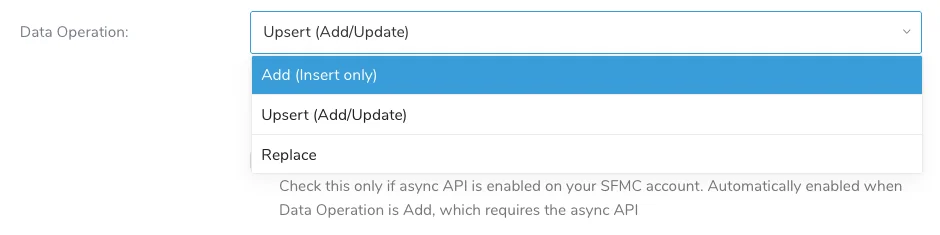
- The Salesforce Marketing Cloud V2 Export connector now supports the Add operation, which inserts only records whose primary key does not already exist in a Data Extension.
- Designed for marketers and integration engineers who add new audience members to Salesforce Marketing Cloud, Add preserves existing Data Extension records by skipping matching primary keys rather than updating them.
- Add uses Salesforce Marketing Cloud's Asynchronous API and requires the target Data Extension to have a primary key; Treasure AI automatically enables the asynchronous API when you select Add in the Console.
- Learn more by visiting the Salesforce Marketing Cloud V2 Export Integration page.
Posted on: Sep 08, 2026
- LINE OA Streaming Import can now return a
200 OKresponse as soon as it accepts and validates a webhook, then write its raw and event data in the background to help avoid LINE Messaging API timeouts when data delivery is delayed. - Designed for teams that use a webhook relay to connect LINE Official Account events to Treasure AI and experience delivery timeouts, the per-source Return response immediately (asynchronous delivery) setting is off by default and lets you choose faster webhook responses where avoiding timeouts outweighs the risk of a lost event.
- When asynchronous delivery is enabled,
200 OKconfirms that the connector accepted the webhook rather than that its data was written; a later background delivery failure or connector restart can result in an unrecoverable lost event. - Learn more by visiting the LINE OA Streaming Import Integration page.
Posted on: Sep 08, 2026
- The Airship Import Integration now supports Channels as a data source, so you can import every channel in a project or retrieve one channel by its Channel ID.
- Designed for teams that need device-level audience data, channel imports bring Airship channel information such as opt-in state, tags, and attributes into Treasure AI for analysis.
- Select Channels as the data source in the Console and optionally enter a Channel ID to import a single channel; existing Reports, Named Users, and Static Lists imports continue to work unchanged.
- Learn more by visiting the Airship Import Integration page.
Posted on: Sep 22, 2026
- The Customer.io Export Connector lets you export Treasure Data CDP query results to Customer.io, keeping customer profiles and segments synchronized after each workflow run.
- Designed for teams that use Customer.io for campaign activation, it supports creating, updating, and removing profiles, as well as adding and removing customers from segments with automatic segment creation.
- Configure the connector in Integrations Hub and select profile or segment operations, then identify customers with
id,cio_id, oremail. - Learn more by visiting the Customer.io Export Integration page.
Posted on: Sep 22, 2026
- The Adform Export Connector sends audience definitions and member data from Treasure AI to an Adform-managed S3 bucket, where Adform DMP makes the audience available for targeting in Adform DSP.
- Designed for marketing operations teams and channel marketers using Adform, it routes data to the correct client DMP account and supports hashed email, mobile advertising IDs (MAIDs), and cookie-based identifiers.
- Configure the connector with your Adform DMP Account ID, ID type, Owner ID, and upload mode; Treasure AI keeps the shared S3 credentials in the connector so clients do not need to manage them.
- Cookie-based identifiers require User ID Sync through the client's website before they can be used for audience activation, while hashed email and MAIDs do not require this step.
- The connector is currently in beta and requires an Adform DMP account and account-specific onboarding.
- Learn more by visiting the Adform Export Integration page.
Posted on: Sep 28, 2026
- Real-Time profile lookup lets you investigate a profile's current identity graph by submitting an identity selector from Treasure Workflow. The result is written to the
profile_lookuptable in the parent segment's real-time database. - Each result includes the resolved profile RID, its associated IDs and their update timestamps, and persisted real-time attributes. An optional
td_rt_lookup_idhelps you match the result to the workflow input; unmatched selectors also produce a result. - Profile lookup is intended for targeted debugging, not bulk ID graph export. Batch attributes and dynamically evaluated attributes are not included.
- Learn more by visiting the Real Time Profile Lookup page.
Posted on: Sep 14, 2026
- Real-Time now records its identity decisions to two queryable tables:
validation_failures, listing key/value pairs on an incoming event that failed validation and were excluded from stitching, andid_changes, which now also records the IDs evicted when an event stitches to a profile holding 200 associations. - Merge rows in
id_changesnow report the incoming IDs that triggered the merge incurrent_id_attributes, separately from the profile's full association set inkey_values, so you can tell which ID caused a profile to merge rather than only that it did. - Identity logging is on for every instance with no opt-in required, and live traffic is never blocked: an event carrying an invalid key is still processed, so the log table is the only place a tracking misconfiguration surfaces.
- Both tables are ingested rows that persist indefinitely by default, so set an expiration period on them to match your investigation window.
- Learn more by visiting the Real Time Identity Log Tables page.
Posted on: Sep 14, 2026
- The reserved
td_rt_tracking_idcolumn now reaches theid_changesandvalidation_failurestables in addition toactivations, so one tracking ID follows a single event across its activation, identity, and validation outcomes. - Attaching the column stays optional, and events without it behave exactly as before.
- Learn more by visiting the Real Time Observability Event Tracking page.
Posted on: Sep 02, 2026
- Composable Audience Studio now sets a structured, JSON-formatted Snowflake
QUERY_TAGon the segmentation, activation, profile lookup, validation, metadata, and metering queries it runs on your Snowflake account, recording which application ran the query, which parent segment, segment, or activation it belongs to, and what kind of operation it was. - Designed for data teams that monitor Snowflake usage, query tags let you separate Composable Audience Studio workloads from the rest of your Snowflake activity, attribute warehouse compute costs to individual audiences, segments, and activations, and set up monitoring or chargeback directly in Snowflake's query history.
- Query tagging requires no configuration — tags appear automatically in
SNOWFLAKE.ACCOUNT_USAGE.QUERY_HISTORY, where you can parse them with Snowflake's JSON functions and filter on the fixed application identifierTreasureAudienceStudio. - Learn more by visiting the Snowflake Query Tags page.
Posted on: Sep 22, 2026
- Composable Audience Studio Snowflake query tags now include
journey_idfor journey workflows anduser_idfor supported user-initiated queries, helping data teams attribute query activity to journeys and operators. - Existing journeys receive tags on their next run without republishing. Activation and journey workflow queries omit
user_id. - Learn more by visiting the Snowflake Query Tags page.
Posted on: Sep 09, 2026
- Treasure Workflow templates now support the
${json:...}placeholder, which evaluates a JavaScript expression and stores the result in the task configuration with its JSON type (string, number, object, array, boolean, or null), while the${...}placeholder always stores the result as a string. - For example, a task that sends a number or an array in the JSON body of an
http>request no longer needs to write the whole body as one manually quoted string. - Write the placeholder as the whole value, such as
count: ${json:count}. - Learn more by visiting the Calculating Variables page.
Posted on: Sep 09, 2026
- The
_paralleloption of Treasure Workflow now supports aneageroption, which starts the next task as soon as a running task finishes instead of running tasks in fixed groups of thelimitsize. - Designed for workflows whose parallel tasks have uneven run times,
eager: truekeeps the number of running tasks at the configuredlimit, so a single slow task does not delay the start of the remaining tasks. - A failed task does not block the other tasks in an eager group, so the remaining tasks run to completion and only the failed tasks run when the attempt is resumed.
- Set
eager: truetogether withlimitin the_parallelconfiguration, and workflows that do not seteagerkeep the same behavior as before. - Learn more by visiting the Parallel Task Examples for Treasure Workflow page.
Posted on: Sep 25, 2026
- Treasure Workflow now has a published data retention policy: workflow execution history — sessions, attempts, and task logs — is retained for 2 years after the attempt completes, and each workflow project keeps its latest 100 revisions plus any older revision that an attempt used within the last 2 years.
- Learn more by visiting the Data Retention Policy page.
Posted on: Sep 24, 2026
- The Consolidated Account Utilization Dashboard shows the last 18 months of monthly resource usage across your organization's Treasure AI accounts.
- Account owners and administrators can compare usage between accounts, track total usage, and compare usage with available plan allowances.
- Filter charts by account or open a daily breakdown to investigate changes in usage within a month.
- To get started, open Control Panel > Utilization > Consolidated Account Utilization in Treasure Console as an account owner or administrator.
- Learn more by visiting the Consolidated Account Utilization Dashboard page.