These are the Treasure AI features and improvements released in June, 2026.
Posted on: Jun 1, 2026
- AI Agent Foundry now supports Claude Sonnet 4.6, Anthropic's latest language model, available across US, Tokyo, and EU01 regions.
Posted on: Jun 3, 2026
- AI Studio agents can now search the web in real time during a chat, automatically pulling in current information whenever your prompt calls for recent or time-sensitive context.
- Designed for marketers and analysts researching topics such as recent market trends, competitor activity, or breaking developments, web search brings live, real-world context directly into your agent conversations without leaving Studio.
- Agents decide on their own whether a web search is needed based on your prompt, so no configuration or setup is required — when a search runs, you simply see it appear as a step in the chat.
- Web Search is available now across all regions (US, Tokyo, and EU01) with no action needed from your team.
- Learn more by visiting the AI Chat Interface page.
Posted on: Jun 17, 2026
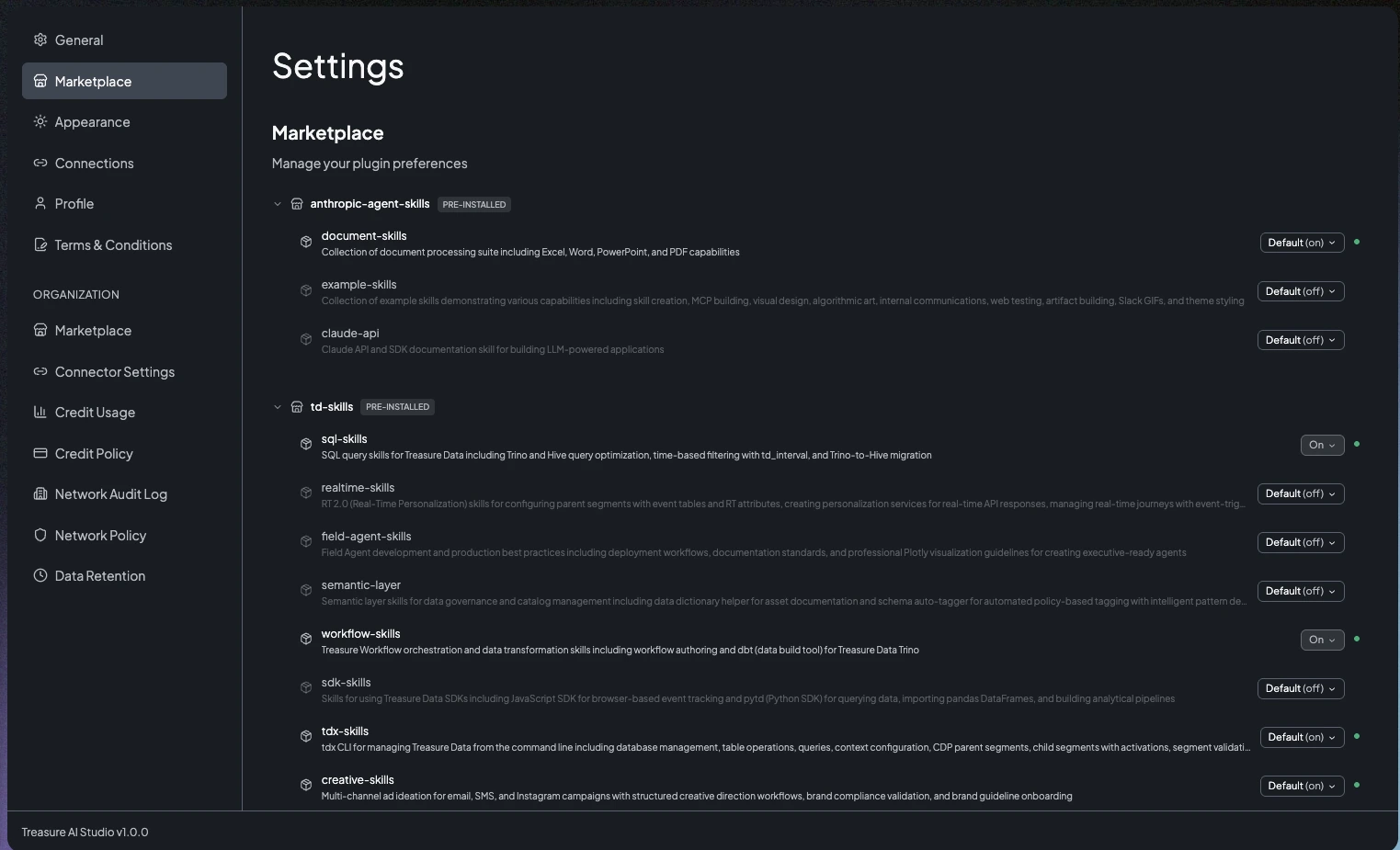
- The Plugin Marketplace in AI Studio lets you register public, GitHub-hosted skill marketplaces and install plugins that add new skills — extra domain expertise — to your AI sessions.
- Designed for teams that want to tailor Studio to their own workflows, it lets each user enable or disable plugins individually, with Treasure AI's own plugins enabled out of the box and removable whenever you choose.
- You manage marketplaces and plugins from Settings → Marketplace on Web and Desktop, and changes take effect the next time you start a chat.
- Account administrators can register marketplaces for the entire organization and, for governance, restrict marketplace registration to administrators only.
- Learn more by visiting the Plugin Marketplace page.
Posted on: Jun 17, 2026
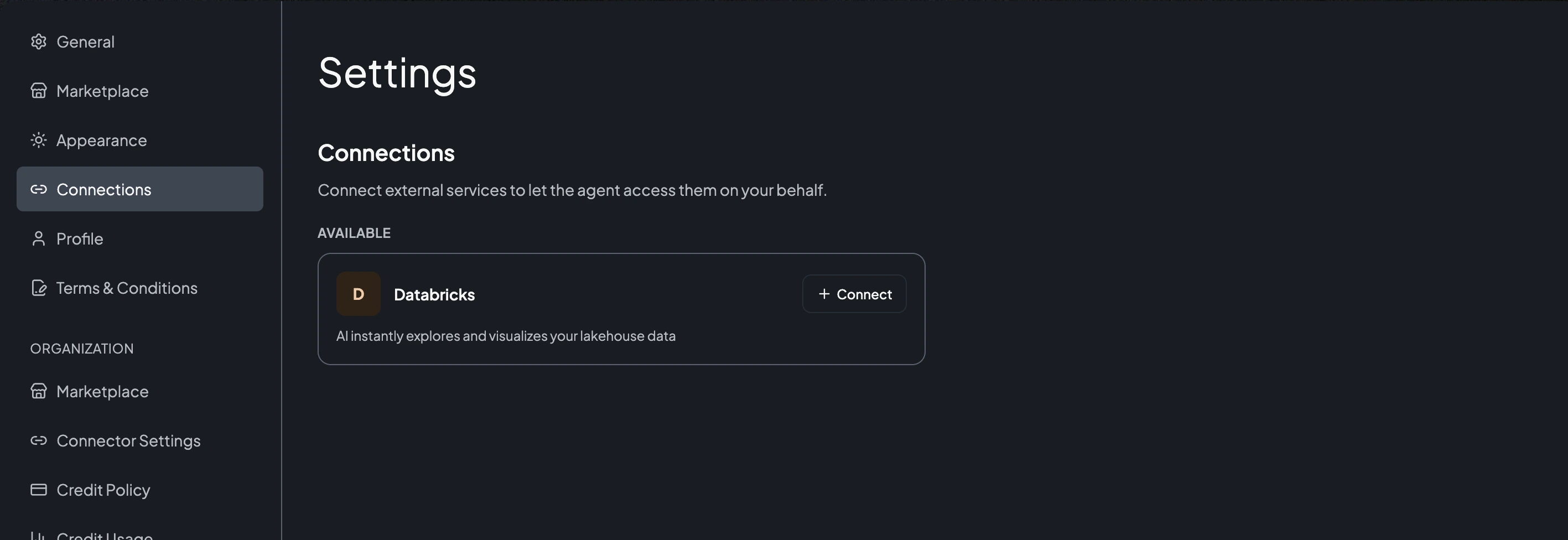
- AI Studio can now connect to a Databricks lakehouse: an administrator registers the Databricks connector once for the organization, each user authorizes their own connection over OAuth, and the agent can then explore and visualize Databricks data directly in a chat.
- Designed for teams whose data lives in Databricks, it lets analysts and marketers ask questions of their lakehouse in natural language without moving data or handling raw credentials.
- Administrators configure the connector in Settings → Connector Settings and users connect from Settings → Connections; the agent only ever uses a placeholder token, with the real credential substituted securely at the network boundary so it is never exposed.
- Learn more by visiting the Connect Databricks and Connections pages.
Posted on: Jun 17, 2026
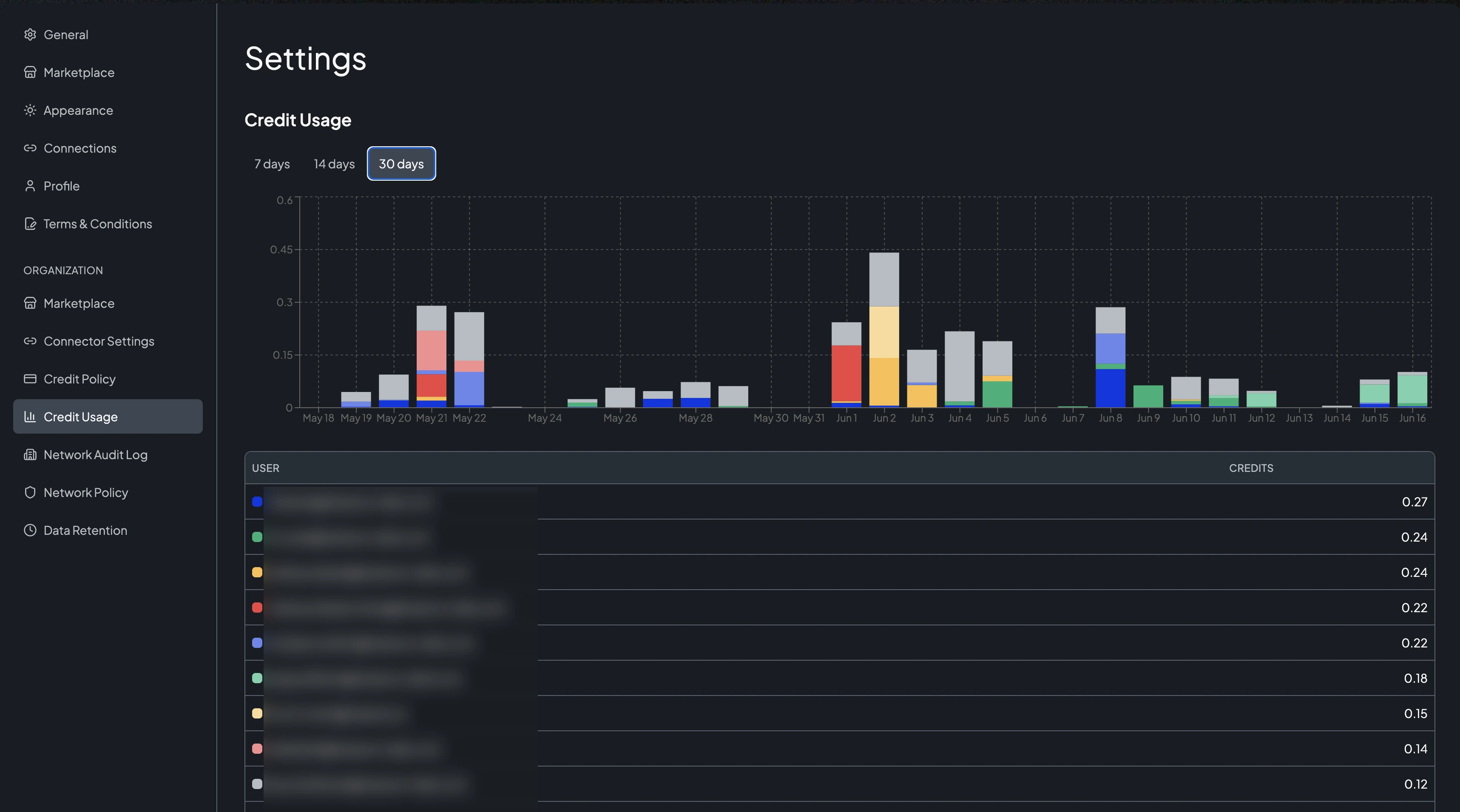
- AI Studio now gives administrators a Credit Usage dashboard to monitor per-user, per-day credit consumption, and a Credit Policy to cap how many credits each user can spend per day.
- Designed for administrators who need visibility into and control over AI spend, the dashboard breaks down consumption by user over a 7-, 14-, or 30-day window, while Credit Policy sets a per-user daily limit (or leaves it unlimited) along with the timezone that controls the daily reset.
- When a user reaches their daily limit, their usage pauses until the next reset; usage and limits are expressed in credits (to convert to conversations, multiply by 600 — 1 credit = 600 conversations).
- Both features are available now to account administrators under Settings.
- Learn more by visiting the Credit Usage Dashboard and Credit Policy pages.
Posted on: Jun 24, 2026
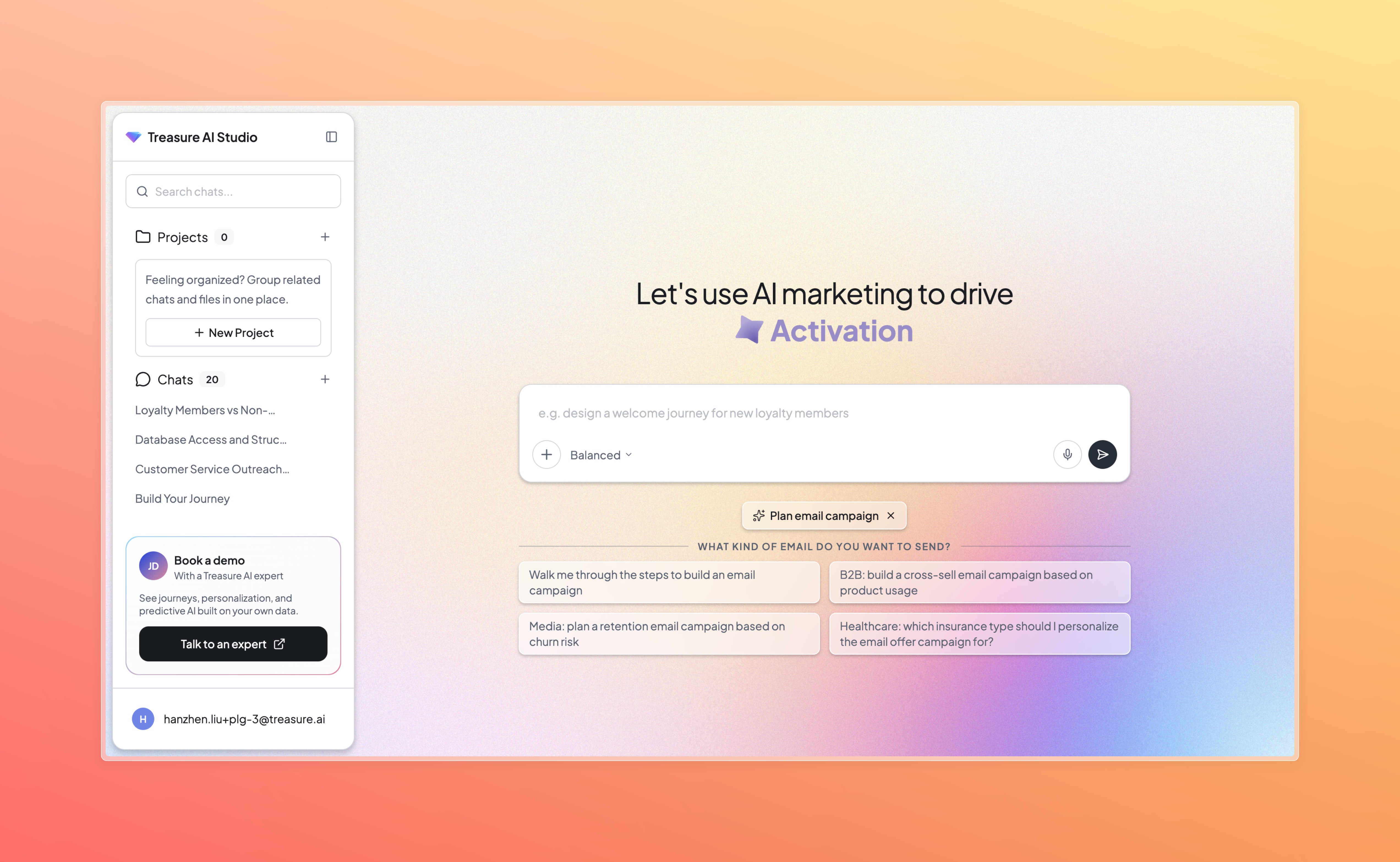
- Try AI Studio for free, self-guided and no meeting required.
- Sign up with your work email and explore at your own pace. Start with sample data or bring your own. Plan campaigns, design journeys, and identify audiences — all from one AI-native workspace.
Posted on: Jun 25, 2026
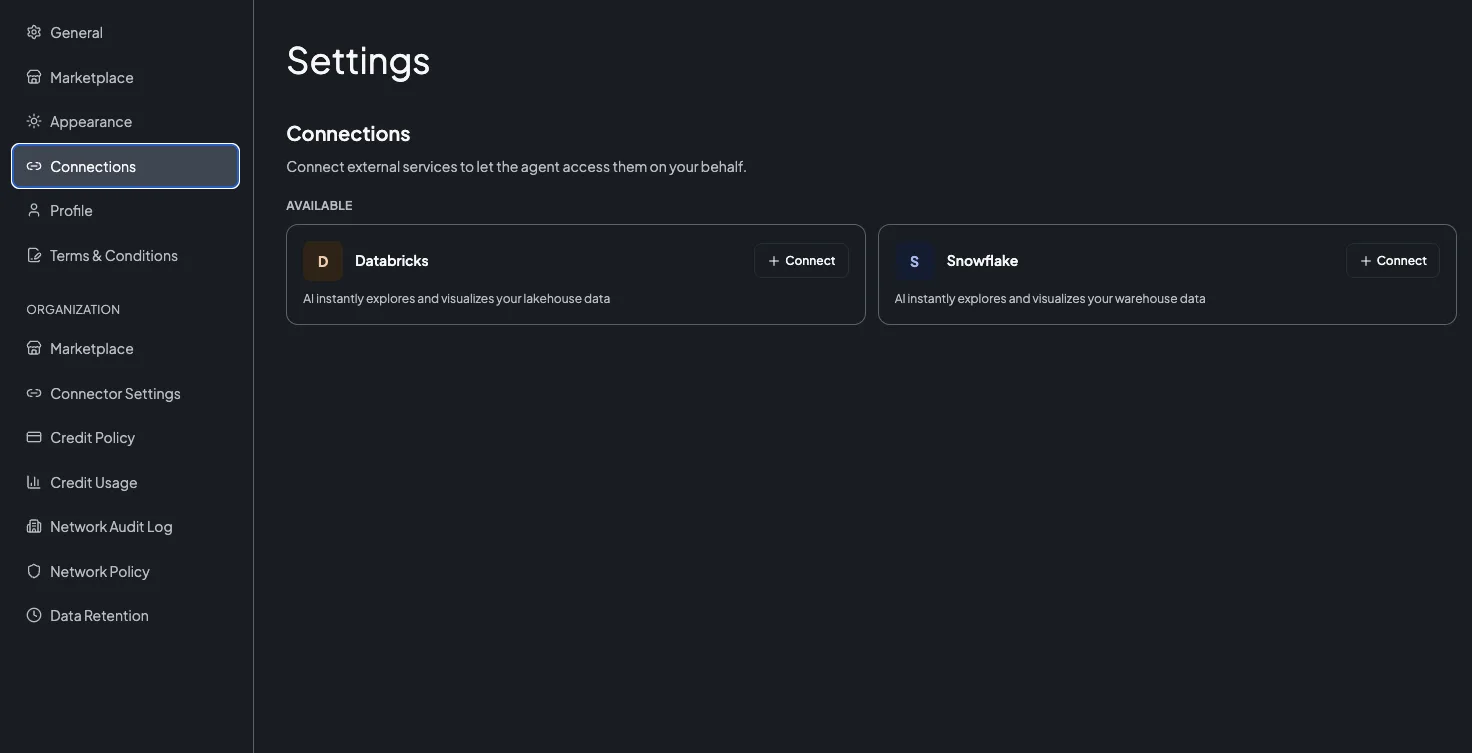
- AI Studio can now connect to a Snowflake data warehouse: an administrator registers the Snowflake connector once for the organization, each user authorizes their own connection over OAuth, and the agent can then explore and visualize Snowflake data directly in a chat.
- Designed for teams whose data lives in Snowflake, it lets analysts and marketers query their warehouse in natural language without moving data or handling raw credentials.
- Administrators configure the connector in Settings → Connector Settings using a Snowflake OAuth security integration, and users connect from Settings → Connections; the agent only ever uses a placeholder token, with the real credential substituted securely at the network boundary so it is never exposed.
- Learn more by visiting the Connect Snowflake and Connections pages.
Posted on: Jun 25, 2026
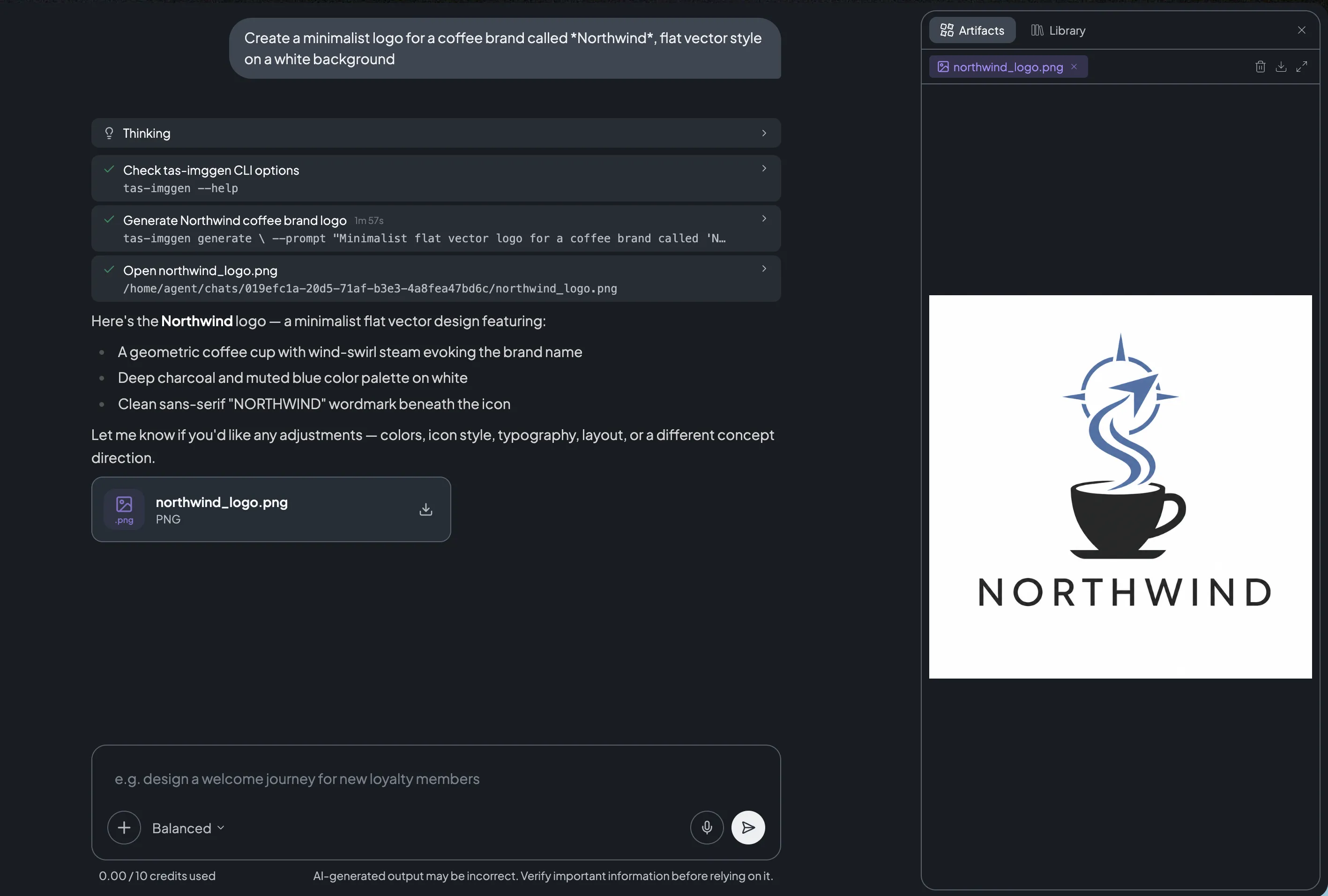
- AI Studio can now generate and edit images directly in a chat: describe the image you want in natural language and the agent creates it inline, backed by OpenAI's GPT Image model.
- Designed for marketers and content creators who need visuals on the fly, it produces logos, banners, and illustrations from a prompt, and can also edit existing images — regenerating a masked region (inpainting) or compositing elements such as a logo onto a product photo.
- You can steer the result by asking for a specific size, quality (low, medium, high, or auto), or file format (PNG, JPG, or WebP), and iterate cheaply at low quality before regenerating a final high-quality version.
- Image generation is available now on paid plans; it is not available on free accounts.
- Learn more by visiting the Image Generation page.
Posted on: Jun 28, 2026
- Account administrators can now control, per user, whether each member of the account may access Treasure AI Studio, so Studio can be limited to an approved set of users instead of everyone in the account.
- Designed for organizations that need to govern who can use Studio, access is managed through the Treasure AI REST API at the user-management layer — there is no Treasure Console UI in this release — with an account administrator granting access to specific users via an API key.
- To restrict Studio to specific users, contact your Customer Success Manager to enable restricted (opt-in) mode for your account, then grant access to the intended users; by default every user with Studio continues to have access.
- Learn more by visiting the Controlling AI Studio Access per User page.
Posted on: Jun 30, 2026
- AI Studio now offers two new Creative Suite skills — the Creative Brief Architect and the Image Brand Guideline agent — that take a campaign from a high-level goal through to brand-validated creative, all within a chat.
- Designed for marketers, campaign owners, creative and brand teams, and agencies running frequent or complex campaigns, the skills bring upfront clarity to briefs and automated brand governance to assets — reducing rework, accelerating review cycles, and letting teams scale AI-assisted creative production safely.
- The Creative Brief Architect is an orchestrator that guides you through a five-step workflow — from Brief Extraction to Review — transforming high-level goals, audience context, and campaign inputs into structured, actionable briefs aligned to your business objectives. It maintains continuity across the workflow by carrying context (extraction data, brand specifications, trend analysis, and creative directions) from each step into the next, delegating to the Creative Direction skill at the Creative Ideation step and synthesizing all prior context to recommend deliverables at Asset Requirements.
- The Image Brand Guideline agent reviews and validates visual creative assets against your brand guidelines — style, tone, color usage, and visual consistency — removing manual review bottlenecks as creative production scales, especially for AI-generated assets, while keeping brand control intact.
- Together the skills prevent misaligned creative before execution begins and reduce brand risk during production, improving cross-channel consistency and the effectiveness of downstream creative.
- Both skills are available now on paid plans across all regions (US, Tokyo, and EU01).
Posted on: Jun 3, 2026
- Engage Studio now adds the
content-availableandcategoryfields to the iOS Mobile Push notification payload, enabling your app to capture push notification delivery events while the app is in the background and dismiss events when a user swipes a notification away. Mobile Push is currently a Beta feature. - Designed for mobile app developers integrating Engage Studio push notifications, this lets you measure delivery and dismiss behavior accurately and report on the effectiveness of push campaigns, complementing the existing
open,link_open, anddeeplink_openevents. - These payload fields are sent automatically with no campaign configuration required. To capture the events, your iOS app must enable Background Modes, register a notification category named
defaultwith a custom dismiss action, and handle the dismiss and background-delivery callbacks. This change applies to iOS only. - Learn more by visiting the iOS Developer Guide page.
Posted on: Jun 2, 2026
- Engage Studio now supports LINE Flex Messages, letting marketers add a Flex Message object to a LINE Official Account campaign by pasting a Flex Message JSON payload directly into the message editor.
- Designed for marketers running LINE-centric campaigns, Flex Messages enable rich, customizable layouts such as image carousels, product cards, event invites, and receipts that go beyond plain text and imagemap messages.
- The editor validates the JSON against LINE's Flex Message schema and enforces platform limits at save time, and ready-to-use JSON templates are available in the Flex Message Template Gallery to help you get started quickly.
- Learn more by visiting the LINE Message Types page.
Posted on: Jun 30, 2026
- SMS is now available in Treasure AI Engage Studio, enabling marketers to send promotional text message campaigns directly to CDP-defined audiences from the same workspace used for email.
- Designed for marketers who want to reach customers on mobile without managing a separate SMS platform, SMS in Engage Studio brings audience segmentation, consent enforcement, quiet hours, and delivery tracking together in one place.
- Available in the US region with dedicated short codes. Contact your Treasure AI representative to begin the short code provisioning process. Carrier registration typically takes 8–12 weeks.
- Learn more by visiting the SMS Channel page.
Posted on: Jun 30, 2026
- Engage Studio now includes an In-Browser Message channel that lets marketers create, configure, and deliver personalized web messages — Modal popups and Inline (DOM replacement) banners — directly from the campaign editor, without relying on Google Tag Manager or custom JavaScript.
- Designed for digital marketers and web developers, the channel uses Treasure AI CDP profile attributes and Real-Time Personalization 2.0 for targeting and decisioning, enabling personalized coupon campaigns, cart reminders, and time-limited sale banners that adapt to each visitor.
- Modal campaigns use a drag-and-drop Beefree editor and support configurable layouts (center, corner, drawer, and bar), while Inline campaigns use a Monaco HTML/CSS/JS code editor with zone-based targeting via CSS selectors; both support RT 2.0 profile variable substitution in message content.
- To assist with element selection and preview on the live website before launch, install the Engage Studio — Web Message Previewer Chrome Extension; campaigns can also be authored without the extension by entering CSS selectors manually.
- In-Browser Message is currently available as a Beta feature for select customers; contact your Customer Success Manager to enable it for your account.
- Learn more by visiting the Engage Studio Channels page.
Posted on: Jun 30, 2026
- The Engage Studio — Web Message Previewer Chrome Extension is now available on the Chrome Web Store, giving marketers a dedicated authoring assist tool to select DOM elements and preview In-Browser Message campaigns on the live website before launch.
- Designed for digital marketers and web developers building Inline campaigns, the Extension lets you click any element on a page to automatically generate a stable CSS selector (Zone ID), then inject replacement HTML to see exactly how your banner or popup will render — all without affecting the live site or any end users.
- Install the Extension from the Chrome Web Store by searching for "Engage Studio — Web Message Previewer" by Treasure AI, or navigate directly to the Chrome Web Store listing; it requires Chrome 114 or later.
- Learn more by visiting the Engage Studio — Web Message Previewer page.
Posted on: Jun 30, 2026
- Treasure AI Personalization Studio is an AI-native platform for creating and launching real-time web content personalization campaigns, letting you show different images, text, and CTAs to different audiences based on their profile attributes and behaviors.
- Designed for cross-functional marketing teams — digital marketers, web developers, and creative marketers — Personalization Studio eliminates the need for disconnected tools by integrating directly with the Customer Data Platform for unified audience targeting and sub-second content delivery.
- Create audiences by importing batch segments from Audience Studio, register website pages and content spots using a visual point-and-click selector, and build personalized creative assets with a drag-and-drop WYSIWYG editor — all within a guided 4-step campaign wizard.
- Campaign performance is tracked automatically with impressions, unique users, clicks, and click-through rate metrics, and content can be previewed across Desktop, Mobile, and Tablet viewports before launch.
- Learn more by visiting the Personalization Studio page.
Posted on: Jun 1, 2026
- The Google Campaign Manager 360 Enhanced Conversions Export connector sends conversion data from Treasure AI directly to Google Campaign Manager 360 (CM360) through the Campaign Manager 360 API, uploading or updating conversion records tied to Floodlight activities.
- Designed for advertisers who use CM360 as their cross-channel measurement and reporting system of record, the connector enables deduplicated, standardized conversion attribution across Google Ads, YouTube, external DSPs, and other media.
- Configuring an export requires a Campaign Manager User Profile ID with conversion upload permissions, along with the Floodlight Configuration ID and Floodlight Activity ID for the conversions you want to upload.
- Learn more by visiting the Google Campaign Manager Enhanced Conversions Export Integration page.
Posted on: Jun 2, 2026
- The Yelp Ads Conversion API Export connector sends offline and server-side conversion events, such as purchases and leads, from Treasure AI directly to Yelp through the Yelp Conversions API for ad attribution and return-on-ad-spend measurement.
- Designed for multi-location advertisers running Yelp Ads, the connector replaces manual conversion uploads and custom pipelines with a configurable activation destination, improving attribution completeness while reducing implementation and maintenance effort.
- The connector maps Treasure AI segment data to the Yelp Conversions API schema and automatically normalizes and SHA-256 hashes personally identifiable fields as required by Yelp.
- Learn more by visiting the Yelp Conversions API Export Integration page.
Posted on: Jun 5, 2026
- The Selligent (Marigold Engage) Export connector sends audience data from Treasure AI directly into Selligent static Segments through the Marigold Engage SMC V1 API, loading records into a master List and then assigning them to one or more Segments.
- Designed for marketers who use Selligent as their outbound channel, the connector provides a native activation path that replaces the custom Digdag workflows, secrets, and Docker images customers previously had to build and maintain.
- A single export can route records to multiple Segments based on a configured Segment column, and Treasure AI can optionally create the target List and Segments if they do not already exist.
- Learn more by visiting the Selligent Export Integration page.
Posted on: Jun 23, 2026
- The Batch Import connector pulls campaign engagement data — including email sent, email open, push sent, push open, and SMS sent events — from Batch's Profile Export API into Treasure AI, loading them into TD tables automatically on a scheduled basis.
- Designed for marketing operations teams and data engineers who use Batch as their mobile marketing automation platform, the connector eliminates the manual effort of exporting and uploading campaign results, enabling campaign attribution analysis and customer profile enrichment directly alongside other data in Treasure AI.
- The connector supports all three Batch export types: ATTRIBUTES (profile properties), EVENTS (campaign engagement history, up to 90 days lookback), and REACHABILITY (channel opt-in status, up to 90 days lookback from October 10, 2024 onwards).
- Learn more by visiting the Batch Integration Overview page.
Posted on: Jun 1, 2026
- Workflow pools let an account administrator control how many of a chosen group of Treasure Workflow attempts can run at the same time in a Treasure AI account, independently of other workflows.
- Designed for administrators of accounts that run large numbers of workflows, pools prevent one group of workflows (such as ad-hoc activations) from consuming every attempt slot in the account and starving higher-priority workflows.
- Each pool has its own concurrency limit and queue, and pool rules decide which pool each newly created attempt is assigned to based on project name, workflow name, workflow type, or invocation type.
- Pools are configured through the Treasure Workflow API and require administrator permissions.
- Learn more by visiting the About Pools page.
Posted on: Jun 3, 2026
- Real-time Total counter attributes now display an updated Batch Backfill configuration with corrected UI helper text and prominent guidance, making clear that Batch Backfill is required for a Total counter to accumulate a true lifetime total rather than behave as a sliding counter.
- Designed for data engineers and CDP administrators configuring real-time attributes, this improvement removes a common source of misconfiguration: without a Batch Backfill, a Total counter silently tracked only a sliding window of events instead of a running lifetime total.
- The Batch Backfill value is always combined with real-time events occurring after the batch timestamp — it is not a fallback used only when real-time data is absent; configuring it correctly is what distinguishes a Total counter from a Sliding counter.
- Documentation for the counter attribute FAQ has also been updated to clarify that counter attributes are not deleted when their events expire — only the events themselves are evicted from the real-time store when they exceed the counter's configured duration.
- Learn more by visiting the Creating and Viewing a Counter Attribute page.
Posted on: Jun 24, 2026
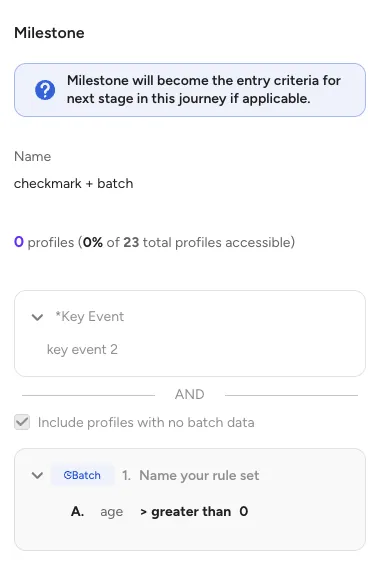
- Real-time personalizations and journeys now offer an Include profiles with no batch data option in the entry criteria configuration, allowing profiles whose batch segment membership is unknown to pass batch-based conditions and receive offers or enter journeys.
- Designed for marketers who want to engage new or recently acquired users whose batch data has not yet been processed, this option prevents those profiles from being incorrectly excluded by batch segment rules that default unknown membership to "not included."
- The option is opt-in and applies to all batch conditions in the entry criteria at once — existing configurations are unaffected unless you explicitly enable the checkbox, so current inclusion and exclusion rules continue to work as before.
- Learn more by visiting the Creating a Real-Time Personalization with Audience Studio page.
Posted on: Jun 25, 2026
- Treasure AI Voice now supports custom Summary Templates: instruction prompts that control how summaries are structured, what action items are extracted, and how inferred titles are generated for each recording.
- Designed for teams with recurring conversation types — such as customer support calls, sales meetings, or user interviews — templates let you define the output format once and reuse it consistently across recordings in that context.
- Templates are personal to the user who creates them and cannot be shared with teammates.
- Learn more by visiting the Summary Templates page.
Posted on: Jun 18, 2026
- On-Demand Journey Execution lets marketers trigger a journey immediately using the most recent segment data, without waiting for a full Parent Segment refresh to complete.
- Designed for marketing operations teams running time-sensitive campaigns, this eliminates multi-hour delays caused by Parent Segment rebuilds — updated segment rules take effect right away without requiring a full rebuild.
- Available via Treasure AI Studio and the
tdx journey run <journey_id>CLI command; note that journeys using Priority Groups are not supported in this release. - Learn more by visiting the On-Demand Journey Execution page.
Posted on: Jun 30, 2026
- Users who have a Column-Level Access Control policy without the Columns full permission can now view job metadata, logs, and status for jobs executed by other users in the same account — only job results remain restricted.
- Designed for data engineers and workflow operators working in accounts with Column-Level Access Control (Tags) enabled, this change restores visibility into shared job activity so teams can monitor workflows and debug errors without requiring elevated column permissions.
- Previously, users without an exact Columns full policy could only see their own jobs in the Jobs list, which made collaborative debugging and workflow monitoring difficult.
- This improvement applies only to accounts with the Column-Level Access Control feature enabled and does not affect job result access — query results remain restricted based on column permissions.
- Note: regardless of this change, users can only see jobs that were executed on databases they have access to — database-level permissions continue to apply.
- Learn more by visiting the Viewing Job Information page.
Posted on: Jun 10, 2026
- Composable Audience Studio now emits the same premium audit log events as Audience Studio, covering segments, segment folders, syndications, activation templates, and bulk operations, plus permission-denial events for folder permissions and column visibility access control.
- Designed for compliance, security, and IT teams that rely on audit logs for governance and operational visibility, this brings Composable Audience Studio to full audit log parity with Audience Studio.
- Composable events reuse the same event names, columns, and schema as their Audience Studio counterparts; use the
requested_path_infocolumn to distinguish composable API paths from legacy or standard Audience Studio events. - Learn more by visiting the Premium Audit Log Events page.
Posted on: Jun 30, 2026
- Policy-based permissions now extend to Composable Audience Studio (CAS) parent segments and segment folders, using the same policy engine that already governs standard Audience Studio.
- Designed for account owners and administrators who need to restrict which team members can view, edit, or run composable segments — especially useful when a Cloud Data Warehouse connection exposes attributes that shouldn't be open to every marketer — this lets you grant Full access, Limited access, or no access on a per-parent-segment and per-folder basis.
- Composable parent segments appear in the same permissions picker as standard parent segments, tagged with a Composable label so administrators can tell them apart at a glance.
- Learn more by visiting the Policy Based Composable Audience Studio Permissions page.