These are the Treasure AI features and improvements released in July, 2026.
Posted on: Jul 3, 2026
- AI Studio now lets you share the custom skills you build in a project with everyone in your account, so teammates can install them with a single click — no public GitHub repository required.
- Designed for teams that want to reuse in-house expertise, it keeps skills private to your account as an alternative to the public Plugin Marketplace, and makes sharing easy even for people who can't or don't want to publish to GitHub.
- Build skills in a project, then share them as a named plugin from the new Develop tab; teammates discover and install them from the Shared tab and manage their installs under Installed.
- Sharing publishes a snapshot, so you can keep refining a skill and push updates when you're ready — subscribers pick up your latest version the next time they start a chat.
- Learn more by visiting the Sharing Custom Skills page.
Posted on: Jul 3, 2026
- Treasure AI Studio is now available to accounts hosted in the Korea (ap02) region, so Korea-based teams can sign in and run the same chat-based AI workflows offered in the US, Tokyo, and EU01 regions.
- Designed for customers with data residency requirements in Korea, it keeps LLM inference within the Korea geographic boundary on Amazon Bedrock (Seoul).
- In the Korea region, AI Studio offers a single model tier — Balanced, backed by Claude Sonnet 4 — while the Pro and Fast tiers are not available there.
Posted on: Jul 3, 2026
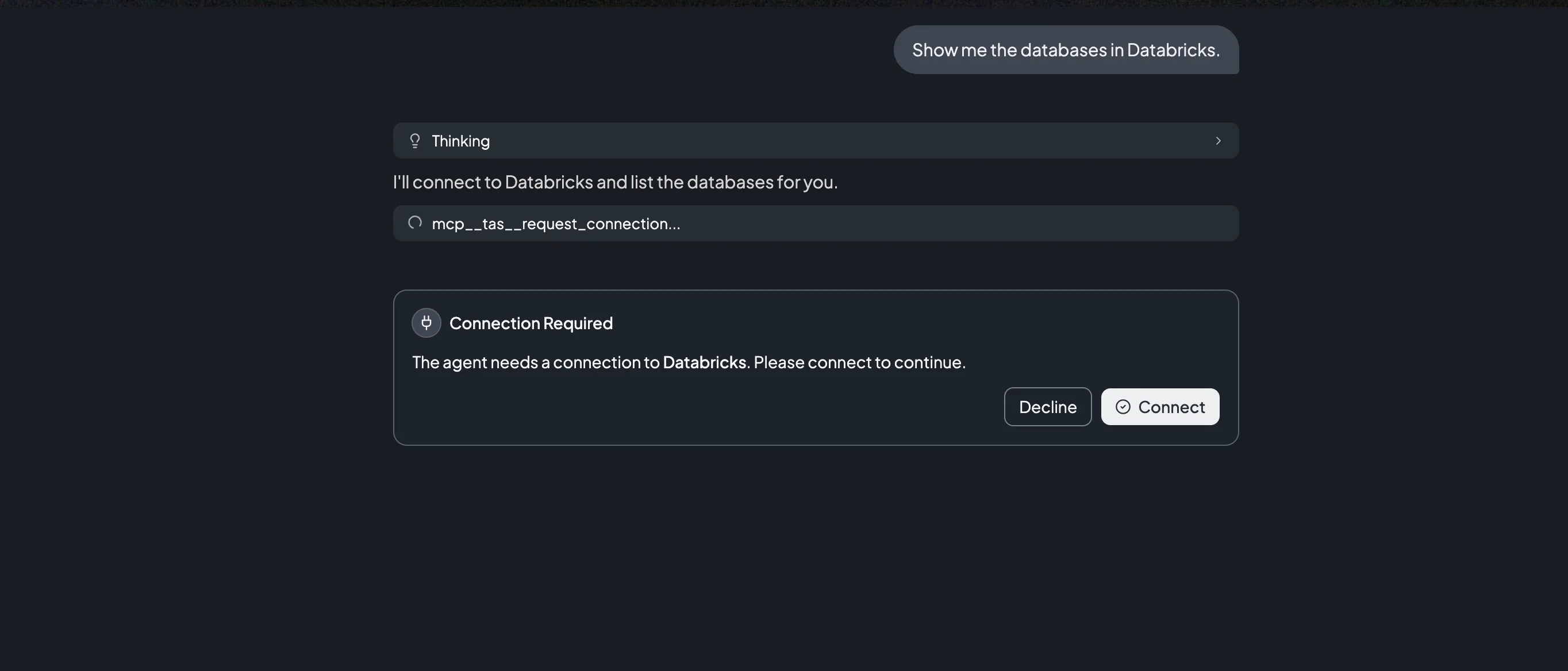
- Treasure AI Studio now lets you create a data-source connection without leaving the conversation: when an agent needs a service you haven't connected yet, it shows an inline Connection Required card with a Connect button right in the chat.
- Designed for anyone working with an agent, it removes the interruption of stopping to visit Settings → Connections before the agent can reach your data, so you can authorize on demand and keep going.
- Click Connect on the card to complete the same secure OAuth authorization used in Settings (or Decline to skip); the connection you create this way is a normal connection that appears under Settings → Connections and is reused in later chats. This is available for the Databricks and Snowflake connectors.
- Learn more by visiting the Connections page.
Posted on: Jul 8, 2026
- The AI Studio workspace that pre-loads your instructions, skills, and default data context into every new chat is now called a Work Folder (previously "Project") — the same capability, with a name that better reflects how you use it.
- New Chat now leads the top of the sidebar, a quick + action appears on hover to start a chat inside a work folder, and search has moved into a header toggle (🔍) that reveals a box filtering both chats and work folders by name.
- Designed for everyday users, these changes put the most frequent action — starting a conversation — front and center and make the sidebar easier to scan.
- Only the labels changed: your existing work folders, their instructions, and their pre-selected skills continue to work exactly as before.
- Learn more by visiting the AI Studio Core Concepts page.
Posted on: Jul 8, 2026
- Treasure AI Studio now lets an account administrator set a custom instruction that is added to the system prompt of every agent in the organization, so shared conventions apply automatically in every chat.
- Designed for account administrators, it gives an organization a self-service way to steer agent behavior — a preferred database, an output format, or a house style for summaries — without each user restating those conventions in every conversation.
- Set it under Settings → Instructions (up to 16,384 characters); changes apply to new chats only.
- Because the instruction becomes part of the agent's system prompt, do not include secrets, credentials, or personal data.
- Learn more by visiting the Custom Instructions page.
Posted on: Jul 14, 2026
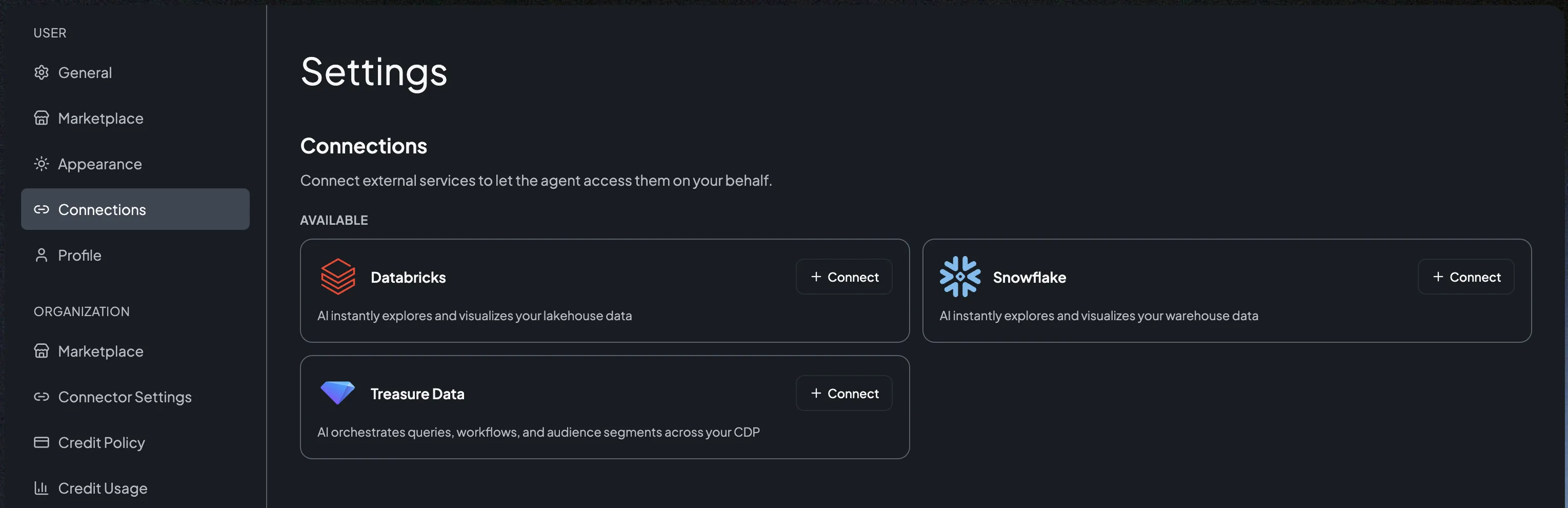
- AI Studio now connects to your Treasure Data CDP through the same Connector/Connection model as Databricks and Snowflake: each user authorizes their own connection over OAuth, and the agent can then run queries, workflows, and audience-segment operations across your CDP directly in a chat.
- Learn more by visiting the Connect Treasure Data CDP and Connections pages.
Posted on: Jul 21, 2026
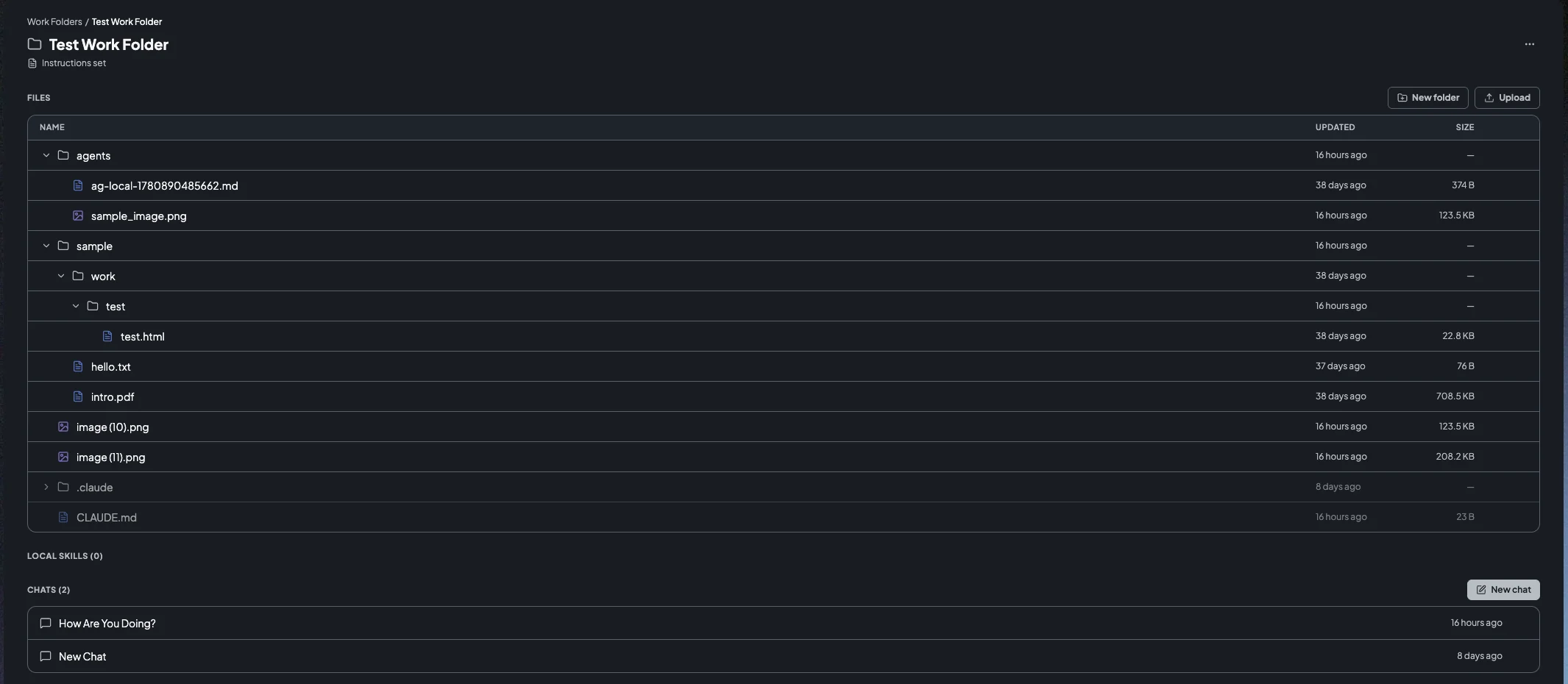
- AI Studio now shows each work folder's files directly in the left sidebar and on a dedicated work folder page, so you can browse everything a folder contains without opening a chat.
- Designed for anyone working in AI Studio, it makes the files an agent generates or you upload visible and reusable at the folder level, instead of being buried inside a single conversation.
- From the work folder page you can organize files directly — create folders, rename entries, move files by dragging them between folders, and delete files and folders — while the chat's right panel becomes a focused file viewer.
- Learn more by visiting Organizing Files in a Work Folder.
Posted on: Jul 21, 2026
- Treasure AI Studio for Mac desktop has been updated to version 1.1.2, bringing the desktop app up to date with recent features shipped on the web, including Work Folders, Custom Instructions, the Treasure Data CDP connector, and in-chat connection requests.
- Download the latest build from the desktop-v1.1.2 release, or use the in-app auto-updater if you're already on a previous version.
- Learn more on the Desktop Setup (Mac) section of the Getting Started guide.
Posted on: Jul 22, 2026
- Treasure AI Studio is now available as a native Windows desktop app, joining the existing Mac desktop app, as part of the v1.2.0 release.
- Designed for Windows-based users, it brings the same AI Studio experience available on Mac and web to Windows for the first time, including Work Folders, Custom Instructions, the Treasure Data CDP connector, and in-chat connection requests.
- The Windows build ships as a single universal installer (
TreasureAIStudio-win.exe) that detects your CPU architecture at install time, so there's one stable download link regardless of architecture — the same approach used for the Mac universal build. - Download it from the desktop-v1.2.0 release.
- Learn more on the Getting Started page.
Posted on: Jul 28, 2026
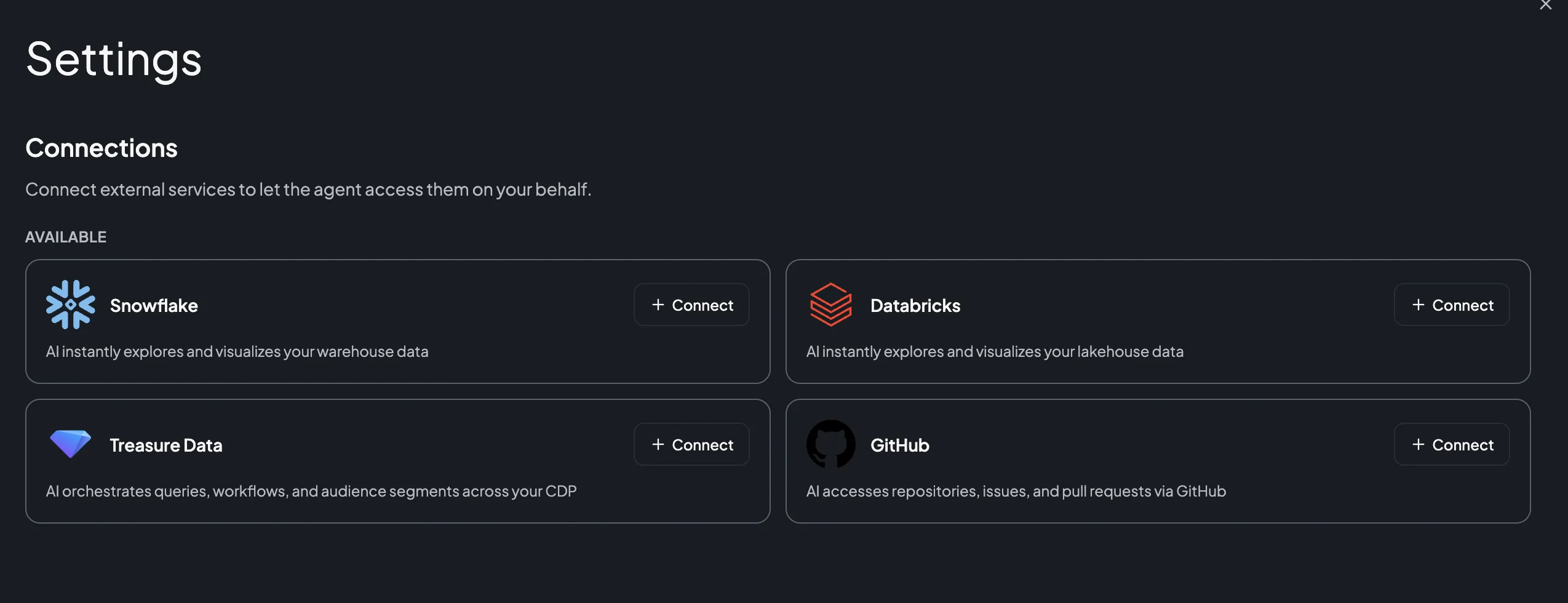
- AI Studio now connects to GitHub through the same Connector/Connection model as Databricks, Snowflake, and Treasure Data CDP, so an agent can clone repositories, read and edit files, open and review pull requests, and manage issues directly in a chat using the
ghCLI andgit. - Designed for developers and teams who want an agent working alongside them in their repositories, it authorizes each user's own connection over OAuth through a Treasure AI–managed GitHub App, with no vendor OAuth application to create.
- A Studio administrator enables the connector, and someone with rights on the target GitHub account or organization installs the GitHub App on the repositories the agent may access — installing happens entirely on GitHub's side and is not tied to your Studio account.
- The agent can reach a repository only where the App is installed and that you can access yourself, and the App's permissions deliberately exclude secrets, workflow definitions, and repository administration.
- Learn more by visiting the Connect GitHub and Connections pages.
Posted on: Jul 31, 2026
- On Web and Desktop, new chats are now saved in a work folder: AI Studio sets up a default folder named General, and a folder chip in the composer names that destination and lets you send the chat elsewhere before your first message.
- The sidebar's chat list is now Recent Chats, listing conversations from every work folder grouped by when each was last active, and each work folder page gained an Uploads section showing the files attached from its chats.
- Learn more by visiting the Work Folders page.
Posted on: Jul 3, 2026
- HTML Email Hosting serves a static, sanitized copy of a launched email campaign as a web page under your own Email Domain, so recipients who click View in Browser in their inbox see the full email rendered in a browser tab instead of relying on email client rendering.
- Designed for marketers who want a reliable fallback for recipients whose email clients render HTML poorly, the feature publishes the page automatically at campaign launch and exposes its HTTPS URL through the
{{campaign.view_in_browser_url}}variable, which can be inserted via the Beefree editor's Special Links panel. - HTML Email Hosting is currently in beta and requires an Email Domain with
DIGITAL_ASSETSDNS enabled, plus feature enablement by Treasure AI Support; contact your account team to request access. - Learn more by visiting the View in Browser page.
Posted on: Jul 14, 2026
- Engage Studio now lets marketers add preheader text — the short preview that appears next to the subject line in recipients' inboxes — without editing HTML, using a dedicated Pre-header field in the email editor.
- Designed for email marketers, preheader text improves open rates and prevents inbox providers from showing unrelated content (such as unsubscribe links) in the preview; it's now a first-class email property just like subject and body.
- Set a default preheader in Email Templates and override it at the campaign level; the field supports Liquid personalization and enforces character limits (90 characters recommended, 220 maximum). Both Visual and HTML editors are supported.
- Learn more by visiting the Adding Preheader Text to Emails page.
Posted on: Jul 1, 2026
- The Iterable Export Connector now supports a truncate action that replaces an Iterable list's membership in a single job, treating the query result as the complete desired state of the list.
- Designed for enterprise customers managing large, frequently refreshed audience lists, truncate mode removes the need to orchestrate a separate
removejob followed by anaddjob just to keep list membership in sync. - Truncate subscribes every user in the query result (refreshing their data fields, as add does) and unsubscribes any existing list member not present in the result; an empty query result is a valid input and clears the list. Set the project_type parameter (
email_based,userid_based, orhybrid) to match how the target Iterable project identifies users. - Truncate mode is membership-only: the
campaign_id,channel_unsubscribe, andupdate_existing_users_onlyparameters are ignored whenactionistruncate. - Learn more by visiting the Iterable Export Integration page.
Posted on: Jul 9, 2026
- The Batch Export Connector sends customer profile data from Treasure AI directly to Batch's Profile Mass Update API, so segment attributes such as email, phone number, language, and custom fields stay in sync with Batch customer profiles.
- Designed for marketers who use Batch as their customer engagement platform, the connector removes the manual exports and custom scripts previously required to keep Batch profiles current, improving data freshness for mobile push, web push, in-app, email, and SMS campaigns.
- Configure the export from a query result: map columns to Batch native attributes (
$email_address,$language, and more) or custom attributes using theidentifier__,batch__, and type-prefixed column-naming convention, then run it as a one-time or scheduled export. - Learn more by visiting the Batch Export Integration page.
Posted on: Jul 29, 2026
- The Batch Export Connector now includes an Audience Export target that syncs Treasure AI segments directly to Batch audience lists for campaign targeting, complementing the existing Profile Update capability.
- Designed for marketers using Batch for mobile push, in-app, email, and SMS campaigns, it enables dynamic audience updates from any segment using support for all three Batch identifier types (Custom ID, Email, Install ID) and sync modes (
add,remove,replace). - Learn more by visiting the Batch Export Integration page.
Posted on: Jul 14, 2026
- The Yelp Conversions API Export connector now supports a bulk_event upload mode that batches up to 1,000 conversion events into a single API call, alongside the existing single_event mode that sends one event per request.
- Designed for multi-location advertisers with high event volumes, bulk upload mode reduces API call overhead and improves throughput for large-scale segment exports and activation workflows, using the same field mapping, normalization, and SHA-256 hashing rules as single-event uploads.
- Set the Upload Mode parameter to
bulk_eventwhen configuring the export (default remainssingle_event); no other configuration changes are required. - Learn more by visiting the Yelp Conversions API Export Integration page.
Posted on: Jul 28, 2026
- The Yahoo! JAPAN Ads connector now supports migrating LINE Ads Custom Audiences, as the LINE Ads API is being sunset in October 2026.
- Designed for advertisers in Japan who currently use LINE Ads for custom audience targeting, it provides automatic field mapping so you can switch to Yahoo! JAPAN Ads without rebuilding your audiences.
- The connector maps LINE Ads identifier types (email, phone, IFA) to their Yahoo! JAPAN Ads equivalents (mail_address, mail_address_and_phone_number, idfa/aaid) automatically; documentation includes step-by-step migration guidance.
- Learn more by visiting the Yahoo! JAPAN Ads V2 Export Integration page.
Posted on: Jul 29, 2026
- The BigQuery Output Connector now supports Workload Identity Federation (WIF) authentication, enabling keyless, short-lived token-based connections to BigQuery using Google Cloud Platform's secure authentication mechanism.
- Designed for enterprise customers with strict security policies that restrict long-lived credentials, WIF authentication eliminates the need to store and rotate JSON key files, improving security posture for teams that export audiences to BigQuery.
- WIF authentication provides full feature parity with JSON key authentication — parent segments, segmentation, activations, and journeys all work identically under WIF with no degraded functionality.
- Select WIF authentication in the BigQuery v2 connector's authentication settings to get started. Learn more by visiting the Google BigQuery Export Integration V2 page.
Posted on: Jul 10, 2026
- The Hive query engine now supports the
CREATE TABLEstatement, so data engineers can define new tables directly using HiveQL — including table and column comments, data retention, and User-Defined Partitioning (UDP) via table properties — without switching to Trino. - Learn more by visiting the CREATE TABLE Statement Syntax page.
Posted on: Jul 22, 2026
- Both the Hive and Trino query engines now support the
UPDATEstatement — Hive support is new in this release, while UPDATE support in Trino is experimental — using the same requiredWHEREclause, partition limits, and resource-consumption guidance asDELETE. - Designed for teams updating large tables, Hive's UPDATE support gives a production-ready option alongside Trino's experimental implementation, avoiding the higher resource consumption of updating large tables in Trino.
- Learn more by visiting the UPDATE Statement Syntax page.
Posted on: Jul 9, 2026
- The Personalization API (
{region}.p13n.in.treasuredata.com, called via the JavaScript SDK'sfetchPersonalizationor directly over HTTP) now automatically populatestd_ipfrom the request'sX-Forwarded-Forheader andtd_global_idfrom the matching browser cookie, when present, on every incoming event. - Designed for developers integrating real-time personalization into websites and apps, this brings the Personalization API's server-side enrichment in line with the standard Ingest API, removing an inconsistency where
td_ipandtd_global_idwere populated automatically on one ingestion path but not the other. - No client-side changes are required — existing calls to the Personalization API pick up the enriched
td_ipandtd_global_idvalues automatically. - Learn more by visiting the Personalization API Quickstart page.
Posted on: Jul 17, 2026
- Lookup Catalog enables marketers to join customer profile attributes against an external reference table at runtime — powering use cases such as time-limited sale banners, coupon reminders, and product-level decisioning that require both a user dimension and a product dimension simultaneously.
- Lookup Catalog data is stored in the dedicated
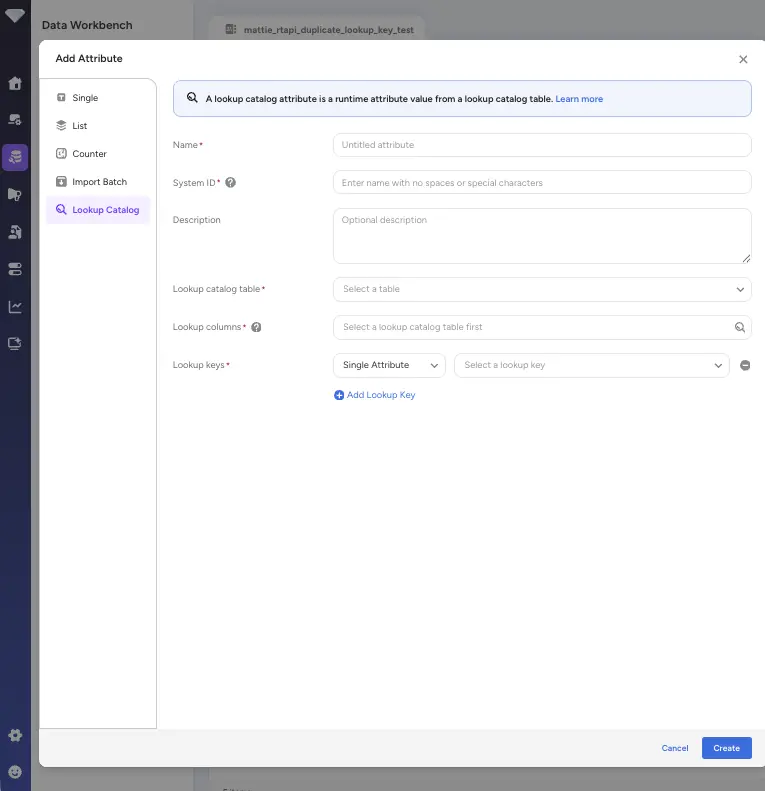
cdp_lookup_catalogPlazma database and synced to the real-time store (DynamoDB) via a provided Treasure Workflow template; the first column of each table (excludingtime) becomes the lookup key, and string and number column types are supported. - Lookup Catalog is now a first-class real-time attribute type alongside Single, List, and Counter attributes — create one in the Parent Segment's Realtime Attribute settings by selecting the Lookup Catalog type in the Add Attribute modal, choosing a lookup table and columns, and setting up to two Single or List attributes as lookup keys (combined as a Cartesian-product composite key); Lookup Catalog attributes appear in the Attribute Payload section of Personalization and can be used in entry criteria with operators
==,!=,<,<=,>,>=, null checks, and Contains/NotContains for array-type columns. - Array-type catalog columns are supported, and Engage Studio's In-Browser Message content can reference Lookup Catalog attributes using Liquid template syntax —
if/elsif/elseconditionals andforloops (up to two nesting levels) that are available. - Learn more by visiting the Real-Time Attributes Overview page.
Posted on: Jul 14, 2026
- AI Agent Foundry now supports OpenAI's GPT-5.5 as a selectable model for your agents.
- Designed for customers who are limited to OpenAI models, it gives them access to GPT-5.5 rather than restricting them to earlier GPT versions such as GPT-5.
- GPT-5.5 supports an adjustable Reasoning effort setting — including a new highest level, Extra high — so you can tune how deeply the model reasons before it responds.
- GPT-5.5 is available alongside the existing GPT-5, GPT-5 mini, and GPT-5 nano models, and existing agents are unaffected.
- Learn more by visiting the Creating an Agent page.
Posted on: Jul 27, 2026
- Amazon Nova Canvas, the image generation model behind AI Agent Foundry's Image Generator, is being retired by AWS, so AI Agent Foundry's support for Nova Canvas ends no later than the end of September 2026.
- The actual cutoff may land earlier than that date: AWS automatically disables a Bedrock model after 30 days without use, and Nova Canvas has already stopped responding in the Tokyo region on that basis.
- AI Agent Foundry will not add a replacement image generation model, so no image generation model will be supported in AI Agent Foundry once Nova Canvas reaches end of life. For image generation going forward, use the GPT Image model available in Treasure AI Studio.
- Learn more by visiting the Supported LLM Models page.
Posted on: Jul 7, 2026
- Treasure AI is removing the "Remember Me" option from the Treasure Console sign-in page, so affected users will no longer be able to stay signed in automatically across browser sessions.
- This change strengthens account security by ensuring that a configured user session timeout is always honored, closing a gap where an active "Remember Me" session could keep a user signed in well beyond the session timeout setting.
- This change only affects users who sign in with email and password; users who sign in via SSO are not affected. The change is planned to take effect between July and August 2026.
- Learn more by visiting the Specifying Maximum Login Attempts and Session Timeout page.
Posted on: Jul 9, 2026
- Treasure Code now lets you move a segment to a different folder by name — no internal ID lookup required.
- A recursive search finds any segment across all folders by typing part of its name; if two segments share the same name, the command lists both and asks which one you meant rather than guessing.
Posted on: Jul 9, 2026
- Two issues that silently cut off query results during data exports have been fixed: results no longer stop at 40 rows by default, and large result sets are no longer cut off mid-stream with no warning.
- Automated workflows and pipelines that export through Treasure Code now receive the full result every time.
Posted on: Jul 9, 2026
- Journey configuration files now use the
.journey.ymlextension, making them easy to tell apart from segment files in any folder or file browser. - Existing journey files continue to work without any changes needed.