Personalization Studio is currently in Release Preview (Beta). Features and implementation details may change before general availability.
Treasure AI Personalization Studio is an AI-native product for creating and launching web content personalization campaigns. It lets you show different content — images, text, and CTAs — to different audiences based on their profile attributes and real-time behaviors.
Personalization Studio is built directly on top of the Customer Data Platform, combining batch profile data with real-time behavioral signals to deliver sub-second personalized experiences on your website.
| Capability | Description |
|---|---|
| Website content personalization | Personalize web banners, text, images, and CTAs for different audiences. |
| Real-time decisioning | Evaluate visitor profiles against campaign rules in real time using both batch and streaming data. |
| Visual content spot selection | Click on elements in your website to mark them as personalization targets. |
| Drag-and-drop content editor | Visual editor for designing creative assets per audience. |
| Campaign scheduling | Configure start and end dates with time-bound delivery. |
| Audience targeting | Target audiences by importing existing batch segments from Audience Studio. |
| Campaign reporting | Track impressions, unique users, clicks, and CTR. |
| Responsive preview | Preview personalized content across Desktop, Mobile, and Tablet viewports. |
| Term | Description |
|---|---|
| Parent Segment | The dataset in Data Workbench containing all profiles, attributes, and behaviors for your company, brand, or region. |
| Audience | A reusable subset of profiles defined by batch attribute rules. Created by importing existing batch segments from Audience Studio. Lives in Personalization Studio and can be used across all campaigns. |
| Campaign | A time-bound personalization effort with audiences, content spots, creative assets, and priority settings. |
| Page | A registered website page (single exact URL) available for personalization. Each page maps to one URL — no wildcards. |
| Content Spot | A specific DOM element on a page, identified by its HTML id attribute, where personalized content appears. |
| Creative Asset | A combination of images, text, and/or CTAs configured for a specific content spot and audience pair. |
| Fallback Content | What visitors see when they don't match any audience or when personalization fails to load. Either the existing website content (no change) or a marketer-defined static replacement. |
Personalization Studio operates as a real-time content delivery system built on the Treasure AI CDP. The architecture connects three major domains: your website, the Personalization Studio application, and the Treasure AI real-time infrastructure.
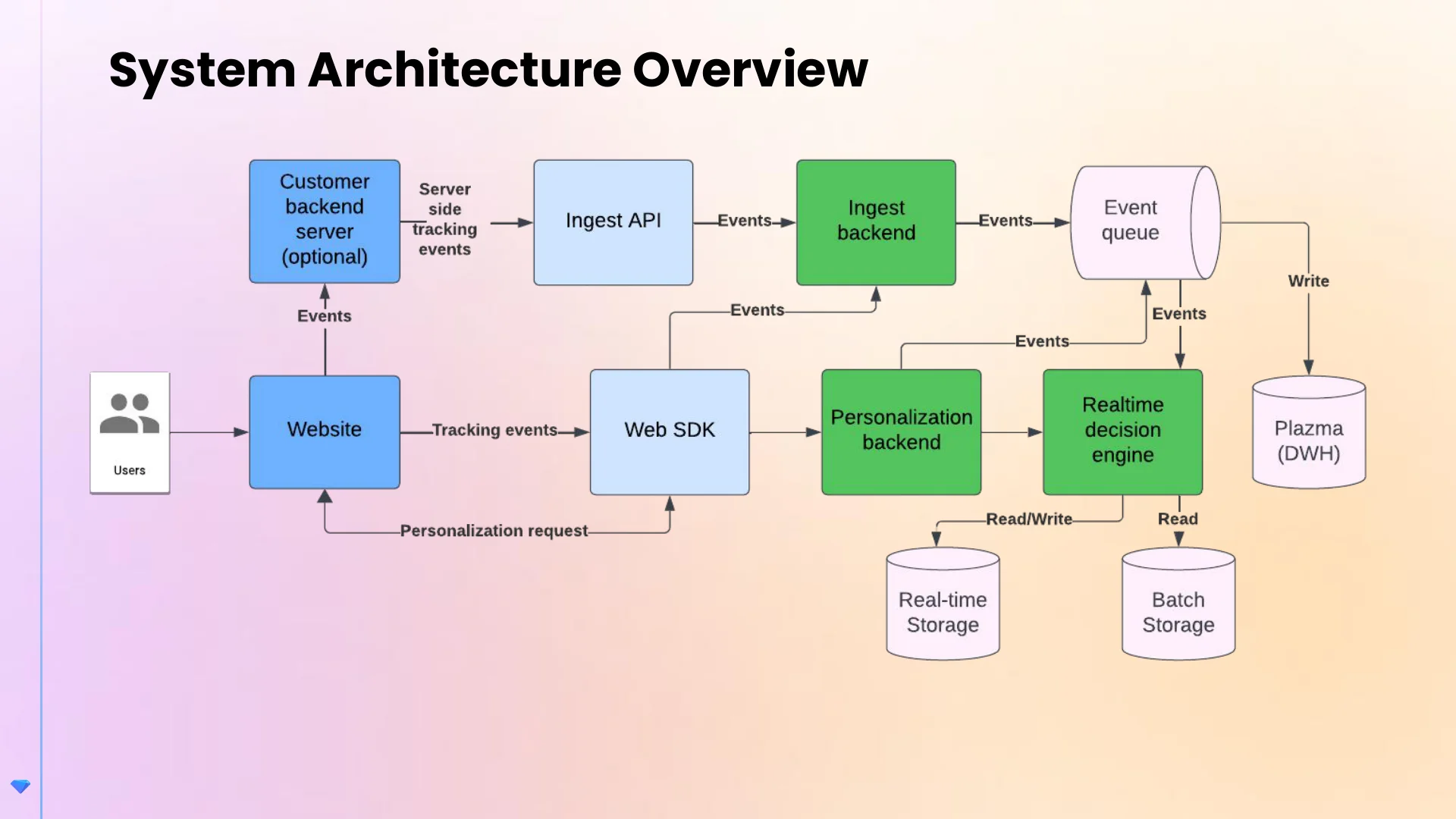
| Component | Role |
|---|---|
| Website | Your website where visitors interact and personalized content is displayed. |
| TD Web SDK | Client-side JavaScript SDK embedded on your website. Sends tracking events, handles personalization requests, and renders personalized content. |
| Personalization Studio Backend | Manages campaigns, creative assets, and pages. |
| Real-time Decision Engine | Evaluates visitor profiles against campaign rules in real time using both batch and streaming data. |
| Ingest API & Backend | Receives tracking events from your backend systems. |
| Event Queue | Buffers incoming events for reliable processing and delivery to downstream systems. |
| Real-time Storage | Stores streaming attributes and recent behavioral data for real-time audience evaluation. |
| Batch Storage | Stores batch profile attributes from the Parent Segment (demographics, purchase history, loyalty tier). |
| Plazma (DWH) | Treasure AI's data warehouse — persists all events for historical analysis and reporting. |
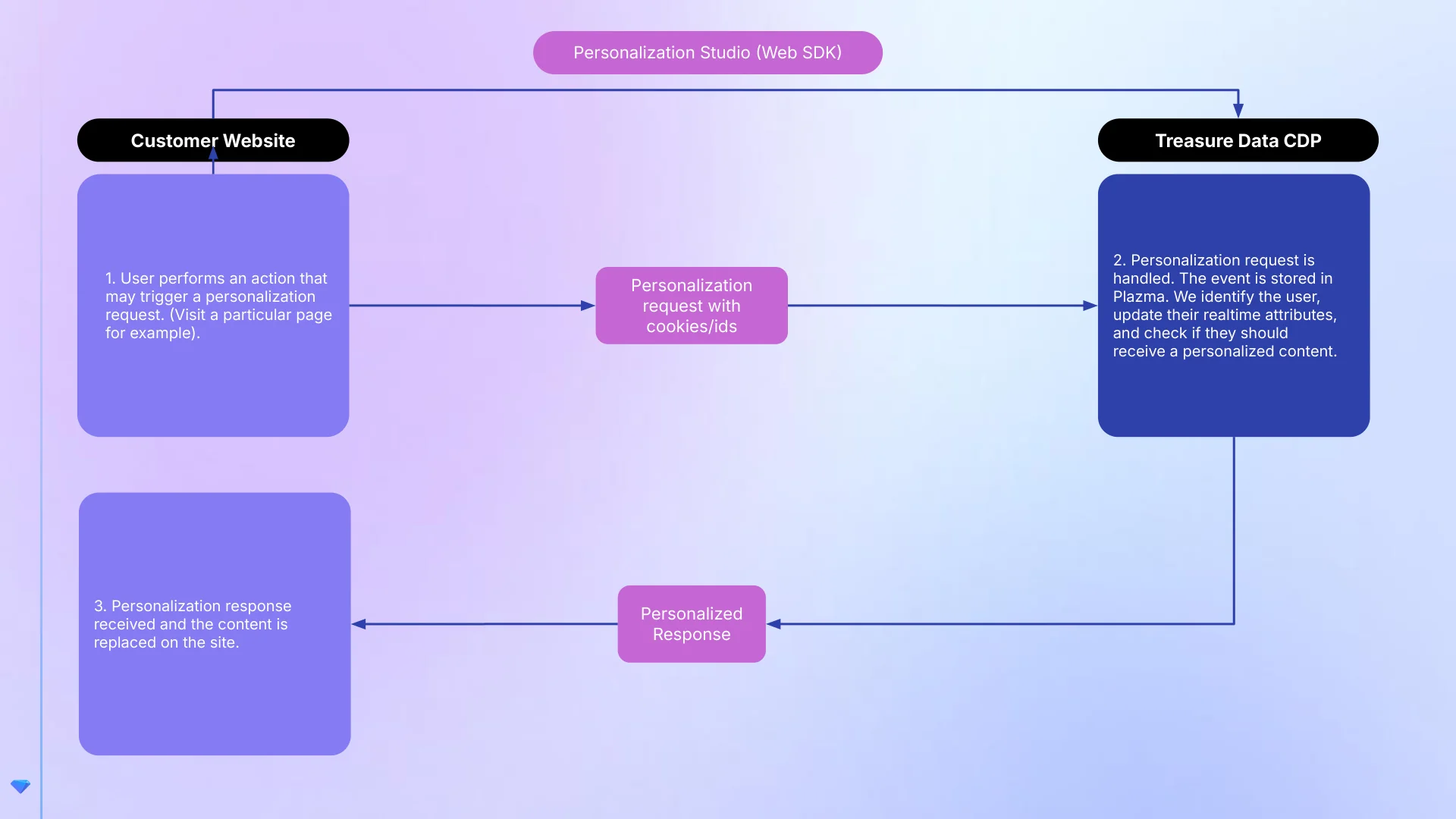
- Visitor triggers a personalization request — a visitor performs an action on your website (for example, visiting a page with a personalized content spot).
- Request sent to the CDP — the Web SDK sends a personalization request with cookies and visitor identifiers. The CDP stores the event, identifies the user profile, updates real-time attributes, and evaluates whether the visitor qualifies for personalized content.
- Personalized response returned — the CDP returns the matching creative asset, and the Web SDK replaces the content spot's DOM element on the page.
This example illustrates an end-to-end personalization scenario for a retail website:
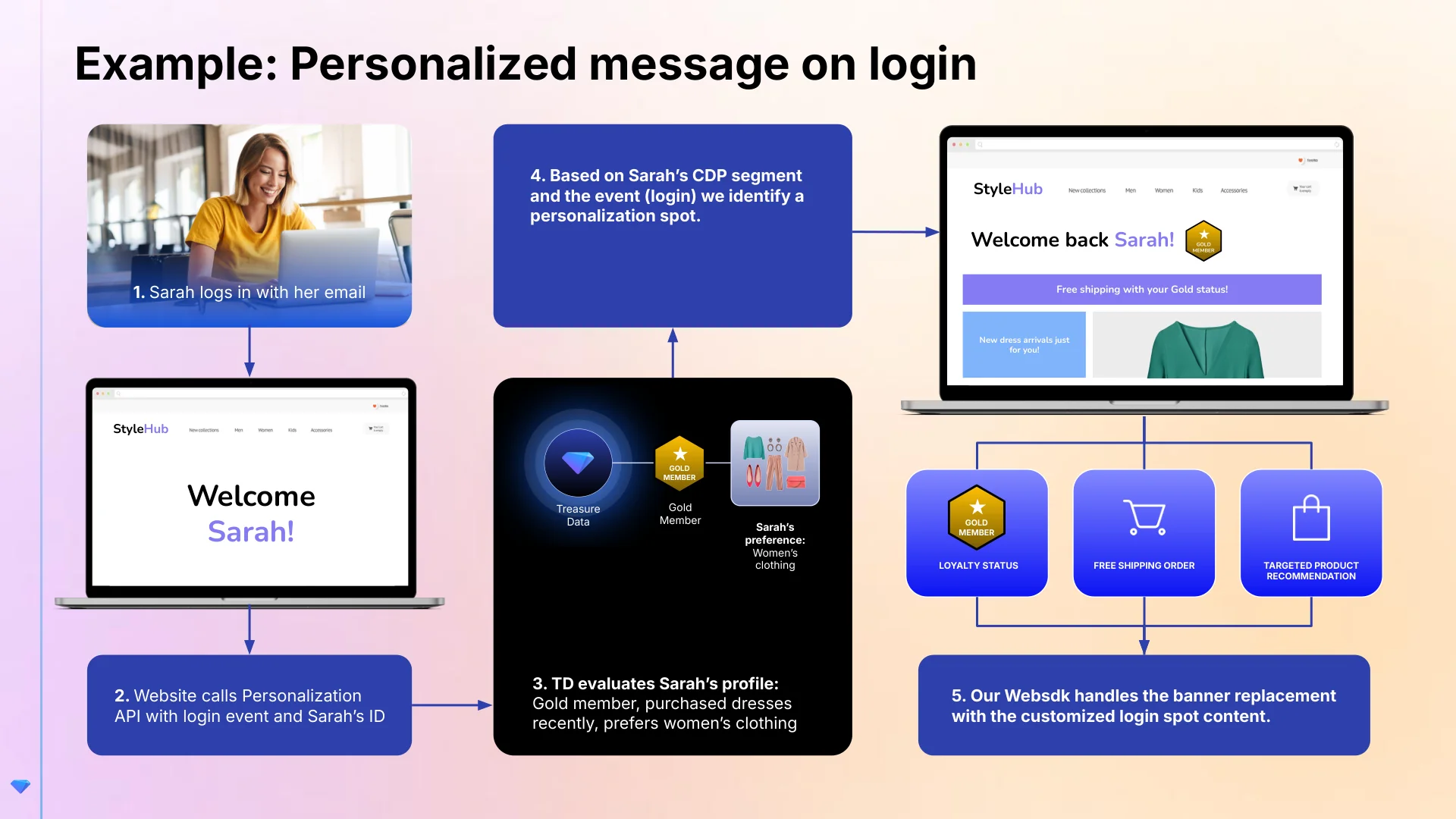
- Sarah logs in with her email on the website.
- Website calls the Personalization API — the Web SDK sends a personalization request with Sarah's login event and identity.
- The CDP evaluates Sarah's profile — the system identifies Sarah as a Gold loyalty member who recently purchased dresses and prefers women's clothing.
- Personalization spot identified — based on Sarah's audience and the login event, the system selects the matching creative assets.
- Web SDK renders personalized content — the homepage hero banner is replaced with a personalized version showing a "Welcome back Sarah!" greeting, a "Free shipping with your Gold status!" promotion, and targeted product recommendations.
| Industry | Example Use Case |
|---|---|
| Retail & E-commerce | Show loyalty members early access to sales. Display "Welcome back" offers to returning shoppers. Personalize product recommendations by browsing history. |
| Automotive | Surface trade-in offers to owners of older models. Promote test drive CTAs to visitors researching specific vehicles. Tailor financing options by credit tier. |
| Healthcare | Guide patients to relevant care resources by condition. Promote open enrollment reminders to eligible members. Personalize wellness content by age group. |
| Financial Services | Highlight premium card offers to high-spend customers. Show retirement planning content to age-appropriate segments. Personalize loan rate CTAs by pre-qualification status. |
| Travel & Hospitality | Promote loyalty tier upgrades to frequent travelers. Display destination deals based on past bookings. Show "complete your trip" CTAs to cart abandoners. |
| Media & Entertainment | Upsell premium subscriptions to engaged free-tier users. Recommend content by viewing history. Personalize event promotions by location. |
To start using Personalization Studio, complete the initial setup steps, then create your first campaign.
Getting Started
Set up your Parent Segment, configure permissions, install the Web SDK, and register your first website pages.
Pages & Content Spots
Register website pages and define content spots using the Visual Selector.
Creating Campaigns
Walk through the 4-step campaign wizard to build, preview, and launch personalization campaigns.