This integration exports data from Treasure AI directly to Batch, a customer engagement platform (CEP) for omnichannel campaigns across mobile push, web push, in-app messaging, email, and SMS. It is one connector with two targets: set target: Profile (default) to update Batch profiles through the Profile Mass Update API, or target: Audience to push segment membership to a Batch Audience through the Audience API.
The integration maps each query result row to a Batch operation. Identity, native attributes, custom attributes, and events are all declared through a column-name prefix convention in your query, so no per-column configuration is needed. In Profile mode you can run Attributes sync (one row updates one profile) or Events sync (one row records one event, grouped by identifier). In Audience mode, one row maps to one audience membership entry. See Target Mapping Summary for a side-by-side comparison of the two targets.
- Basic knowledge of Treasure AI.
- Basic knowledge of Batch profiles, custom IDs, installation identities, native attributes, and events.
- A Batch REST API key.
- A Batch project key.
- A query that exposes the required identity column through the
identifier__column-name prefix:- For
target: Profile:identifier__custom_id, oridentifier__apikeytogether withidentifier__installation_id. - For
target: Audience:identifier__id.
- For
If your security policy requires IP whitelisting, you must add Treasure Data's IP addresses to your allowlist to ensure a successful connection.
Please find the complete list of static IP addresses, organized by region, at the following document
- All array-valued attributes are replace-only.
string_array__custom attributes and$topic_preferencesare always sent as the complete array. Incremental$add/$removeoperations are not supported in this version, even though the Batch API supports them. Your query must emit the full desired array. - There is no opt-out for the
batch__prefix. A column namedbatch__regionalways maps to the native$regionattribute. To send a custom attribute instead, alias the column to a name without the prefix. - The Profile Mass Update API (
target: Profile) returns an immediate acceptance or error response and does not provide an audience-style indexing token or polling flow. The Audience API (target: Audience) returns indexing tokens and supports polling; see Audience Indexing and Polling for its behavior. Do not conflate the two. - Throughput (10,000 profile updates per second) is not actively throttled client-side. Only
429responses trigger a back-off. - Column names are normalized to lower case automatically, so uppercase or mixed-case names are accepted. Names that still do not match
^[a-z0-9_]{1,30}$after lower-casing (for example, names containing hyphens or dots, or longer than 30 characters) must be aliased in the query. No runtime rename beyond case-folding is supported. - Rate-limit (
429) and server errors (5xx, network timeouts) are retried with exponential back-off.400and401responses fail fast because they indicate a payload or authentication problem. - In
Audiencemode, there is no partial-error concept: Batch reports audience errors only as a top-level HTTP status.ignore_partial_errorsdoes not apply.
In Treasure AI, you must create and configure the data connection before running your query. As part of the data connection, you provide authentication to access Batch.
- Open TD Console.
- Navigate to Integrations Hub > Catalog.
- Click the search icon on the far right of the Catalog screen and enter Batch.
- Hover over the Batch connector and select Create Authentication.
The New Authentication dialog opens.
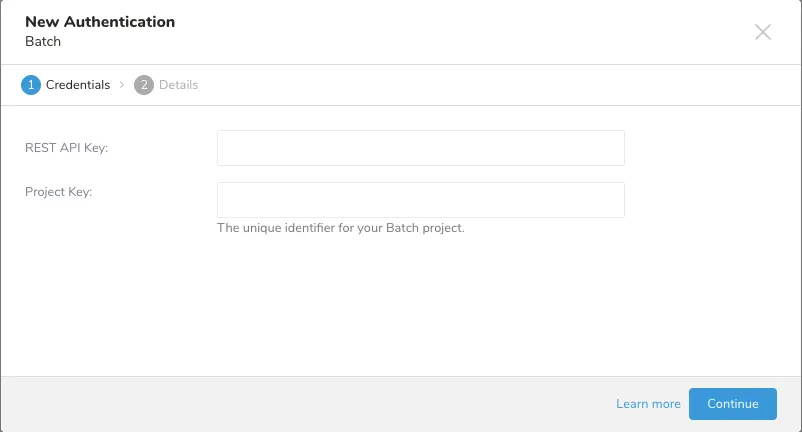
- Enter your Batch REST API Key.
- Enter your Batch Project Key.
- Enter a name for your connection.
- Select Continue.
| Parameter | Required | Description |
|---|---|---|
rest_api_key | Yes | Batch REST API key. |
project_key | Yes | Batch project key. |
To configure the integration:
- Open TD Console.
- Navigate to Data Workbench > Queries.
- Click New Query to create a query, or open a saved query that you want to export.
- At the top of the query editor, select Export Results.
- Select the Batch authentication that you created.
- Configure the export parameters.
- Column prefix detection: The integration inspects each query result column name and classifies it as an identifier (
identifier__), a native attribute (batch__), a type-prefixed custom attribute (date__,url__,string_array__,object__,array__), or a plain custom attribute (no prefix, type inferred from the Embulk column type). - Identity extraction: In
Profilemode, the integration reads theidentifier__value for each row and builds theidentifiersblock, using eithercustom_idor theinstallationform (apikey+installation_id). InAudiencemode, it readsidentifier__idand buildsids[]entries. - Attribute or event mapping: In
Attributesmode, native columns are emitted under their reserved$…wire keys and custom columns under wrapped or plain keys. InEventsmode, each row builds one event, and events are grouped by identifier into theevents[]array. InAudiencemode, each row's non-identifier columns becomeids[].attributes. - Per-row validation: The integration validates key formats, value limits, native attribute types, and the 25 kB serialized attributes size before sending.
- Batching: Operations are buffered and flushed in batches (up to
batch_size, maximum 10,000 operations per request). - Retry and response handling:
429and server errors are retried with back-off. InProfilemode, Batch'sSUCCESS_WITH_PARTIAL_ERRORSresponse is handled according toignore_partial_errors. InAudiencemode, async indexing tokens are polled according to the audience indexing settings.
The connector has a single configuration surface with conditional fields. The Applies To column shows whether a parameter is common to both targets, or specific to Profile or Audience.
| Parameter | Applies To | Required | Default | Description |
|---|---|---|---|---|
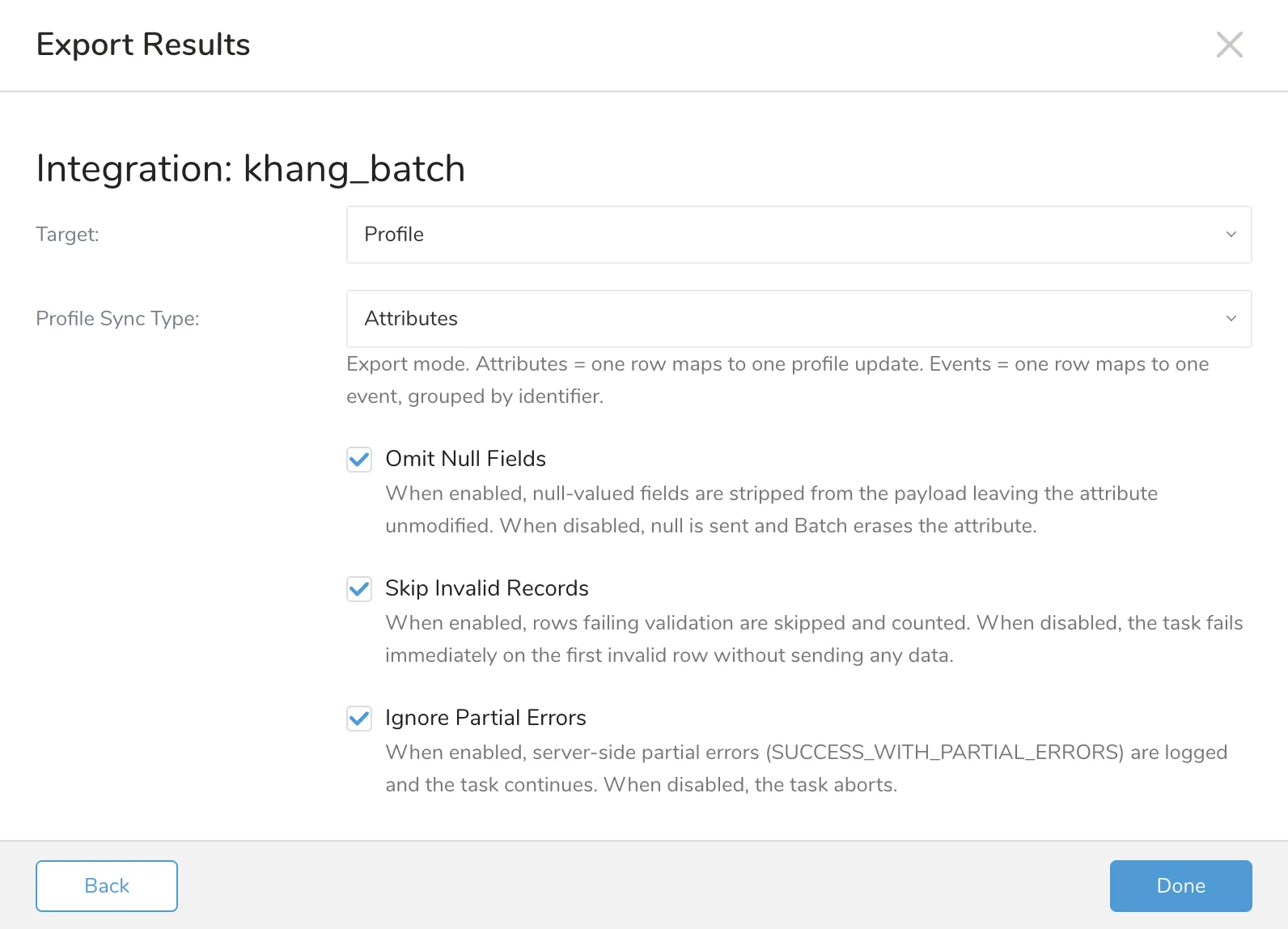
target | Common | No | Profile | Profile (Profile Mass Update API) or Audience (Audience API). Selects the API and mapping. An unknown value causes a configuration error. |
batch_size | Common | No | 10000 | Number of operations per request. Must be an integer from 1 to 10000. A value of 0 or greater than 10000 causes a configuration error. |
skip_invalid_records | Common | No | true | When true, rows that fail client-side validation are skipped, logged, and counted, and valid rows continue. When false, the task fails on the first invalid row and nothing is sent. |
omit_null_fields | Profile only | No | true | When true, null-valued fields are stripped from the payload and the attribute is left unmodified. When false, null fields are emitted as JSON null so Batch erases the attribute. Ignored when target: Audience (null attribute cells are always omitted). See Null Handling. |
profile_sync_type | Profile only | No | Attributes | Export mode. Attributes maps one row to one profile update. Events maps one row to one event, grouped by identifier. Ignored when target: Audience. |
ignore_partial_errors | Profile only | No | true | Governs Batch's server-side SUCCESS_WITH_PARTIAL_ERRORS response only. When true, per-record errors are logged and the task continues. When false, the task aborts. Ignored when target: Audience. |
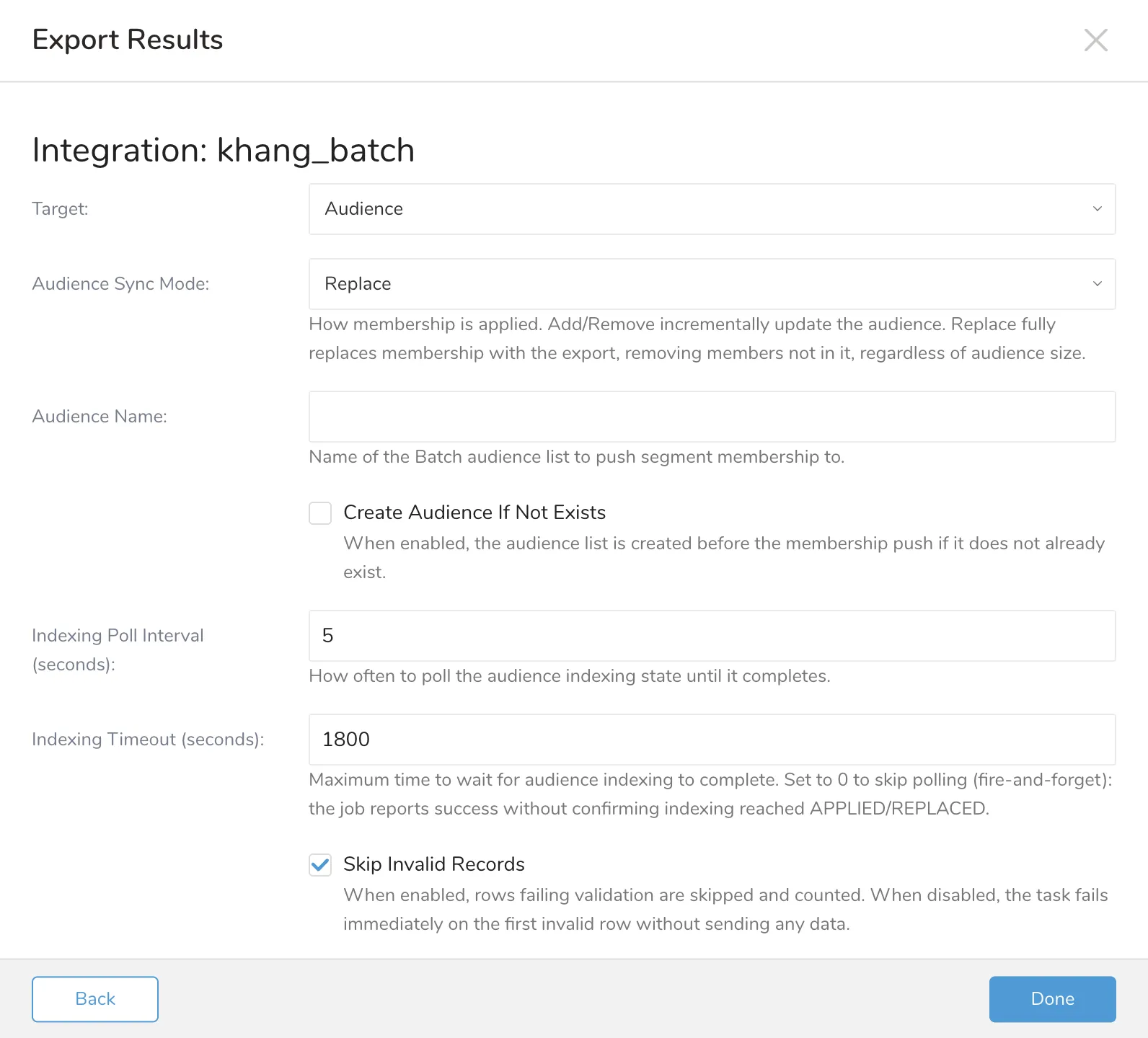
audience_name | Audience only | Yes | — | Name of the Batch audience. Must match ^[A-Za-z0-9_-]{1,255}$. |
audience_sync_mode | Audience only | No | replace | add | remove | replace. See Audience Sync Modes. |
create_audience_if_not_exists | Audience only | No | false | When true, the job creates the audience first if it doesn't exist (POST /audiences/create), then pushes membership. When false, the job fails if the audience is missing. |
audience_type | Audience only | Conditional | — | Required when create_audience_if_not_exists: true. custom_ids | emails | install_ids. Only used when creating. |
audience_display_name | Audience only | No | — | Optional display name, only used when creating. |
indexing_poll_interval_secs | Audience only | No | 5 | Seconds between GET /audiences/view polls. |
indexing_timeout_secs | Audience only | No | 1800 | Seconds to wait for indexing to complete. 0 means fire-and-forget: the job reports success immediately without confirming the membership push reached a terminal indexing state. |
Use this configuration when target is Profile.
Use this configuration when target is Audience.
Identity and attribute type are declared by column-name prefixes in the query result schema. No column configuration is needed.
Column names are matched and serialized case-insensitively. The integration lower-cases each column name before detecting its prefix and deriving the Batch wire key, so IDENTIFIER__Custom_Id, BATCH__Email_Address, and a plain LoyaltyTier are treated as identifier__custom_id, batch__email_address, and loyaltytier respectively. Custom attribute keys are therefore always sent to Batch in lower case (Batch requires them to match ^[a-z0-9_]{1,30}$). In Events mode the batch__name value is also lower-cased before it is validated and sent, so Purchase_Completed becomes purchase_completed.
| Area | Profile target | Audience target |
|---|---|---|
| Input row | One profile update (Attributes) or one event (Events). | One audience id entry. |
| Required identity | identifier__custom_id, or installation identity (identifier__apikey + identifier__installation_id). | identifier__id. |
| Custom attribute cap | 50 attributes per profile. | 15 attributes per id. |
| Sync options | profile_sync_type (Attributes | Events). | audience_sync_mode (add | remove | replace). |
| API behavior | Profile Mass Update response with success / partial errors. | Async Audience API with indexing token polling. |
The same prefix model applies to both targets, but each prefix is accepted only where it makes sense. Columns rejected for a target cause a configuration error at export time.
| Column pattern | Profile target | Audience target |
|---|---|---|
identifier__custom_id | Profile identity → identifiers.custom_id. String, 512 characters maximum. | Rejected. Use identifier__id. |
identifier__apikey + identifier__installation_id | Installation identity → identifiers.installation.apikey and identifiers.installation.installation_id. Both columns must appear together. | Rejected. Use identifier__id. |
identifier__id | Rejected. | Audience member id → ids[].id. Required; the row is rejected (per skip_invalid_records) if null or empty. |
batch__<name> | Native profile attribute (Attributes) → $<name>, or event reserved field (Events). See Profile-Specific Notes. | Rejected. Native profile attributes and events are not supported for audiences; the audience action comes from audience_sync_mode. |
date__<name> | Custom date attribute → date(<name>). Value is epoch seconds or an RFC 3339 string. | Audience attribute → attributes."date(<name>)". Same value rules. |
url__<name> | Custom URL attribute → url(<name>). Value must include a scheme (://) and be 2048 characters maximum. | Audience attribute → attributes."url(<name>)". Same value rules. |
string_array__<name> | Custom string array attribute (replace-only) → <name>. JSON array of non-empty strings, each 300 characters maximum, 25 items maximum. | Rejected. Container prefixes are not supported for audiences. |
object__<name> / array__<name> | Custom object or array attribute → <name>. The cell must be a well-formed JSON object or array string. | Rejected. Container prefixes are not supported for audiences. |
<name> (no prefix) | Custom attribute → <name>, type inferred from the Embulk column type. The key must match ^[a-z0-9_]{1,30}$. | Audience attribute → attributes.<name>, type inferred from the Embulk column type. |
In Attributes mode, the supported batch__ native attribute names are email_address, email_marketing, phone_number, sms_marketing, email_open_tracking_consent, language, timezone, region, and topic_preferences. In Events mode, the batch__ prefix instead carries the reserved event fields name (required), time, label, and tags. The native attribute set is gated by profile_sync_type: profile-native names are rejected in Events mode and event-reserved names are rejected in Attributes mode.
The connector infers Batch types for plain (no-prefix) custom attributes from the Treasure AI column type.
| Treasure AI type | Batch data type |
|---|---|
string | string |
long | number |
double | number |
boolean | boolean |
timestamp | Use date__<name> to send as a Batch date(<name>) attribute. |
Audience mode uses a single identity column, identifier__id. The Profile identifier suffixes (identifier__custom_id, identifier__apikey, identifier__installation_id) are rejected in this mode. profile_sync_type and ignore_partial_errors are also ignored — audiences have no Events mode and no partial-error semantics.
All non-identifier columns become custom attributes under ids[].attributes, capped at 15 attributes per id (vs. 50 for profiles). Only the scalar prefixes date__, url__, and plain (no-prefix) are supported; the container prefixes string_array__, object__, and array__ are not supported and cause a configuration error. Native profile attributes and events do not apply to audiences, so the batch__ prefix is unsupported in this mode — any batch__ column present is a configuration error. The action comes entirely from audience_sync_mode.
When create_audience_if_not_exists: true, the job first checks whether the audience exists and creates it (POST /audiences/create, using audience_type and the optional audience_display_name) before pushing membership. When false, the job fails if the audience is missing.
omit_null_fields does not apply in this mode: the Batch Audience API rejects null attributes, so null attribute cells are always omitted from the payload regardless of the setting.
The omit_null_fields parameter controls how null-valued cells are sent in Profile mode. It has no effect in Audience mode — the Batch Audience API rejects null attributes, so null attribute cells are always omitted regardless of this setting.
omit_null_fields | Behavior (Profile mode) |
|---|---|
true | Null-valued fields are stripped client-side; the attribute is left unmodified on the Batch profile. |
false | Null-valued fields are emitted as JSON null; Batch erases the attribute. For typed date__/url__ attributes, the plain unwrapped key is emitted for deletion. |
profile_sync_type | Behavior |
|---|---|
Attributes | One input row maps to one profile update. Native and custom attributes are written to the profile. |
Events | One input row maps to one event. Events are grouped by identifier into the events[] array. Up to 15 events accumulate per identifier before a flush. |
audience_sync_mode | Endpoint(s) | Behavior |
|---|---|---|
add | POST /audiences/update (every batch) | Adds each id to the audience, ids[].action: "add". |
remove | POST /audiences/update (every batch) | Removes each id from the audience, ids[].action: "remove". |
replace | POST /audiences/replace (batch 1) + POST /audiences/update (batch 2..N, action: "add") | Full-segment replace at any scale. The first batch wipes all existing membership (regardless of its prior size) and seeds it with batch 1; the connector polls the batch-1 replace indexing token to completion before sending any continuation add-batch, so the async wipe can't race and erase a just-added batch (see Audience Indexing and Polling). Any subsequent batch, when the segment exceeds batch_size, is sent to /audiences/update with action: "add", appending on top of batch 1. Members that dropped out of the source segment are actually removed — not just left stale — no matter how large the segment or the prior membership was. |
Audience indexing is the Batch async process that propagates a membership push (add, remove, or replace) into the live audience. Every /audiences/{update,replace,create} call is async and returns an indexing_token. After all batches are sent, the connector polls GET /audiences/view for every collected token until each reaches a terminal indexing_state (APPLIED or REPLACED) or indexing_timeout_secs elapses. In replace mode, the batch-1 replace token is additionally polled to completion before any add-continuation batch is sent, so the async wipe can't race and erase a just-added continuation batch; this barrier is skipped when indexing_timeout_secs: 0.
This example exports customer profiles with native attributes (email, language, region) and custom attributes (a signup date, a profile URL, and a loyalty tier).
SELECT
  customer_id          AS identifier__custom_id,
  email                AS batch__email_address,
  marketing_consent    AS batch__email_marketing,
  phone                AS batch__phone_number,
  preferred_language   AS batch__language,
  timezone             AS batch__timezone,
  country_code         AS batch__region,
  CAST(signup_ts AS VARCHAR) AS date__signup_date,
  profile_url          AS url__profile_url,
  loyalty_tier,
  interests            AS string_array__interests,
  preferences_json     AS object__preferences
FROM customer_profiles
WHERE TD_TIME_RANGE(time, TD_DATE_TRUNC('day', TD_SCHEDULER_TIME() - 86400, 'UTC'), NULL)
Sample query result
| identifier__custom_id | batch__email_address | batch__language | batch__region | loyalty_tier |
|---|---|---|---|---|
| abc123 | user@example.com | en | FR | gold |
| def456 | jane@example.com | fr | fr | silver |
This produces one POST /2.11/profiles/mass-update request. Each row becomes one operation with an identifiers.custom_id block and an attributes object using the $email_address, $language, $region, date(signup_date), url(profile_url), and loyalty_tier wire keys. The batch__region value fr is normalized to FR.
Required configuration
| Parameter | Value |
|---|---|
target | Profile |
profile_sync_type | Attributes |
skip_invalid_records | true |
omit_null_fields | true |
This example records one purchase event per row in Events mode. The batch__name column is required; events are grouped under each identifier.
SELECT
  customer_id          AS identifier__custom_id,
  'purchase'           AS batch__name,
  CAST(purchased_at AS VARCHAR) AS batch__time,
  product_category     AS category,
  order_amount         AS amount
FROM purchases
WHERE TD_TIME_RANGE(time, TD_DATE_TRUNC('day', TD_SCHEDULER_TIME() - 86400, 'UTC'), NULL)
Sample query result
| identifier__custom_id | batch__name | batch__time | category | amount |
|---|---|---|---|---|
| abc123 | purchase | 2026-06-21T10:00:00Z | electronics | 299 |
| abc123 | purchase | 2026-06-21T14:30:00Z | books | 42 |
Both rows share custom_id abc123, so they are grouped into a single operation with two entries in the events[] array. The category and amount columns become event attributes under events[].attributes.
Required configuration
| Parameter | Value |
|---|---|
target | Profile |
profile_sync_type | Events |
skip_invalid_records | true |
Batch enforces a 24-hour recency window on batch__time server-side: an event can be at most 24 hours old and cannot be in the future. For scheduled syncs, ensure event timestamps fall within the last 24 hours of the connector run time, not the data's logical day. Omit batch__time to let Batch stamp the request arrival time instead.
This example pushes Treasure AI segment membership to a Batch Audience instead of updating profiles. For the mapping, sync modes, and indexing behavior, see Audience-Specific Notes, Audience Sync Modes, and Audience Indexing and Polling.
SELECT
  customer_id       AS identifier__id,
  CAST(signup_ts AS VARCHAR) AS date__signup_date,
  loyalty_tier
FROM customers
WHERE segment = 'vip'
Sample query result
| identifier__id | date__signup_date | loyalty_tier |
|---|---|---|
| abc123 | 2024-01-01T00:00:00Z | gold |
| def456 | 2024-02-15T00:00:00Z | silver |
This produces one POST /2.11/audiences/replace request (or, for larger segments spanning multiple batches, one /audiences/replace request followed by one or more /audiences/update requests). Each row becomes one ids[] entry: {"id": "abc123", "attributes": {"date(signup_date)": "2024-01-01T00:00:00Z", "loyalty_tier": "gold"}}.
Required configuration
| Parameter | Value |
|---|---|
target | Audience |
audience_name | vip_customers |
audience_sync_mode | replace |
create_audience_if_not_exists | true |
audience_type | custom_ids |
skip_invalid_records | true |
You can use Scheduled Jobs with Result Export to periodically write the output result to Batch.
Treasure AI's scheduler feature supports periodic query execution to achieve high availability.
You can use Scheduled Jobs with Result Export to periodically write the output result to a target destination that you specify.
Treasure Data's scheduler feature supports periodic query execution to achieve high availability.
When two specifications provide conflicting schedule specifications, the specification requesting to execute more often is followed while the other schedule specification is ignored.
For example, if the cron schedule is '0 0 1 * 1', then the 'day of month' specification and 'day of week' are discordant because the former specification requires it to run every first day of each month at midnight (00:00), while the latter specification requires it to run every Monday at midnight (00:00). The latter specification is followed.
Navigate to Data Workbench > Queries
Create a new query or select an existing query.
Next to Schedule, select None.
In the drop-down, select one of the following schedule options:
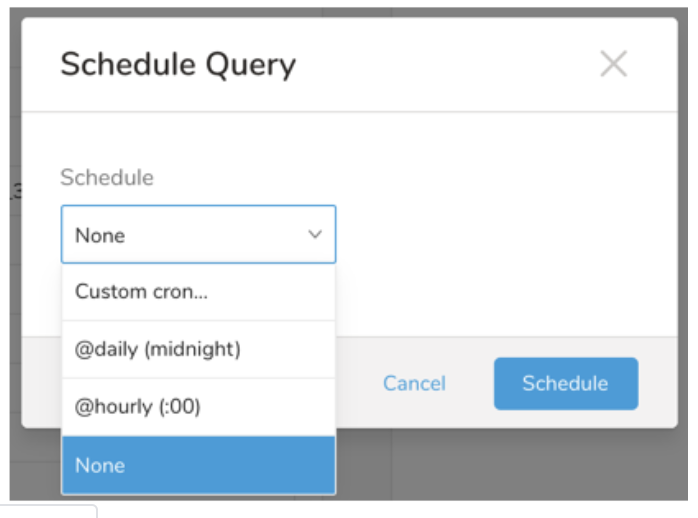
Drop-down Value Description Custom cron... Review Custom cron... details. @daily (midnight) Run once a day at midnight (00:00 am) in the specified time zone. @hourly (:00) Run every hour at 00 minutes. None No schedule.
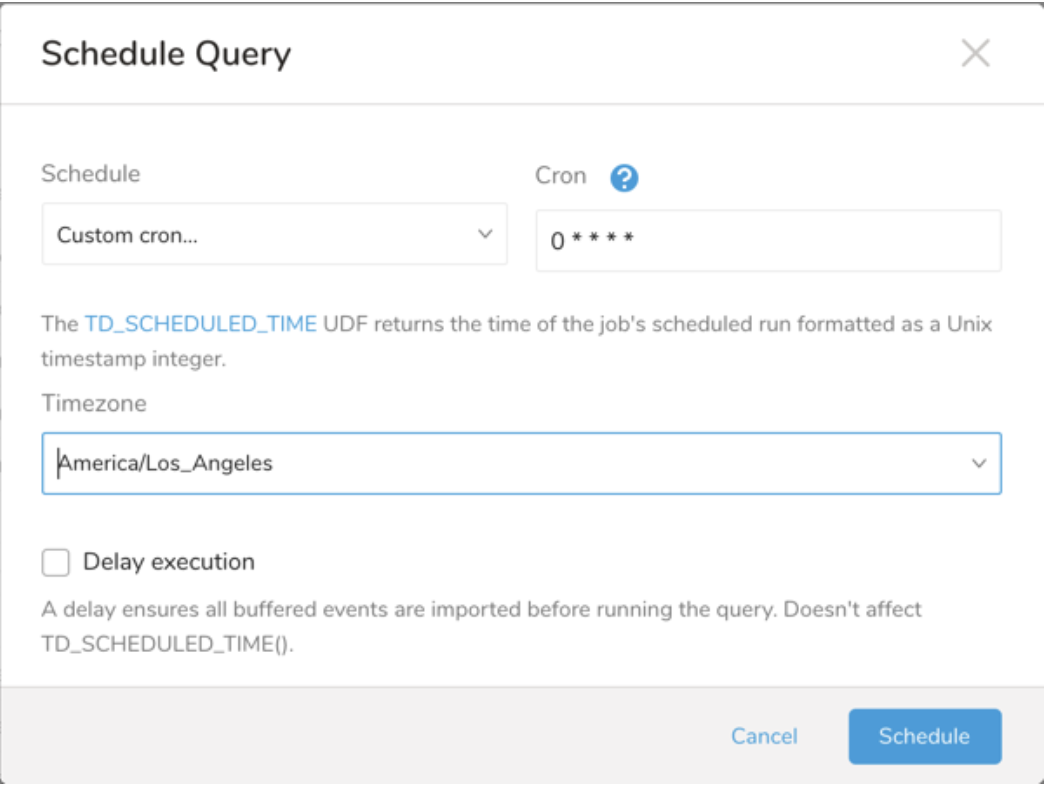
| Cron Value | Description |
|---|---|
0 * * * * | Run once an hour. |
0 0 * * * | Run once a day at midnight. |
0 0 1 * * | Run once a month at midnight on the morning of the first day of the month. |
| "" | Create a job that has no scheduled run time. |
 *    *    *    *    *
 -    -    -    -    -
 |    |    |    |    |
 |    |    |    |    +----- day of week (0 - 6) (Sunday=0)
 |    |    |    +---------- month (1 - 12)
 |    |    +--------------- day of month (1 - 31)
 |    +-------------------- hour (0 - 23)
 +------------------------- min (0 - 59)
The following named entries can be used:
- Day of Week: sun, mon, tue, wed, thu, fri, sat.
- Month: jan, feb, mar, apr, may, jun, jul, aug, sep, oct, nov, dec.
A single space is required between each field. The values for each field can be composed of:
| Field Value | Example | Example Description |
|---|---|---|
| A single value, within the limits displayed above for each field. | ||
A wildcard '*' to indicate no restriction based on the field. | '0 0 1 * *' | Configures the schedule to run at midnight (00:00) on the first day of each month. |
A range '2-5', indicating the range of accepted values for the field. | '0 0 1-10 * *' | Configures the schedule to run at midnight (00:00) on the first 10 days of each month. |
A list of comma-separated values '2,3,4,5', indicating the list of accepted values for the field. | '0 0 1,11,21 * *' | Configures the schedule to run at midnight (00:00) every 1st, 11th, and 21st day of each month. |
A periodicity indicator '*/5' to express how often based on the field's valid range of values a schedule is allowed to run. | '30 */2 1 * *' | Configures the schedule to run on the 1st of every month, every 2 hours starting at 00:30. '0 0 */5 * *' configures the schedule to run at midnight (00:00) every 5 days starting on the 5th of each month. |
A comma-separated list of any of the above except the '*' wildcard is also supported '2,*/5,8-10'. | '0 0 5,*/10,25 * *' | Configures the schedule to run at midnight (00:00) every 5th, 10th, 20th, and 25th day of each month. |
- (Optional) You can delay the start time of a query by enabling the Delay execution.
Save the query with a name and run, or just run the query. Upon successful completion of the query, the query result is automatically exported to the specified destination.
Scheduled jobs that continuously fail due to configuration errors may be disabled on the system side after several notifications.
(Optional) You can delay the start time of a query by enabling the Delay execution.
You can also send segment data to the target platform by creating an activation in the Audience Studio.
- Navigate to Audience Studio.
- Select a parent segment.
- Open the target segment, right-mouse click, and then select Create Activation.
- In the Details panel, enter an Activation name and configure the activation according to the previous section on Configuration Parameters.
- Customize the activation output in the Output Mapping panel.
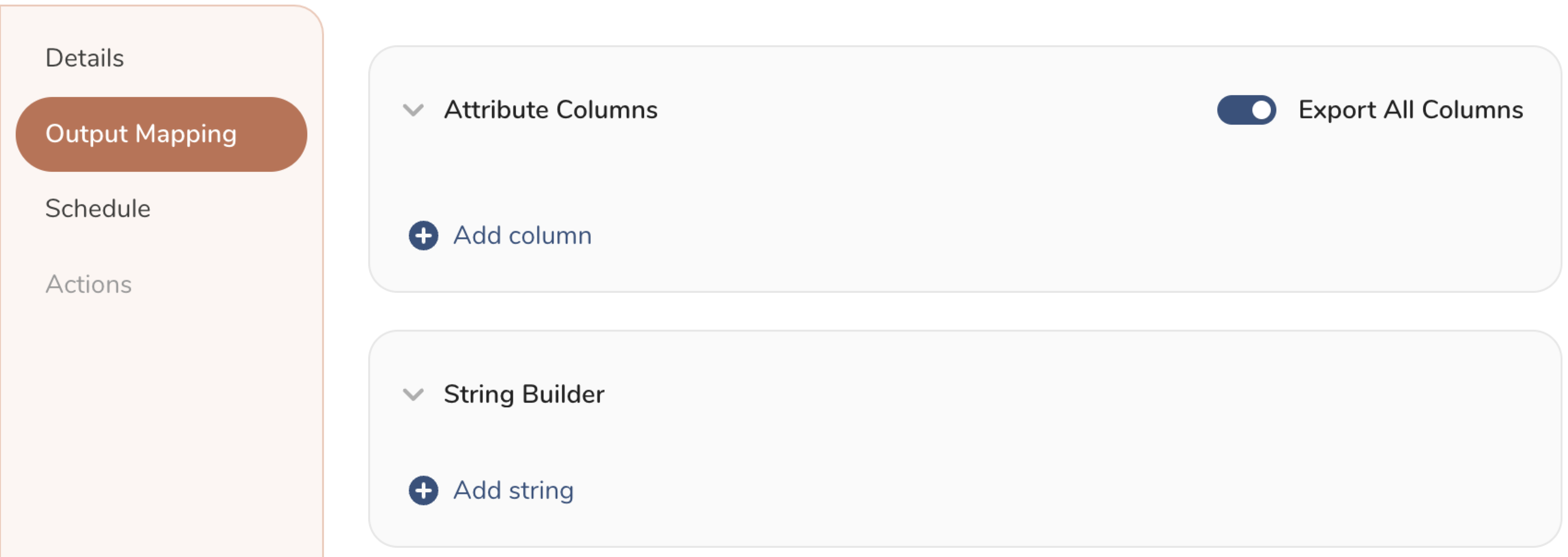
- Attribute Columns
- Select Export All Columns to export all columns without making any changes.
- Select + Add Columns to add specific columns for the export. The Output Column Name pre-populates with the same Source column name. You can update the Output Column Name. Continue to select + Add Columnsto add new columns for your activation output.
- String Builder
- + Add string to create strings for export. Select from the following values:
- String: Choose any value; use text to create a custom value.
- Timestamp: The date and time of the export.
- Segment Id: The segment ID number.
- Segment Name: The segment name.
- Audience Id: The parent segment number.
- + Add string to create strings for export. Select from the following values:
- Set a Schedule.
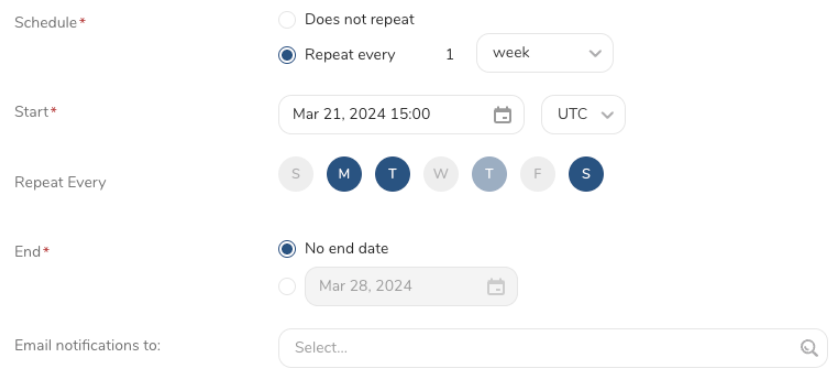
- Select the values to define your schedule and optionally include email notifications.
- Select Create.
If you need to create an activation for a batch journey, review Creating a Batch Journey Activation.
Within Treasure Workflow, you can specify the use of a data connector to export data.
Learn more at Using Workflows to Export Data with the TD Toolbelt.
Sample Workflow Configuration
timezone: UTC

_export:
  td:
    database: sample_datasets

+td-result-into-batch:
  td>: queries/batch_export.sql
  result_connection: batch
  result_settings:
    target: Profile
    profile_sync_type: Attributes
    batch_size: 10000
    skip_invalid_records: true
    ignore_partial_errors: true
omit_null_fields: true| Error or symptom | Cause | Solution |
|---|---|---|
Authentication fails with 401. | The rest_api_key or project_key is incorrect, or the credentials do not have access to the project. | Verify the REST API key and project key in the Batch console under Settings. |
The export fails at configuration time with "unknown Batch native attribute" (target: Profile). | A batch__ column uses a suffix that is not a supported native attribute, or it is used in the wrong mode (for example, a profile-native name in Events mode). | Check the supported native attribute names and confirm they match profile_sync_type. Incremental forms such as batch__topic_preferences__add are not supported. |
The export fails because no identity column is present (target: Profile). | The query has no identifier__custom_id and no installation columns, or it includes both identity forms. | Provide exactly one identity form: identifier__custom_id, or identifier__apikey together with identifier__installation_id. |
The export fails because the identity column is wrong (target: Audience). | The query has no identifier__id column, or it uses a Profile identifier suffix (identifier__custom_id, identifier__apikey, identifier__installation_id), or it includes a batch__ or container-prefixed (string_array__/object__/array__) column, which are not allowed in Audience mode. | Provide exactly one identifier__id column, and use only date__, url__, or plain custom attribute columns. |
| The export fails with a custom key error. | A custom attribute column name does not match ^[a-z0-9_]{1,30}$ even after lower-casing (for example, it contains hyphens or dots, or is longer than 30 characters). Uppercase alone does not cause this error, because names are lower-cased automatically. | Alias the column in the query to a name that uses only lowercase letters, digits, and underscores, 30 characters or fewer. |
| Rows are skipped. | A row fails client-side validation (for example, an invalid email format or an attributes object larger than 25 kB) and skip_invalid_records is true. | Review the job logs for the row index, column, and rule, then correct the source data. Set skip_invalid_records to false to fail the export instead of skipping rows. |
| The export is rate limited. | Batch returned 429 Too Many Requests. | No action is required. The connector waits at least 5 seconds and retries automatically. |
Batch returns SUCCESS_WITH_PARTIAL_ERRORS (target: Profile). | Batch accepted the request but rejected some records. | Review the per-record diagnostics (bulk index, category, attribute, reason) in the job logs and correct the source data. Set ignore_partial_errors to false to fail the export when partial errors occur. |
The export job fails because the audience is missing (target: Audience). | create_audience_if_not_exists is false and no audience with the given audience_name exists yet in Batch. | Set create_audience_if_not_exists to true to have the job create the audience automatically, or create the audience in Batch first. |
The export fails with "indexing did not complete within N s" (target: Audience). | Batch's async indexing took longer than indexing_timeout_secs to reach APPLIED/REPLACED. | Increase indexing_timeout_secs, or set it to 0 to report success without waiting for indexing to be confirmed. |