Audiences in Personalization Studio are reusable subsets of profiles that you can target across all your personalization campaigns. You create audiences by importing existing batch segments from Audience Studio. All audiences are stored under a single Parent Segment, which serves as the foundation for all audience targeting.
| Term | Where It Lives | Description |
|---|---|---|
| Audience | Personalization Studio | A reusable subset of profiles imported from a batch segment for use in personalization campaigns. |
| Segment | Audience Studio | A reusable subset of profiles defined by batch attribute and behavior rules in Audience Studio. |
To create an audience, you import an existing batch segment from Audience Studio:
- Navigate to Audiences in Personalization Studio.
- Click Create Audience.
- Enter a Name for the audience (for example, "Gold Loyalty Members").
- Enter an optional Description.
- Select a Batch Segment from the dropdown — this lists all available segments from Audience Studio.
- Click Save.
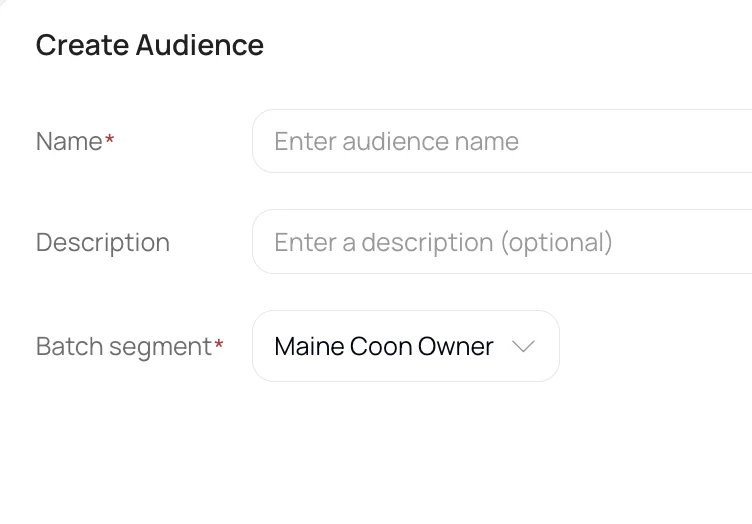
The audience is now reusable across all personalization campaigns.
| Audience Name | Based on Segment |
|---|---|
| New Visitors | Profiles with visit_count = 1 |
| Gold Loyalty Members | Profiles with loyalty_tier = "Gold" and active = true |
| High-Value Shoppers | Profiles with total_spend > 500 and order_count > 3 |
| Cart Abandoners (7-day) | Profiles with cart_abandoned = true and days_since_cart < 7 |
When a visitor's profile matches multiple audiences for the same content spot within a campaign, only the highest-priority audience's creative is shown.
To set audience priority:
- In the campaign wizard (Step 2: Events & Audiences), view the audience list for a content spot.
- Drag and drop audiences to reorder them — audiences higher in the list have higher priority.
Example: A visitor who is both a "Gold Member" and a "Cart Abandoner" sees whichever audience ranks higher in the priority list.
If campaigns target different content spots, a visitor can only see personalized content from the most recently updated campaign.
- Audiences are reusable — create once, use across multiple campaigns.
- Audiences can be added to or removed from campaigns at any time while the campaign is in Draft status.
- If audiences are updated for a launched campaign, the campaign has be re-launched.
- Deleting an audience that is referenced by active campaigns is blocked by the system.