Turn hours of manual Treasure AI console work into minutes of AI-assisted conversation. Treasure AI Studio lets you query data, build audiences, orchestrate journeys, and generate production-ready reports — all from a single chat interface across Web, Desktop, and Mobile.
Studio's AI operates inside a secure, server-side sandbox connected to your Treasure AI account. Every action — query execution, segment creation, file generation — is visible in real time so you stay in control.
- A Treasure AI account
- AI Credits provisioned for your account
- A modern browser (Web), macOS or Windows (Desktop), or iOS 18.0 or later / Android 7.0 or later (Mobile)
Treasure AI Studio is available on three platforms. Choose the one that fits your workflow — all share the same AI capabilities and connect to the same Treasure AI account.
| Platform | Environment | Requirements | Key Characteristics |
| Web |
| Instant access from any machine. Full feature set including query execution, file viewers, and charts | |
| Desktop | Download for macOS or Windows | macOS (Intel or Apple Silicon), or Windows | Same features as Web with native desktop integration. Auto-updates and offline session resumption |
| Mobile | iOS 18.0 or later (iPhone and iPad), or Android 7.0 or later | Chat and file management on the go. Voice input for hands-free interaction. Charts are viewable via the HTML file viewer. Markdown tables in AI responses render as tables |
See Getting Started for installation and sign-in instructions for each platform.
Query your data without writing SQL. Describe what you want in plain English. Studio writes the query, executes it against your Treasure AI account, and renders results as interactive tables. Every generated query is visible in its tool call, so you can inspect the exact SQL or just read the summarized results.
Build CDP resources through conversation. "Create a segment of users who purchased in the last 30 days but haven't opened an email in 90." Studio creates the segment definition, validates it, and pushes it to your account. Same for journeys, activations, and workflows.
Power through tedious tasks. Explore segment definitions, compare journey configurations, and generate ad-hoc reports from query results — the kind of work that takes hours of clicking through the console.
Stay in control. Watch every step in real time — queries executing, APIs called, files written. Everything is transparent and reviewable.
The chat interface is where everything happens. Ask a question, give an instruction, or describe what you want — Studio streams the AI's response in real time so you can see it think and act.
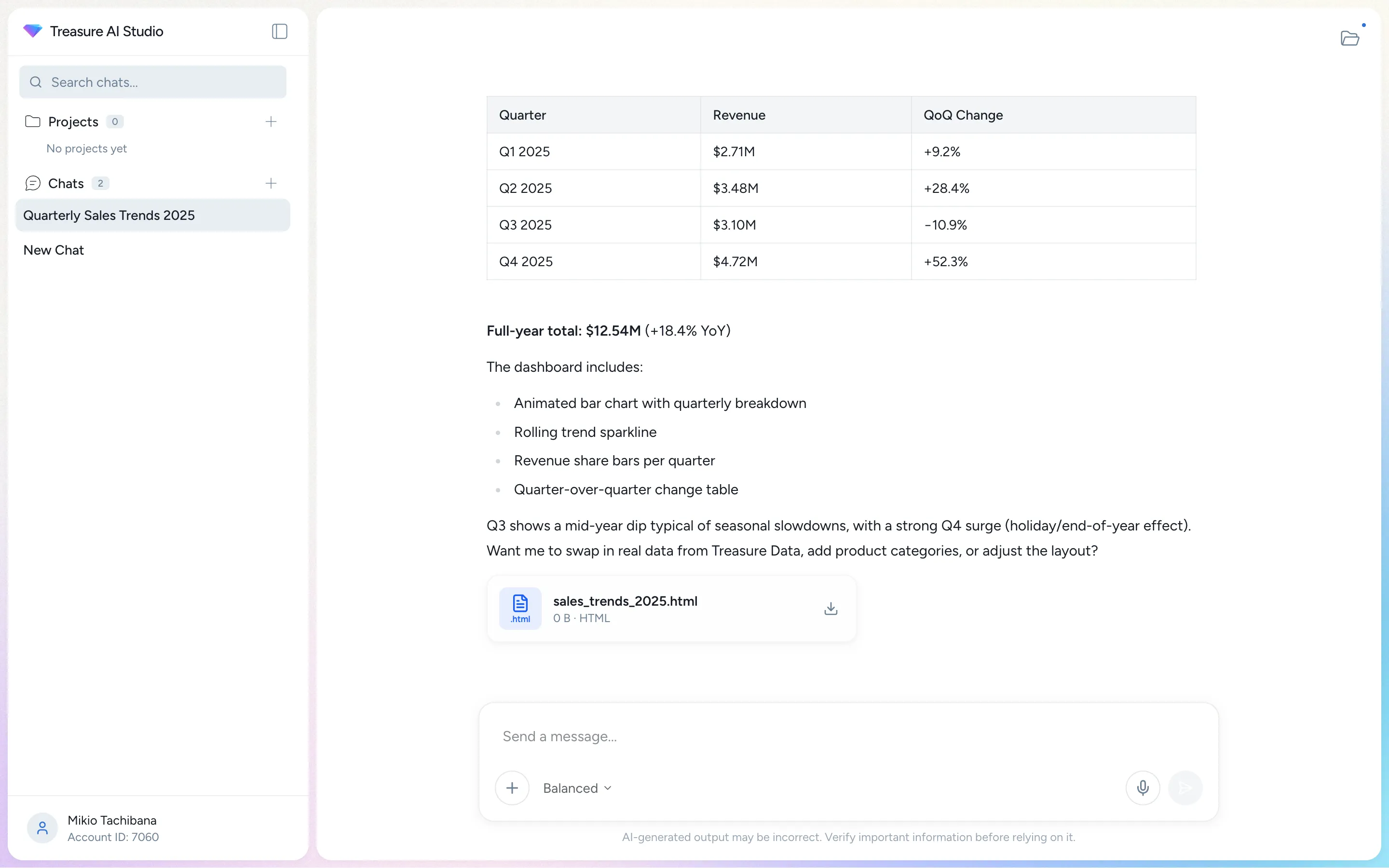
What makes it powerful:
- Real-time streaming — Responses stream in as the AI works, with a "Thinking" indicator while the model processes your request.
- Tool calls in real time — Watch the AI execute queries, read files, and call APIs. Every tool call is visible and expandable.
- In-session memory — The AI remembers context within your current session, so you can build on previous questions without repeating yourself.
- Auto-compact — Long conversations don't hit a wall. When the context window fills up, Studio automatically summarizes earlier messages so the conversation continues seamlessly.
Learn more: Chat Overview | AI Chat Interface | Chat Sessions & Limits | Chat History | In-Session Memory
When the AI generates something visual — a chart, a table, a code file, a document — it opens in the viewer panel alongside the chat.
| Type | Examples |
|---|---|
| Spreadsheet | Query results, user lists, segment previews |
| Document | Word documents, analysis reports, documentation drafts |
| Presentation | PowerPoint slide decks with speaker notes |
| Image | Charts, visualizations, generated graphics |
| Code | SQL queries, YAML configs, workflow definitions |
| YAML | Journey definitions, segment configs, workflow files |
Every one of these opens in a built-in viewer, and you can download any of them. Interactivity belongs to the file, not to Studio: an HTML chart the AI writes behaves however that file was written, while the viewers themselves are read-only.
Learn more: AI-Generated Files | Files & Artifacts
Studio renders a Journey Orchestration definition as a flow diagram, so you can read a journey the AI just wrote — its entry criteria, decision points, segment rules, and activation steps — before anything reaches your account. It is a read-only view of the file, not the live journey: the profile counts a launched journey reports stay in the Treasure AI console.
The viewer is selected by the file name, which has to end in .journey.yaml or .journey.yml. The AI does not always apply that suffix, and a journey saved as a plain .yaml file opens as source code instead — ask the AI to rename it.
Learn more: Journey Viewer | tdx journey
Every time you start a new analysis or workflow, you end up re-explaining context: which database, which segment, what conventions to follow. Work folders eliminate that.
A work folder is a saved workspace that carries persistent instructions into every new chat you start inside it:
- Name — Identifies the work folder in the sidebar and in the destination picker. You can rename it at any time.
- Instructions — Custom guidance the AI follows automatically in every chat in the folder — for example, "Always use the
marketingdatabase, and summarize results for a non-technical audience." Studio saves these as aCLAUDE.mdfile inside the work folder.
Each work folder keeps its own file space, so generated and uploaded files stay grouped with the work they belong to.
One of your work folders is your default — Studio sets one up named General — and new chats are saved there. On the welcome screen, a work folder chip in the composer names that destination and lets you send the chat to a different folder instead. See Work Folders.
Work folders appear in the Work Folders section of the sidebar, with your default folder pinned at the top and marked Default. Click the plus icon next to the header to create a new work folder. Expand a work folder to browse its files in the sidebar, or click its name to open the work folder page, where you can organize files — create folders, rename, move, and delete. See Organizing Files in a Work Folder.
Open the navigation drawer and tap Work Folders to see your work folders, with your default pinned at the top and marked Default. Tap a work folder to open its page, which has Chats, Files, and Actions and Skills tabs; the Files and Actions and Skills tabs are read-only on mobile. New chats are saved in your default work folder unless you pick another one with the work folder chip above the composer. Creating and renaming work folders is done on Web and Desktop.
A work folder can also be shared with your account. A shared work folder puts one file tree in front of a team — every member reads all of it, work modes decide who writes where, and each member gets a private area of their own inside it, so the workflow itself is shared rather than copied. Sharing and importing are done on Web and Desktop. See Shared Work Folders.
Learn more: Work Folders | Shared Work Folders | Core Concepts | Agent Orchestrator
Skills are pre-built capabilities that teach the AI how to handle specialized tasks — from writing optimized SQL to building CDP segments to managing workflows. Browse and install skills from the Skills page, which organizes them into Shared, Installed, and Develop tabs. Installing a skill makes it available in all your chats.
You can also build your own. The Develop flow copies a skill's files into a work folder where you can customize them and combine them, then share the result back to a registry. Administrators can register additional GitHub-hosted marketplaces so your team can install skills from your own repositories.
See Supported Skills Catalog for the skills available out of the box.
Learn more: Skills & Marketplace | Actions | Supported Skills Catalog
Studio renders file previews directly in the viewer panel beside the chat. Files the AI generates open automatically; files you upload are listed with the rest of the work folder's files in the sidebar tree and on the work folder page — click one to open it.
| Format | Viewer |
|---|---|
| Continuously scrolling viewer with 50–300% zoom and a page counter | |
| DOCX | Word document preview via HTML rendering |
| PPTX | Every slide rendered in one vertical scrolling column |
| XLSX | Read-only table, with sheet tabs for multi-sheet workbooks |
| Images | Image scaled to fit the viewer |
| Code | Syntax highlighting for 20+ languages including JavaScript, TypeScript, Python, SQL, Go, Rust, Java, C, C++, and more |
| HTML | Sandboxed HTML rendering |
Learn more: File Viewers | Files & Artifacts
| Feature | Web | Desktop (macOS / Windows) | Mobile |
|---|---|---|---|
| Chat & AI | Yes | Yes | Yes |
| File Upload/Download | Yes | Yes | Upload only |
| File Viewers | Yes | Yes | Yes |
| Querying data | Yes | Yes | Yes |
| Skills / Marketplace | Yes | Yes | Limited |
| Charts & Visualization | Yes | Yes | View only |
| AI-Generated Files | Yes | Yes | Yes |
| Voice Input | Yes | macOS only | Yes |
On Mobile, there is no marketplace, and a work folder's actions and skills are shown read-only; skills you have enabled elsewhere still apply in your mobile chats. Files can be uploaded and previewed, but not downloaded.
- Identify which platform you will use (Web, Desktop, or Mobile)
- Understand the three main areas: Chat, Files, and Work Folders
- Navigate to the Getting Started guide for your platform
| Issue | Solution |
|---|---|
| Studio page does not load | Check your network connection and verify your Treasure AI account is active. Try a different browser (Web) or restart the app (Desktop/Mobile) |
| Features described here are not visible | Some features are platform-specific. Check the Platform Availability table above to confirm availability on your platform |
- Getting Started — Access Studio on Web, Desktop, or Mobile
- SSO Login — Sign in with your Treasure AI account
- Supported Skills Catalog — See all available skills for SQL, segments, workflows, and more
- Core Concepts — Learn how work folders, models, and credits work together
- Settings — Set your language, theme, and default model tier
- Security — Configure permissions and security settings
- Access Control — Permissions, IP allowlists, and AI feature access