The Google Data Manager for Conversions connector allows you to export conversion event data from Treasure AI directly to Google Ads. It uses the Google Data Manager API to upload Offline, Online, and Store Sales conversion events tied to conversion actions in your Google Ads account.
- Basic knowledge of Treasure AI, including the TD Toolbelt.
- A Google account with access to Google Ads.
- A Google Ads ID (operating account) with permissions to upload conversions.
- A Conversion Action ID configured in Google Ads.
- For Store Sales conversions: the Google Ads account must be on Google's allowlist.
- Each event may contain a maximum of 10
userIdentifiersentries. - Address-based
userIdentifiersrequire all four address fields for the same numeric suffix:first_name,last_name,region_code, andpostal_code. - IP address matching is not supported for users in the European Economic Area (EEA), United Kingdom (UK), or Switzerland (CH).
- For Store Sales conversions, Google removes the entire
cartDataobject if any item is missingmerchantProductIdorunitPrice. The event is still accepted without cart data. - Request status diagnostics require waiting at least 30 minutes after upload before checking, and may take up to 24 hours to finalize.
Before running your query, you must create and configure the data connection on the Treasure Console. As part of the data connection, you provide authentication to access the integration.
- Open Treasure Console.
- Navigate to Integrations Hub > Catalog.
- Search for and select Google Data Manager for Conversions. Select Create Authentication.
- Select the credentials to authenticate.
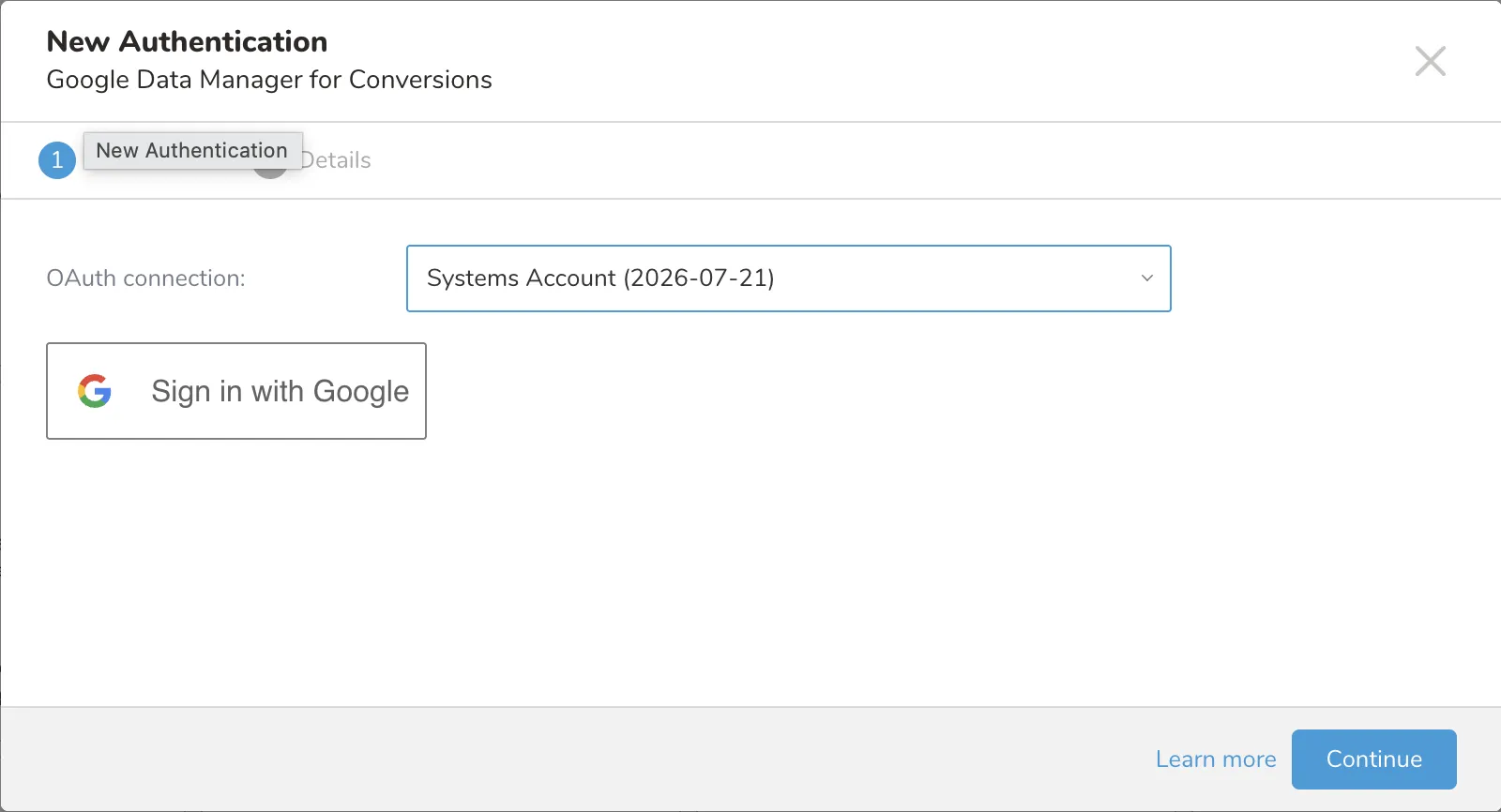
- Optionally, select Sign in with Google and log in to Google.
- Return to Integrations Hub > Catalog.
- Search for and select Google Data Manager for Conversions.
- The New Authentication dialog opens.
- Select the OAuth connection with your account name in the dropdown list.
- Select Continue.
- Name the connection.
- Select Done.
The Treasure Console supports multiple ways to export data. Complete the following steps to export data from Data Workbench.
- Navigate to Data Workbench > Queries.
- Select New Query and define your query.
- Select Export Results to configure the data export.
- Select an existing Google Data Manager for Conversions authentication or create a new one as described previously.
- Configure the export parameters.
- Select Done.
| Field | Description | Required | Default |
|---|---|---|---|
| Conversion Type | The type of conversion to upload. OFFLINE for offline conversions, ONLINE for additional online data, STORE_SALES for in-store purchase attribution. | No | OFFLINE |
| Operating Account ID | Google Ads Customer ID that receives the conversion events. Numeric value (dashes allowed, e.g., 123-456-789). | Yes | |
| Login Account ID | MCC (Manager) account ID. Only required when the credential user accesses the operating account via a Manager account. Leave empty for direct access. | No | |
| Conversion Action ID | The ID of the conversion action in Google Ads where events will be uploaded. | Yes | |
| Ad User Data Consent | Request-level consent for user data. Accepted values: CONSENT_GRANTED, CONSENT_DENIED, CONSENT_STATUS_UNSPECIFIED. | No | CONSENT_GRANTED |
| Ad Personalization Consent | Request-level consent for ad personalization. Accepted values: CONSENT_GRANTED, CONSENT_DENIED, CONSENT_STATUS_UNSPECIFIED. | No | CONSENT_GRANTED |
| Skip Invalid Records | When enabled, invalid records are skipped and the job continues. When disabled, the job stops on the first invalid record. | No | true |
| Waiting for Request Status | When enabled, the connector polls for upload request status after all events are uploaded. This blocks the job until status is resolved or times out. | No | false |
To upload conversion data to Google Ads, your export query must include a combination of required and optional columns. Column names are matched case-insensitively and whitespace is trimmed. Columns with NULL values are skipped for that record; if the column is required, the record is considered invalid.
| Specification | Description |
|---|---|
| Required Fields (All Conversion Types) | Every event must include:
|
| Required Fields (Offline) | In addition to event_timestamp:
|
| Required Fields (Online) | In addition to event_timestamp:
|
| Required Fields (Store Sales) | In addition to event_timestamp:
|
| Required Identifier (Offline / Online) | At least one identifier must be present in the schema:
|
| Address Completeness | When any address field is present for a given numeric suffix, all four address fields for that suffix must be present:
|
| Duplicate Columns | Duplicate column names are not allowed. |
| Null Value Handling | Columns with NULL values are skipped for that record. |
| PII Hashing | The following fields are normalized and SHA-256 hashed automatically if raw (unhashed) values are provided. If a value is already a 64-character hex string, it is used as-is:
|
| UserIdentifier Limit | Each event may contain a maximum of 10 userIdentifiers entries across all email, phone number, and address identifier columns. |
| Currency | Required when conversion_value is set. Must be uppercase ISO 4217 format (e.g., USD, EUR, JPY). |
| Event Timestamp | Must be in ISO 8601 format (e.g., 2024-01-15T10:30:00.000Z) or a long value representing epoch milliseconds. The connector converts epoch values to RFC 3339 format automatically. |
| Field (Column Name) | Description | Required | Data Type | Notes |
|---|---|---|---|---|
event_timestamp | The timestamp of the conversion event. | Yes (All) | String (ISO 8601) or Long (epoch ms) | Connector converts epoch to RFC 3339. |
last_updated_timestamp | The timestamp of the last update to this event. | No | String (ISO 8601) or Long (epoch ms) | Connector converts epoch to RFC 3339. |
event_source | The source of the conversion event. | Yes (Offline) | String | Values: WEB, APP, PHONE, MESSAGE, OTHER. Hardcoded to WEB for Online, IN_STORE for Store Sales. |
transaction_id | A unique identifier for the transaction. | Yes (Online, Store Sales) | String | |
conversion_value | The monetary value of the conversion. | Yes (Store Sales) | Double or Long | |
conversion_count | The number of conversions. | No | Long | |
currency | The currency code for conversion_value. | Required if conversion_value is set | String | ISO 4217 uppercase (e.g., USD). |
event_name | A custom name for the conversion event. | No | String | |
user_id | A user identifier from the advertiser's system. | No | String |
| Field (Column Name) | Description | Data Type | Notes |
|---|---|---|---|
gclid | Google Click ID. | String | |
gbraid | Google Braid ID (iOS app conversions). | String | |
wbraid | Google Wbraid ID (web-to-app conversions). | String | |
session_attributes | Session attributes from the Google tag. | String | |
mobile_device_id | Mobile advertising ID (IDFA on iOS, AdID on Android). | String | |
dclid | Display Click ID. | String | |
impression_id | Impression ID for view-through conversions. | String | |
match_id | Match ID for joining events. | String |
| Field (Column Name) | Description | Data Type |
|---|---|---|
landing_page_user_agent | User agent string of the device at landing time. | String |
landing_page_ip_address | IP address of the device at landing time. | String |
landing_page_category | Device category (e.g., desktop, tablet, mobile, smart TV). | String |
landing_page_language | Device language in ISO 639-1 format. | String |
landing_page_screen_height | Screen height in pixels. | Long |
landing_page_screen_width | Screen width in pixels. | Long |
landing_page_os | Operating system of the device. | String |
landing_page_os_version | Operating system version. | String |
landing_page_model | Device model. | String |
landing_page_brand | Device brand. | String |
landing_page_browser | Browser brand/type. | String |
landing_page_browser_version | Browser version. | String |
| Field (Column Name) | Description | Data Type | Notes |
|---|---|---|---|
ip_address | IP address of the device at event time. | String | NOT supported for EEA/UK/CH users. |
device_user_agent | User agent string of the device at event time. | String | |
device_category | Device category. | String | |
device_language | Device language (ISO 639-1). | String | |
device_os | Operating system. | String | |
device_os_version | Operating system version. | String | |
device_model | Device model. | String | |
device_brand | Device brand. | String | |
device_browser | Browser brand/type. | String | |
device_browser_version | Browser version. | String |
| Field (Column Name) | Description | Data Type | Notes |
|---|---|---|---|
store_id | Store identifier. | String | Required for Store Sales. |
location_city | City of the event location. | String | |
location_subdivision_code | ISO 3166-2 subdivision code. | String | |
location_region_code | Region/country code. | String | |
location_subcontinent_code | UN M49 subcontinent code. | String | |
location_continent_code | UN M49 continent code. | String |
These columns populate the userIdentifiers array on each event. Multiple identifiers can be provided using numeric suffixes (e.g., email, email1, email2). A record may contain at most 10 userIdentifiers entries total.
| Column Name | Data Type | Normalization and Hashing |
|---|---|---|
email, email1, email2, ... | String | Whitespace removed, converted to lowercase. Then SHA-256 hashed (hex). If already a 64-character hex string, used as-is. |
Phone Number
| Column Name | Data Type | Normalization and Hashing |
|---|---|---|
phone_number, phone_number1, phone_number2, ... | String | Must be in E.164 format (user responsibility). Then SHA-256 hashed (hex). If already a 64-character hex string, used as-is. |
Address Info (all four fields required per suffix)
| Column Name | Data Type | Normalization and Hashing |
|---|---|---|
first_name, first_name1, first_name2, ... | String | Converted to lowercase, punctuation removed, no leading or trailing whitespace. Then SHA-256 hashed. |
last_name, last_name1, last_name2, ... | String | Converted to lowercase, punctuation removed, no leading or trailing whitespace. Then SHA-256 hashed. |
region_code, region_code1, region_code2, ... | String | Not hashed. |
postal_code, postal_code1, postal_code2, ... | String | Not hashed. |
| Field (Column Name) | Description | Data Type | Notes |
|---|---|---|---|
customer_type | Customer type classification. | String | |
customer_value_bucket | Customer value tier. | String | |
additional_user_prop_name, additional_user_prop_name1, ... | Property name for additional user properties. | String | |
additional_user_prop_value, additional_user_prop_value1, ... | Property value for additional user properties. | String |
| Field (Column Name) | Description | Data Type | Notes |
|---|---|---|---|
ad_user_data_consent | Row-level consent for user data. Overrides request-level consent. | String | Values: CONSENT_GRANTED, CONSENT_DENIED, CONSENT_STATUS_UNSPECIFIED. |
ad_personalization_consent | Row-level consent for ad personalization. Overrides request-level consent. | String | Values: CONSENT_GRANTED, CONSENT_DENIED, CONSENT_STATUS_UNSPECIFIED. |
| Column Name | Description | Data Type |
|---|---|---|
custom_variable_name, custom_variable_name1, ... | Custom variable name. | String |
custom_variable_value, custom_variable_value1, ... | Custom variable value. | String |
experimental_field_name, experimental_field_name1, ... | Experimental field name. | String |
experimental_field_value, experimental_field_value1, ... | Experimental field value. | String |
additional_event_param_name, additional_event_param_name1, ... | Additional event parameter name. | String |
additional_event_param_value, additional_event_param_value1, ... | Additional event parameter value. | String |
| Column Name | Description | Data Type |
|---|---|---|
merchant_id | Merchant Center ID. | String |
merchant_feed_label | Feed label for the Merchant Center account. | String |
merchant_feed_language_code | Language of the Merchant Center feed. | String |
transaction_discount | Transaction-level discount amount. | Double or Long |
coupon_codes, coupon_codes1, ... | Coupon codes applied. | String |
cart_item_id, cart_item_id1, ... | Item identifier. | String |
cart_item_merchant_product_id, cart_item_merchant_product_id1, ... | Merchant product ID (required for Store Sales cart data). | String |
cart_item_quantity, cart_item_quantity1, ... | Quantity of item purchased. | Long |
cart_item_unit_price, cart_item_unit_price1, ... | Unit price (required for Store Sales cart data). | Double or Long |
cart_item_conversion_value, cart_item_conversion_value1, ... | Conversion value for the item. | Double or Long |
cart_item_merchant_id, cart_item_merchant_id1, ... | Item-level merchant ID | String |
cart_item_merchant_feed_label, cart_item_merchant_feed_label1, ... | Item-level feed label (overrides cart-level for Store Sales). | String |
cart_item_merchant_feed_language_code, cart_item_merchant_feed_language_code1, ... | Item-level feed language code. | String |
Offline Conversion with gclid:
SELECT
    event_timestamp,
    event_source,
    gclid,
    transaction_id,
    conversion_value,
    currency,
    email
FROM conversions_tbl
Online Conversion:
SELECT
    event_timestamp,
    transaction_id,
    gclid,
    conversion_value,
    currency
FROM online_conversions_tbl
Store Sales Conversion:
SELECT
    event_timestamp,
    transaction_id,
    conversion_value,
    currency,
    store_id,
    email,
    phone_number,
    first_name,
    last_name,
    region_code,
    postal_code,
    merchant_id,
    merchant_feed_label,
    merchant_feed_language_code,
    cart_item_merchant_product_id,
    cart_item_quantity,
    cart_item_unit_price
FROM store_sales_tblYou can use Scheduled Jobs with Result Export to periodically write the output result to a target destination that you specify.
Treasure Data's scheduler feature supports periodic query execution to achieve high availability.
When two specifications provide conflicting schedule specifications, the specification requesting to execute more often is followed while the other schedule specification is ignored.
For example, if the cron schedule is '0 0 1 * 1', then the 'day of month' specification and 'day of week' are discordant because the former specification requires it to run every first day of each month at midnight (00:00), while the latter specification requires it to run every Monday at midnight (00:00). The latter specification is followed.
Navigate to Data Workbench > Queries
Create a new query or select an existing query.
Next to Schedule, select None.

In the drop-down, select one of the following schedule options:
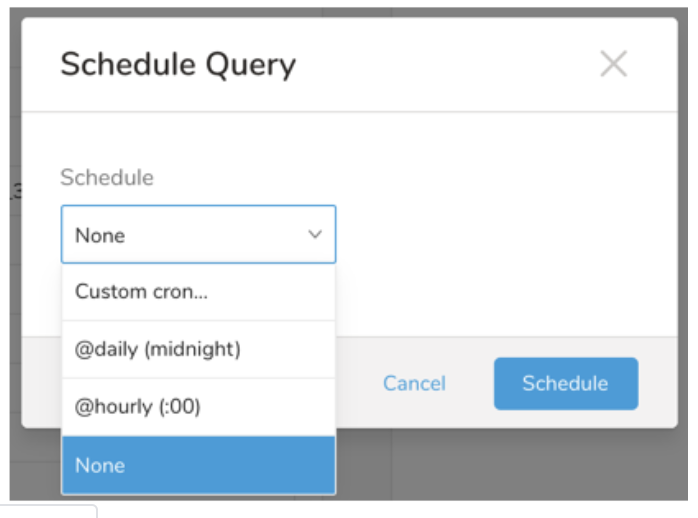
Drop-down Value Description Custom cron... Review Custom cron... details. @daily (midnight) Run once a day at midnight (00:00 am) in the specified time zone. @hourly (:00) Run every hour at 00 minutes. None No schedule.
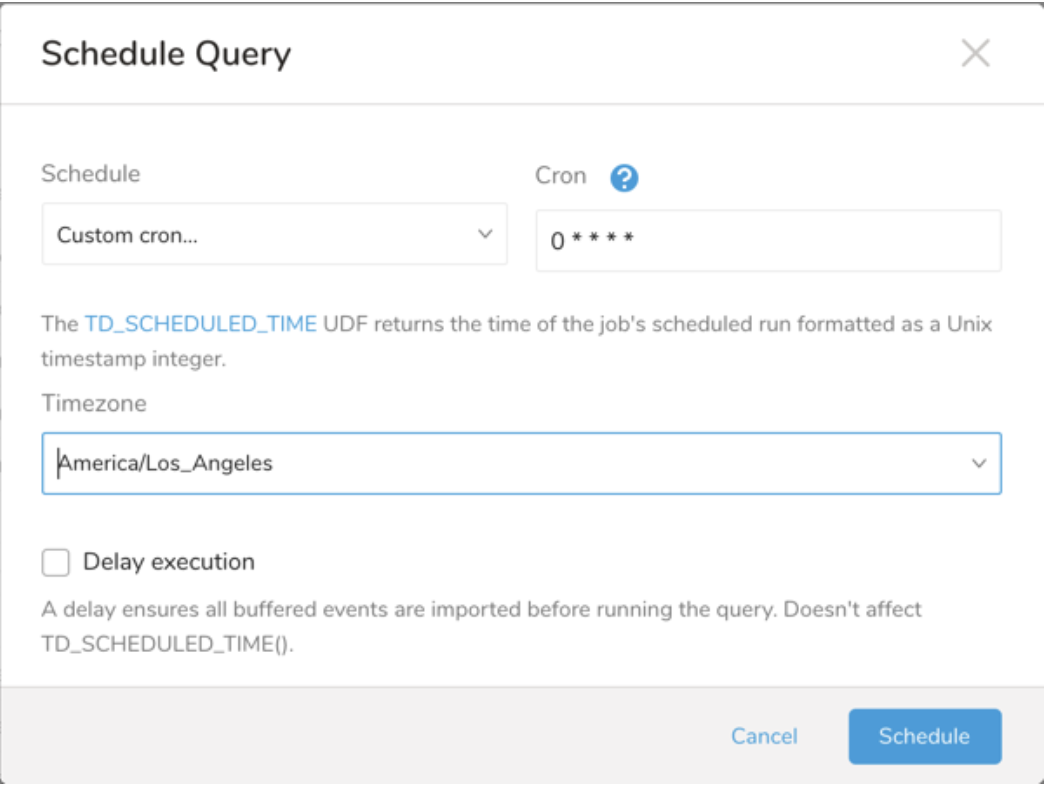
| Cron Value | Description |
|---|---|
0 * * * * | Run once an hour. |
0 0 * * * | Run once a day at midnight. |
0 0 1 * * | Run once a month at midnight on the morning of the first day of the month. |
| "" | Create a job that has no scheduled run time. |
 *    *    *    *    *
 -    -    -    -    -
 |    |    |    |    |
 |    |    |    |    +----- day of week (0 - 6) (Sunday=0)
 |    |    |    +---------- month (1 - 12)
 |    |    +--------------- day of month (1 - 31)
 |    +-------------------- hour (0 - 23)
 +------------------------- min (0 - 59)
The following named entries can be used:
- Day of Week: sun, mon, tue, wed, thu, fri, sat.
- Month: jan, feb, mar, apr, may, jun, jul, aug, sep, oct, nov, dec.
A single space is required between each field. The values for each field can be composed of:
| Field Value | Example | Example Description |
|---|---|---|
| A single value, within the limits displayed above for each field. | ||
A wildcard '*' to indicate no restriction based on the field. | '0 0 1 * *' | Configures the schedule to run at midnight (00:00) on the first day of each month. |
A range '2-5', indicating the range of accepted values for the field. | '0 0 1-10 * *' | Configures the schedule to run at midnight (00:00) on the first 10 days of each month. |
A list of comma-separated values '2,3,4,5', indicating the list of accepted values for the field. | '0 0 1,11,21 * *' | Configures the schedule to run at midnight (00:00) every 1st, 11th, and 21st day of each month. |
A periodicity indicator '*/5' to express how often based on the field's valid range of values a schedule is allowed to run. | '30 */2 1 * *' | Configures the schedule to run on the 1st of every month, every 2 hours starting at 00:30. '0 0 */5 * *' configures the schedule to run at midnight (00:00) every 5 days starting on the 5th of each month. |
A comma-separated list of any of the above except the '*' wildcard is also supported '2,*/5,8-10'. | '0 0 5,*/10,25 * *' | Configures the schedule to run at midnight (00:00) every 5th, 10th, 20th, and 25th day of each month. |
- (Optional) You can delay the start time of a query by enabling the Delay execution.
Save the query with a name and run, or just run the query. Upon successful completion of the query, the query result is automatically exported to the specified destination.
Scheduled jobs that continuously fail due to configuration errors may be disabled on the system side after several notifications.
(Optional) You can delay the start time of a query by enabling the Delay execution.
You can also send segment data to the target platform by creating an activation in the Audience Studio.
- Navigate to Audience Studio.
- Select a parent segment.
- Open the target segment, right-mouse click, and then select Create Activation.
- In the Details panel, enter an Activation name and configure the activation according to the previous section on Configuration Parameters.
- Customize the activation output in the Output Mapping panel.
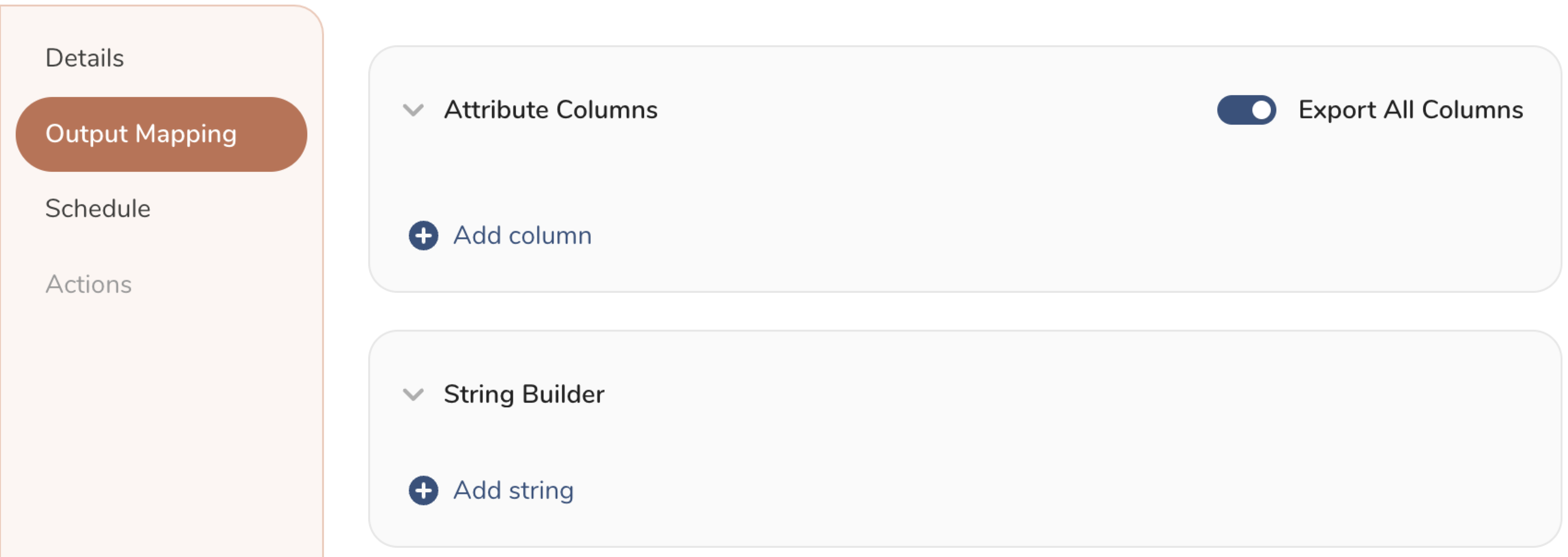
- Attribute Columns
- Select Export All Columns to export all columns without making any changes.
- Select + Add Columns to add specific columns for the export. The Output Column Name pre-populates with the same Source column name. You can update the Output Column Name. Continue to select + Add Columnsto add new columns for your activation output.
- String Builder
- + Add string to create strings for export. Select from the following values:
- String: Choose any value; use text to create a custom value.
- Timestamp: The date and time of the export.
- Segment Id: The segment ID number.
- Segment Name: The segment name.
- Audience Id: The parent segment number.
- + Add string to create strings for export. Select from the following values:
- Set a Schedule.
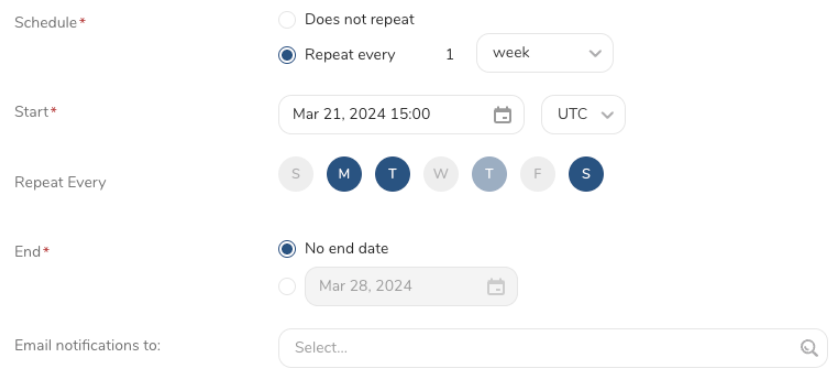
- Select the values to define your schedule and optionally include email notifications.
- Select Create.
If you need to create an activation for a batch journey, review Creating a Batch Journey Activation.
The TD Toolbelt can trigger the Query Result exporting from a CLI. You need to specify the parameters for the exporting job using the --result option of the td query command. For more information, please refer to this article.
The format of the option is JSON, and the general structure is as follows.
{
  "type": "google_data_manager_for_conversions",
  "td_authentication_id": "${authentication_id_from_td_console}",
  "conversion_type": "OFFLINE",
  "operating_account_id": "123456789",
  "conversion_action_id": "your_conversion_action_id",
  "ad_user_data_consent": "CONSENT_GRANTED",
  "ad_personalization_consent": "CONSENT_GRANTED",
  "skip_invalid_records": true,
  "waiting_for_request_status": false
}| Name | Description | Value | Default | Required |
|---|---|---|---|---|
type | Connector type identifier. | google_data_manager_for_conversions | Yes | |
td_authentication_id | The ID of the existing Google Data Manager for Conversions authentication on the Treasure Console. | Number | Yes | |
conversion_type | The type of conversion events to upload. | OFFLINE / ONLINE / STORE_SALES | OFFLINE | No |
operating_account_id | Google Ads Customer ID that receives events. Numeric value (dashes allowed). | String | Yes | |
login_account_id | MCC account ID for Manager account access. Leave empty for direct access. | String | No | |
conversion_action_id | The conversion action ID in Google Ads. | String | Yes | |
ad_user_data_consent | Request-level consent for user data. | CONSENT_GRANTED / CONSENT_DENIED / CONSENT_STATUS_UNSPECIFIED | CONSENT_GRANTED | No |
ad_personalization_consent | Request-level consent for ad personalization. | CONSENT_GRANTED / CONSENT_DENIED / CONSENT_STATUS_UNSPECIFIED | CONSENT_GRANTED | No |
skip_invalid_records | Skip invalid records and continue the job instead of stopping. | true / false | true | No |
waiting_for_request_status | Poll for request status after upload completes. | true / false | false | No |
Offline Conversion Upload:
td query \
  --result '{"type":"google_data_manager_for_conversions","td_authentication_id":"xxxx","conversion_type":"OFFLINE","operating_account_id":"123456789","conversion_action_id":"conv-123","skip_invalid_records":true}' \
  -d my_database \
  "SELECT event_timestamp, event_source, gclid, conversion_value, currency FROM offline_conversions" \
  -T presto
Online Conversion Upload:
td query \
  --result '{"type":"google_data_manager_for_conversions","td_authentication_id":"xxxx","conversion_type":"ONLINE","operating_account_id":"123456789","conversion_action_id":"conv-123"}' \
  -d my_database \
  "SELECT event_timestamp, transaction_id, gclid, conversion_value, currency FROM online_conversions" \
  -T presto
Store Sales Upload:
td query \
  --result '{"type":"google_data_manager_for_conversions","td_authentication_id":"xxxx","conversion_type":"STORE_SALES","operating_account_id":"123456789","conversion_action_id":"conv-123"}' \
  -d my_database \
  "SELECT event_timestamp, transaction_id, conversion_value, currency, store_id, email FROM store_sales" \
  -T presto