Treasure AI's AI Agent Foundry supports the building blocks for developing and managing AI agents.
Imagine how you might use an agent to contribute to more efficient marketing activities that will also reduce your operational costs.
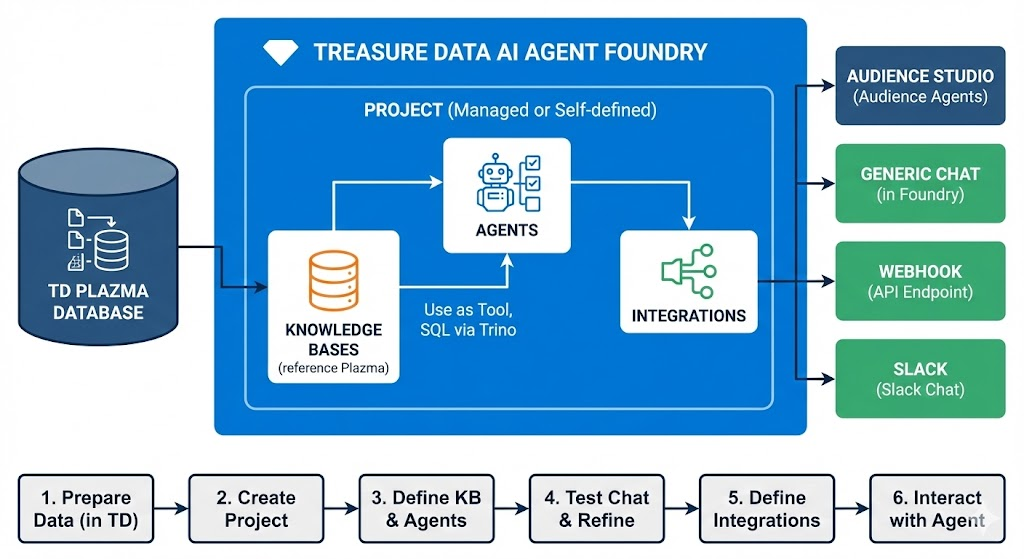
The AI Agent Foundry allows you to create agents utilizing data stored in the TD Plazma database. You can generate content with a specific AI model, utilize it within Treasure AI, and use it outside of Treasure AI. For example, you can call the AI Model from a Google Spreadsheet, Gmail, Slack, etc. AI Agent Foundry agents can be run interactively in Foundry Workspace, and form-type agents can also be scheduled to run automatically on a daily, weekly, or monthly cadence.
The following is a simplified diagram of how AI Agent Foundry works.
- Treasure AI's AI Agent Foundry supports managed and self-defined projects.
- Project consists of agents, knowledge bases, and integrations.
- The Agent is a unit of execution, generally it has particular tasks.
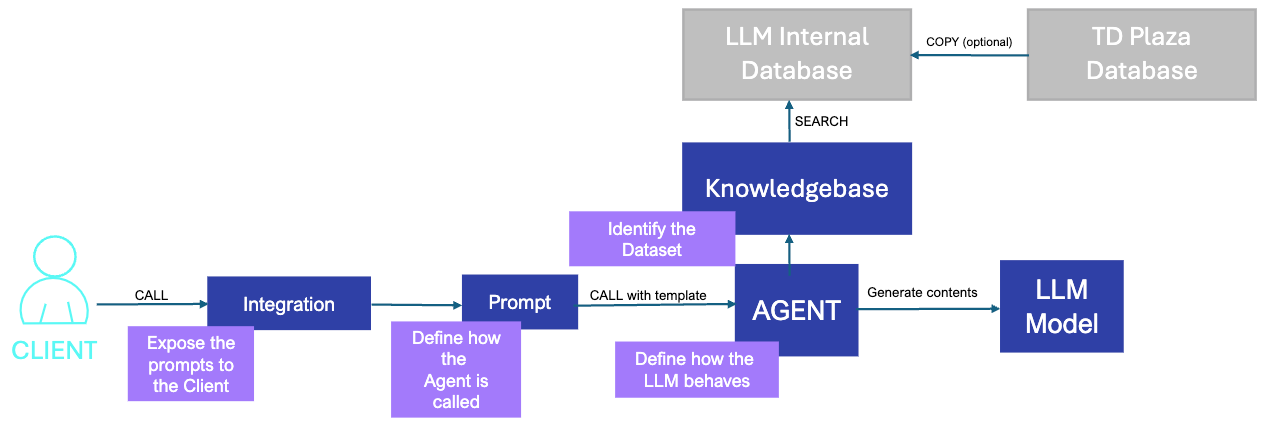
- The Knowledge Base is a definition of the reference to the Plazma database. Agent can use knowledge base as tool so that it can issue a SQL on Plazma DBs through Trino.
- The Integration is a configuration of where the agent would be exposed to the user. Currently, it supports "Audience Studio" (as Audience Agents) and "Generic Chat" (Chat in the AI Agent Foundry) for within Treasure Console, "Webhook" (enable to access via webhook API endpoint) and "Slack" (enable to access via Slack chat) for outside of the Treasure Console.
- Prepare Data: Data must be in Treasure AI to be accessible by the AI Agent Foundry
- Create Project: Access AI Agent Foundry and create a project as needed
- Define the Knowledge Bases and Agents: Define knowledge bases for Plazma databases to which agents must refer. Also, define agents for the purposes
- Using Test chat is recommended to build an agent and good user prompt. It's expected to go back and forth between agent edit view and Test chat.
- Once you are confident with your agent and user prompt, go to Integrations and define a Generic Chat integration so that agent users can see your agent in the Generic Chat tab in the project
- Interact with the Agent: Define necessary integrations to allow users to use agents
Treasure AI's AI Agent Foundry does not support all LLM models. For more information, see Supported AI Models.
AI Agent Foundry is the platform behind three different runtime surfaces — Foundry Workspace, Audience Agent, and Generic Chat — and is a separate product from Treasure AI Studio. See Comparing AI Studio, Foundry Workspace, and Audience Agent for how they relate, including whether a custom agent built here can be used from Treasure AI Studio.