Secure Signed Webhook(SS Webhook)Streaming Export Integrationは、Treasure AIのアクティベーションワークフローの一部として、暗号署名による検証付きで外部のWebhookエンドポイントへデータをリアルタイムに配信します。
この連携を使用すると、顧客データをWebhookエンドポイントへリアルタイムに安全に送信できます。各リクエストには署名が付き、リクエストの真正性と完全性を検証できます。
- Treasure AIの基本知識
- Webhookのアーキテクチャと、HTTP/HTTPSプロトコルの基本知識
- HMAC-SHA256による署名検証の理解
- HTTPリクエストを受信できる、公開アクセス可能なHTTPSエンドポイント(サポートされるHTTPメソッド:GET、POST、PUT、DELETE、PATCH)
- Webhookの受信側に署名検証のロジックを実装できること
このストリーミング連携の主なユースケースは、リアルタイムアクティベーションワークフローに組み込んで、次のことを行うことです。
- 顧客プロファイルデータを外部システムへリアルタイムに送信する
- 顧客の行動に基づいて下流のプロセスをトリガーする
- 顧客データをサードパーティのアプリケーションと同期する
- 外部プラットフォームでリアルタイムのパーソナライゼーションを実現する
配信をトリガーするワークフローの設定手順の概要は次のとおりです。
- JSONペイロードを含むHTTPリクエストを受信できるように、Webhookエンドポイントを設定します(デフォルトのメソッドはPOSTですが、他のHTTPメソッドも設定できます)。
- Webhookの受信側に、HMAC-SHA256を使用した署名検証のロジックを実装します。
- WebhookのURLと署名用シークレットを使用して、この連携の認証を作成します。
- Real-time Journeyで、新しいトリガー型アクティベーションにこの認証を選択します。
- WebhookエンドポイントはHTTPSでアクセスできる必要があります(TLS 1.2以上を推奨)。
- デフォルトでは、エンドポイントは30秒以内に応答する必要があります。各タイムアウトは1~900秒の範囲で設定できます。
- リクエストボディの最大サイズは250 KBです。
- レート制限は、お客様のインフラストラクチャの処理能力によって異なります。
- コネクタはリクエストに自動で署名しません。署名するには、暗号関数を使用するカスタムヘッダーを追加してください。
- 処理に成功した場合、WebhookはHTTPステータスコード200~299を返す必要があります。
Treasure AIでデータ接続を作成して設定する必要があります。データ接続の一部として、連携にアクセスするための認証情報を指定します。
次の手順で、認証情報を使用して新しい認証を作成します。
- Integrations Hubを選択します。
- Catalogを選択します。
- Catalogで連携を検索し、アイコンにマウスカーソルを合わせて、Create Authenticationを選択します。
- Credentialsタブが選択されていることを確認し、連携の認証情報を入力します。
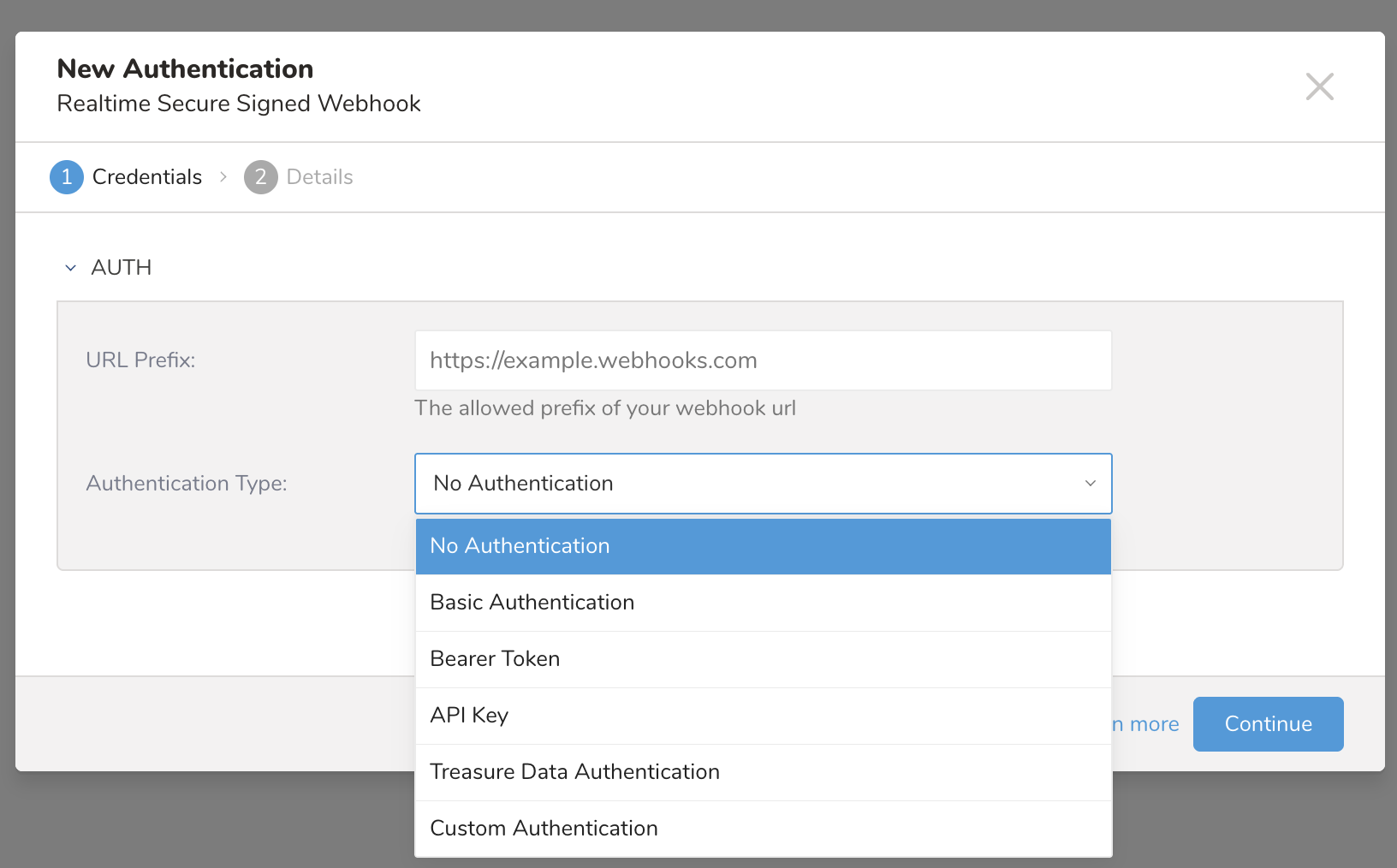
| パラメータ | 説明 |
|---|---|
| URL Prefix | Webhookリクエストを受信するHTTPSエンドポイントの、ベースURLのプレフィックスです。この認証を使用するすべてのトリガー型アクティベーションでは、このプレフィックスで始まるURLを使用する必要があります。 |
| Authentication Type | Webhookエンドポイントを保護する認可タイプを選択します。サポートされるタイプ:Basic Authentication、Bearer Token、API Key、Treasure Data Authentication、Custom Authentication、No Authentication。 |
認証タイプの詳細:
Basic Authentication:ユーザー名とパスワードを使用するHTTP Basic認証
- User Name:認証に使用するユーザー名
- Password:認証に使用するパスワード
Bearer Token:OAuth 2.0のBearer Token認証
- Bearer Token:認証トークンの値
API Key:カスタムのAPIキー認証
- API Key Name:APIキーのヘッダー名またはパラメータ名
- API Key:APIキーの値
Treasure Data Authentication:Treasure APIキーによる認証
- お客様のTreasure APIキーを認証に使用します
Custom Authentication:カスタムの
Authorizationヘッダー値- 入力した値がそのまま
Authorizationヘッダーで送信されます
- 入力した値がそのまま
No Authentication:認証なし
- テスト用、または公開アクセス可能なエンドポイントにのみ使用してください
- Continueを選択します。
- 接続の名前を入力します。
- Doneを選択します。
SS Webhook Streaming連携の設定が完了すると、リアルタイムのカスタマージャーニーのアクティベーションに組み込めるようになります。リアルタイムトリガー型アクティベーションの作成を参照してください。
トリガー型アクティベーションを作成または更新するには、次の手順を実行します。
設定するトリガー型アクティベーションを選択します
 。
。トリガー型アクティベーションのウィンドウで、Copy triggered activation fromドロップダウンメニューからアクティベーションを選択します。
Triggered activation nameを入力します。
必要に応じて、アクティベーションの説明(Optional description)を入力します。
Authenticationドロップダウンメニューから、アクティベーションで使用する認証を選択します。
選択した認証のタイプによって、入力する必要のある詳細が異なります。詳しくは、下記の連携固有の表を参照してください。
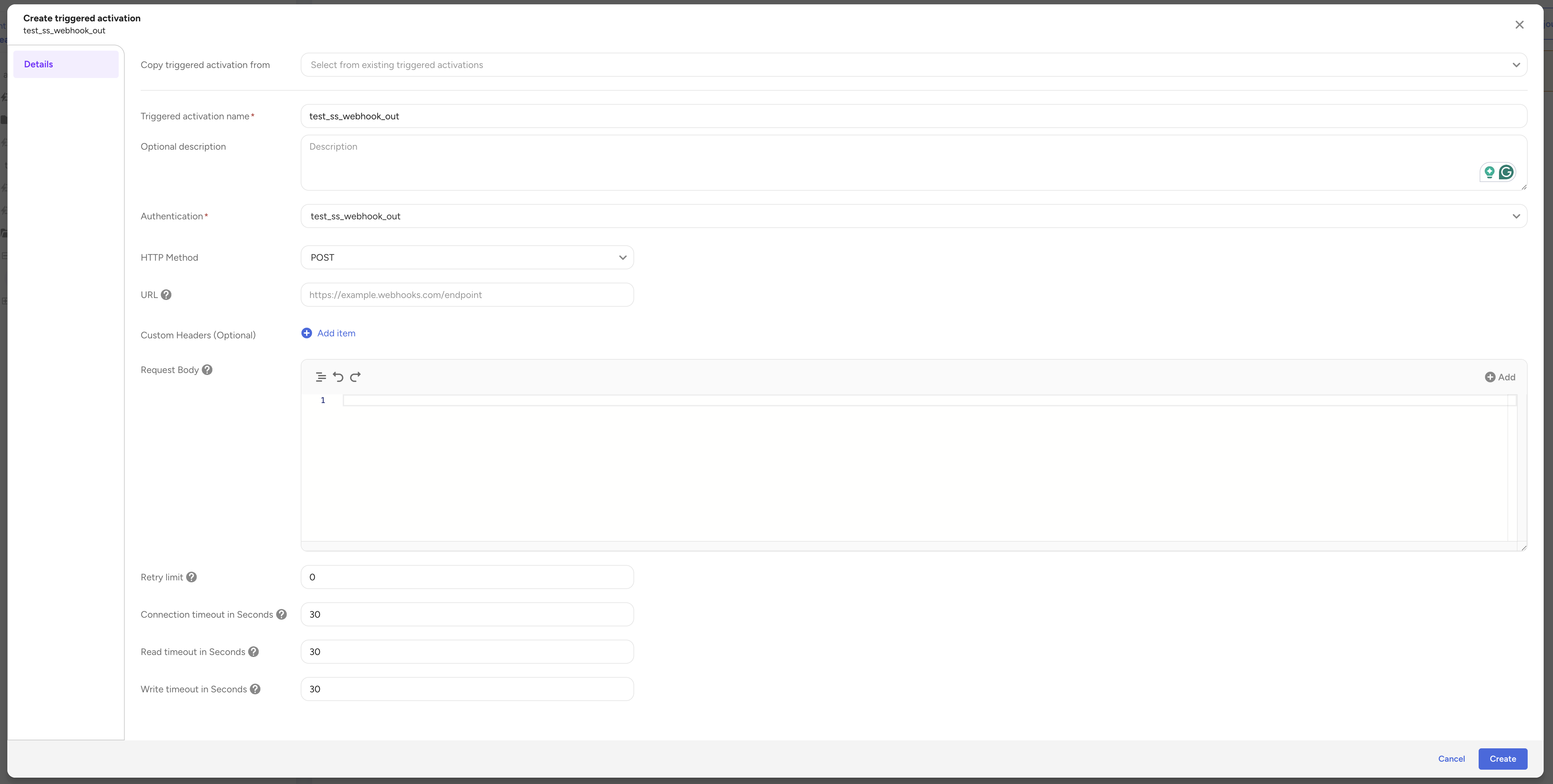
- Detailsページで、必須フィールドの情報を確認または入力します。
- Detailsの設定が完了したら、CreateまたはUpdateを選択します。
| パラメータ | 値 | 説明 |
|---|---|---|
| HTTP Method | 任意、デフォルトはPOST | リクエストに使用するHTTPメソッドです。サポートされるメソッド:GET、POST、PUT、DELETE、PATCH |
| URL | 必須 | WebhookのAPIエンドポイントの完全なURLです。認証で設定したURL Prefixで始まる必要があります |
| Custom Headers | 任意 - JSONオブジェクト | リクエストに追加するHTTPヘッダーです。ヘッダーは最大32個まで追加できます。各ヘッダーのキーと値の最大サイズは、それぞれ256バイトです。例:{"Content-Type": "application/json", "X-Custom-Header": "value"} |
| Request Body | 必須 - JSONオブジェクト | Webhookエンドポイントへ送信するJSONペイロードの構造です。 |
| Retry Limit | 任意、デフォルトは0 | 失敗したリクエストの再試行を打ち切るまでの、最大再試行回数です。0~64の整数です。 |
| Connection Timeout (Seconds) | 任意、デフォルトは30 | Webhookエンドポイントへの接続の確立を待つ最大時間(秒)です。1~900の整数です。 |
| Read Timeout (Seconds) | 任意、デフォルトは30 | Webhookエンドポイントからのレスポンスの読み取りを待つ最大時間(秒)です。1~900の整数です。 |
| Write Timeout (Seconds) | 任意、デフォルトは30 | Webhookエンドポイントへのリクエストペイロードの送信を待つ最大時間(秒)です。1~900の整数です。 |
SS Webhook連携は、動的なランタイム式と暗号関数をサポートしています。これらはカスタムヘッダーとリクエストボディで使用できます。
次の式を使用すると、リクエスト時に値を動的に挿入できます。
| 式 | 説明 | 出力例 |
|---|---|---|
${unix_timestamp} | 現在のUnixタイムスタンプ(秒) | 1709568000 |
${http_method} | 使用されるHTTPメソッド | POST |
${relative_path} | URLの相対パス(ドメインより後ろのパス) | /api/webhook/events |
Custom Headersでの使用例:
{
  "X-Timestamp": "${unix_timestamp}",
  "X-Method": "${http_method}"
}次の暗号関数を使用すると、リクエスト認証用の安全な署名を生成できます。
| 関数 | 説明 | 出力形式 |
|---|---|---|
${hmac_sha256_hex(secret, string)} | HMAC-SHA256署名を生成し、16進数の文字列で返します | a1b2c3d4e5... |
${hmac_sha256_base64(secret, string)} | HMAC-SHA256署名を生成し、Base64でエンコードした文字列で返します | YTFiMmMzZD... |
署名の生成の使用例:
{
  "X-Signature": "${hmac_sha256_hex(my_secret_key, ${unix_timestamp}.${request_body})}",
  "X-Timestamp": "${unix_timestamp}"
}
これにより、Secure Signed Webhookのパターンと同様のカスタム署名検証を、Webhookエンドポイントに実装できます。
- ステータスコード429、500、502、503、504を受け取ると、コネクタはリクエストの送信を再試行します。
- Retry Limitに達する前にリクエストの送信に成功した場合、ログには成功と表示されます。
- Retry Limitに達してもリクエストが失敗する場合、コネクタはジョブを停止します。
- リクエストの送信に失敗するたびに、エラーメッセージとステータスコードがお客様のアクティベーションテーブルに記録されます。
- Retry Limitは、Activation Configで設定できます。
- べき等性:再試行が発生する可能性があるため、重複したリクエストを安全に処理できるようにWebhookの受信側を設計してください。
- タイムアウトの処理:Webhookエンドポイントが読み取りタイムアウト(デフォルト30秒)以内に応答するようにしてください。処理に時間がかかる場合は、受信をすぐに確認応答し、処理は非同期で行ってください。
- セキュリティ:カスタムヘッダーでリクエストに署名する場合は、不正なリクエストを防ぐため、ペイロードを処理する前に署名を検証してください。
- モニタリング:配信の成功と失敗を追跡できるように、Webhookエンドポイントにログ記録とモニタリングを実装してください。
- エラー処理:適切なHTTPステータスコードを返してください(成功は200~299、クライアントエラーは4xx、サーバーエラーは5xx)。